

Cost-Aware GenAI Architecture: Caching, Model Routing, and Token Budgets That Don’t Explode
Keep GenAI cheap and fast: cache aggressively, route models by confidence, cap tokens and tools, compress context, and monitor cost per successful outcome.
Join the DZone community and get the full member experience.
Join For FreeShipping GenAI is easy. Shipping it without a surprise bill, latency spikes, and “why did it call the big model for that?” incidents is the hard part.
This article is a practical architecture pattern for cost control as a first-class system requirement — built around three levers:
- Caching (don’t pay twice)
- Model routing (use the cheapest model that meets quality)
- Token budgets (keep context and outputs bounded, always)
The Core Problem: “GenAI Cost” Is Mostly Architecture, Not Pricing
Teams often treat token costs as an API detail. In production, cost comes from:
- Re-sending context (same policy text, same user history, same retrieved chunks)
- Overusing high-tier models (because routing doesn’t exist)
- Unbounded retrieval (stuffing prompts with irrelevant chunks)
- Retries and tool loops (agents calling tools repeatedly)
- Verbose outputs (“explain everything” becomes 2k tokens)
If your architecture doesn’t bound these, cost will drift upward forever.

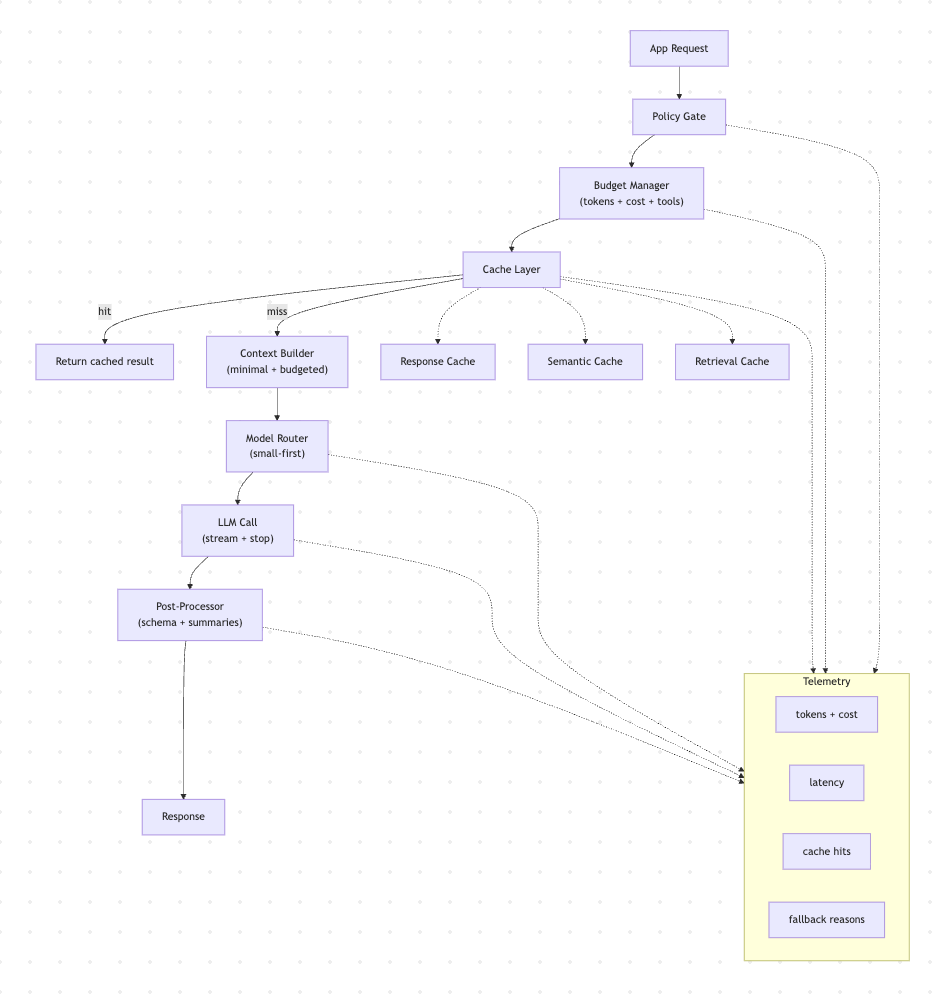
Reference Architecture (High Level)
Request Flow
- Policy Gate: validate feature, user tier, risk level
- Budget Manager: allocates token and cost budgets
- Cache Layer: response, semantic, and retrieval caches
- Context Builder: composes minimal, budgeted context
- Model Router: selects model tier and parameters
- LLM Call: streaming and stop rules
- Post-Processor: validate output schema, store summaries
- Telemetry: cost, quality, cache, and fallback reasons
Think of it as “FinOps meets SRE meets prompt engineering.”
1) Caching: Stop Paying for the Same Intelligence Twice
Cache #1: Response Cache (Exact Match)
Best for
- Deterministic prompts
- Stable system instructions
- Frequent repeat questions (“How do I reset my password?”)
Key = hash of
- System prompt version
- User prompt (normalized)
- Feature flag set
- Locale and app version (optional)
TTL: minutes to hours (depends on freshness needs)
Rule: If you can make prompts stable, you can make caching high hit-rate.
Cache #2: Semantic Cache (Near Match)
Exact-match misses are common because users rephrase. Semantic caching uses embeddings:
Key = embedding(user intent + feature + locale)
Look up nearest neighbors; if similarity > threshold, reuse or adjust the response.
When it’s safe
- Non-sensitive content
- Non-transactional responses
- “Advice” or “explanation” output
When it’s risky
- Anything that must be factually grounded in fresh data
- Personalized or regulated content unless you segment by user and policy
Practical approach
- Use the semantic cache as a candidate response
- Run a cheap verifier (small model) to confirm it still applies
Cache #3: Retrieval Cache (RAG)
Embedding and retrieval costs hide in the shadows. Cache:
- Query → top-k document IDs
- Document ID → chunk text and metadata
- Chunk → embedding
This reduces repeated embedding calls and repeated vector DB hits.
Android note: A local vector cache (Room + approximate search or lightweight index) can store:
- Frequent policy chunks
- Product FAQs
- Recent user-visible help content
2) Model Routing: The Cheapest Model That Meets Quality
The Routing Principle
Default to small. Escalate only when signals justify it.
If you don’t encode this rule in a router, your system will drift toward “always large.”
A Simple 3-Tier Routing Policy
- Small model: classification, rewriting, summarization, extraction, tool-argument shaping
- Medium model: normal Q&A and grounded responses with limited context
- Large model: complex reasoning, multi-step synthesis, ambiguous tasks, high-stakes language
Signals That Should Trigger Escalation
- Low confidence from the small model (self-rated or classifier-based)
- High ambiguity (multiple intents detected)
- High complexity (multi-step reasoning or long synthesis)
- User-visible failure (retry after dissatisfaction)
- Safety-sensitive content (sometimes you want better, sometimes stricter guardrails — decide explicitly)
Signals That Should Prevent Escalation
- Feature is in cost-saving mode
- User exceeded daily budget
- Request is non-critical
- Retrieval grounding already provides a direct answer
Router Output Should Be Typed, Not “Prompt-y”
Example routing decision object:
{
  "model_tier": "small|medium|large",
  "max_output_tokens": 350,
  "temperature": 0.2,
  "reason": "low_confidence_small + multi_doc_synthesis",
  "fallback_plan": ["medium", "small_template"]
}
This makes routing auditable and testable.
3) Token Budgets: Treat Tokens Like CPU and Memory
Budgeting Is Not “set max_tokens”
You need three budgets:
- Context budget (input tokens)
- Output budget (output tokens)
- Tool budget (calls/iterations)
And they should exist at multiple scopes:
- Per request
- Per session
- Per user per day
- Per feature per day
The Practical Formula
Define a request budget based on feature tier:
B_in= max input tokensB_out= max output tokensB_tools= max tool callsB_cost= max $ cost per request
Then make the Context Builder “spend” B_in intentionally.
Context Building That Stays Inside Budget
Step 1: Start with a “context envelope”
- System instructions: fixed
- Policy snippets: fixed minimal set
- User state summary: short
- Retrieval: top-k, capped
- Conversation history: summarized, capped
Step 2: Prefer summaries over raw logs
session_summary(updated each turn)user_profile_summary(opt-in, policy-controlled)tool_result_summary(store the gist, not raw data)
Step 3: Retrieval must be budget-aware
If your budget allows 1,200 tokens of retrieval, don’t retrieve 4,000.
Technique:
-
Retrieve more candidates (IDs), but only materialize chunks until the budget is hit.
Step 4: Enforce hard stop rules
- Cap number of chunks
- Cap total retrieved tokens
- Cap history tokens
- Cap output tokens with “be concise” instructions and stop sequences
Kotlin-ish Skeleton: Budget Manager + Router
data class Budgets(
  val maxInputTokens: Int,
  val maxOutputTokens: Int,
  val maxToolCalls: Int,
  val maxCostMicros: Long
)

enum class ModelTier { SMALL, MEDIUM, LARGE }

data class RouteDecision(
  val tier: ModelTier,
  val maxOutputTokens: Int,
  val temperature: Double,
  val reason: String,
  val fallback: List<ModelTier>
)

class BudgetManager {
  fun allocate(feature: String, userPlan: String): Budgets {
    return when (feature) {
      "help_qna" -> Budgets(1800, 300, 0, 2_000)      // cheap
      "rag_answer" -> Budgets(2400, 450, 0, 6_000)    // moderate
      "agent_task" -> Budgets(2600, 500, 4, 12_000)   // pricey
      else -> Budgets(1600, 250, 0, 2_000)
    }
  }
}

class ModelRouter {
  fun route(signals: Map<String, Any>, budgets: Budgets): RouteDecision {
    val complexity = signals["complexity"] as? Int ?: 1
    val confidence = signals["confidence"] as? Double ?: 0.7

    return when {
      confidence < 0.45 || complexity >= 4 ->
        RouteDecision(ModelTier.LARGE, budgets.maxOutputTokens, 0.2,
          reason = "low_confidence_or_high_complexity", fallback = listOf(ModelTier.MEDIUM, ModelTier.SMALL))

      complexity >= 2 ->
        RouteDecision(ModelTier.MEDIUM, budgets.maxOutputTokens, 0.2,
          reason = "moderate_complexity", fallback = listOf(ModelTier.SMALL))

      else ->
        RouteDecision(ModelTier.SMALL, minOf(250, budgets.maxOutputTokens), 0.1,
          reason = "default_small", fallback = emptyList())
    }
  }
}
The “Prompt Budget” Patterns That Actually Work
Pattern A: Answer in constraints
Add explicit constraints that reduce verbosity:
- “Use at most 6 bullets.”
- “No preamble.”
- “If unsure, ask exactly one question.”
- “Cite only the top 2 reasons.”
Pattern B: Two-pass with a cheap first pass
- Small model: classify intent, decide what to retrieve, outline response
- Medium model: generate final answer using only the outline and retrieval
This reduces large-model calls and reduces thrash.
Pattern C: Compress, then reason
When context is big:
- Compress retrieval (small-model summarizer)
- Feed summary to medium model
You pay tokens once to compress, then keep future turns cheap.
Guardrails: Prevent “Infinite Tool Loops” and “Retry Storms”
Cost spikes often come from tool retries:
- Transient network errors
- Ambiguous tool arguments
- Agent planning loops
Controls
- Hard cap on
maxToolCalls - Tool-level idempotency keys
- Exponential backoff
- “If tool fails twice, degrade gracefully”
- Cache safe tool results
Telemetry You Must Log (Uncontrolled Cost)
At minimum per request:
model_tierinput_tokens,output_tokenscache_hit_type(none/response/semantic/retrieval)retrieval_tokens,retrieval_chunkstool_callslatency_msfallback_reasoncost_estimate_micros
Then build two dashboards:
- Cost per feature per day
- Cost per successful outcome (not per request)
Cost per success is the one that changes behavior.
Failure Modes (What to Do)
- Cache hit-rate is low → prompts aren’t stable; normalize inputs; version templates
- Large model dominates → router missing signals; add small-first + confidence gating
- RAG prompts are huge → retrieval not budget-aware; cap chunk tokens; compress
- Outputs are verbose → output constraints + schema-first responses
- Retry storms → idempotency, max retries, degrade mode, circuit breaker
Closing Thought
Most teams try to “optimize prompts” when their real problem is missing system controls.
If you implement:
- Budget manager
- Caching layer
- Router with typed decisions
- Token-aware context builder
- Cost telemetry
…you’ll get stable spend, predictable latency, and a system you can actually operate.
Opinions expressed by DZone contributors are their own.
Comments