

Creating a Microservice With Quarkus, Kotlin, and Gradle
A closer look at creating microservices on the modern JVM frameworks: Quarkus, Kotlin, and Gradle. Learn about the processes and technologies.
Join the DZone community and get the full member experience.
Join For FreePreface
In the previous article, the brief explanations of creating microservices on the modern JVM frameworks and comparison of them were shown. Now it’s time to take a closer look at the most recently appeared framework: Quarkus. I’ll describe the process of creating a microservice using the mentioned technologies and in accordance with the requirements specified in the main article.
You may also like: Build a Java REST API With Quarkus
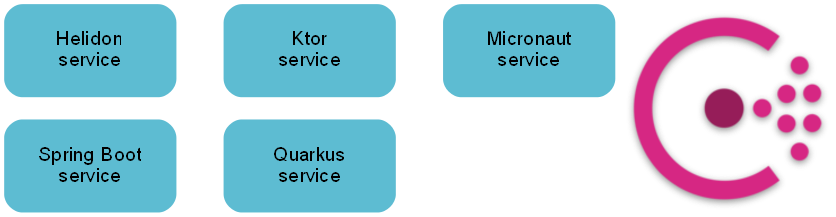
This microservice will be a part of the following microservice architecture:
As usual, the project’s source code is available on GitHub.
Prerequisites
JDK 13.
Creating an Application From Scratch
To generate a new project you can use a web starter or Maven (for Maven or Gradle project generation). It is worth noting that the framework supports Java, Kotlin, and Scala languages.
Dependencies
In this project, Gradle Kotlin DSL as a build tool is used. A build script should contain:
Plugins
Listing 1. build.gradle.kts
plugins {
kotlin("jvm")
kotlin("plugin.allopen")
id("io.quarkus")
}
Plugins' versions resolution is performed in settings.gradle.kts.
Dependencies
Listing 2. build.gradle.ktsxxxxxxxxxx
dependencies {
...
implementation(enforcedPlatform("io.quarkus:quarkus-bom:$quarkusVersion"))
implementation("io.quarkus:quarkus-resteasy-jackson")
implementation("io.quarkus:quarkus-rest-client")
implementation("io.quarkus:quarkus-kotlin")
implementation("io.quarkus:quarkus-config-yaml")
testImplementation("io.quarkus:quarkus-junit5")
...
}
Also, it is needed to make some Kotlin classes open (they’re final by default; more details on Gradle configuration in the Quarkus Kotlin guide):
Listing 3. build.gradle.kts.xxxxxxxxxx
allOpen {
annotation("javax.enterprise.context.ApplicationScoped")
}
Configuration
The framework supports configuration via properties or YAML files (more detailed in the Quarkus config guide).
The configuration file is located in the resources folder and looks like:
xxxxxxxxxx
quarkus
http
hostlocalhost
port8084
application-info
namequarkus-service
framework
nameQuarkus
release-year2019
Here application’s standard properties are defined, as well as custom. Latter can be read as follows:
Listing 5. Reading properties ( source code).xxxxxxxxxx
import io.quarkus.arc.config.ConfigProperties
@ConfigProperties(prefix = "application-info")
class ApplicationInfoProperties {
lateinit var name: String
lateinit var framework: FrameworkConfiguration
class FrameworkConfiguration {
lateinit var name: String
lateinit var releaseYear: String
}
}
Beans
Before we start with the coding part, it should be noted that there is no main method in the source code of your Quarkus application, but maybe somewhen it will be.
Injection of @ConfigProperties bean from the previous listing to another bean is performed using @Inject annotation:
@ConfigProperties bean ( source code)
xxxxxxxxxx
@ApplicationScoped
class ApplicationInfoService(
@Inject private val applicationInfoProperties: ApplicationInfoProperties,
@Inject private val serviceClient: ServiceClient
) {
...
}
ApplicationInfoService bean annotated with @ApplicationScoped can then be injected itself like this:
@ApplicationScoped bean ( source code)
xxxxxxxxxx
class ApplicationInfoResource(
@Inject private val applicationInfoService: ApplicationInfoService
)
More on Contexts and Dependency Injection in the Quarkus CDI guide.
REST Endpoints
REST controller looks very typical for those who are familiar with Spring or Java EE:
Listing 8. REST controller ( source code).xxxxxxxxxx
@Path("/application-info")
@Produces(MediaType.APPLICATION_JSON)
@Consumes(MediaType.APPLICATION_JSON)
class ApplicationInfoResource(
@Inject private val applicationInfoService: ApplicationInfoService
) {
@GET
fun get(@QueryParam("request-to") requestTo: String?): Response =
Response.ok(applicationInfoService.get(requestTo)).build()
@GET
@Path("/logo")
@Produces("image/png")
fun logo(): Response = Response.ok(applicationInfoService.getLogo()).build()
}
REST Client
For working in a microservice architecture Quarkus service should be able to perform requests to other services. Since every service has the same API, it is worth to create a uniform interface for common code, and then a bunch of REST clients extending that interface:
Listing 9. REST clients ( source code).xxxxxxxxxx
@ApplicationScoped
@Path("/")
interface ExternalServiceClient {
@GET
@Path("/application-info")
@Produces("application/json")
fun getApplicationInfo(): ApplicationInfo
}
@RegisterRestClient(baseUri = "http://helidon-service")
interface HelidonServiceClient : ExternalServiceClient
@RegisterRestClient(baseUri = "http://ktor-service")
interface KtorServiceClient : ExternalServiceClient
@RegisterRestClient(baseUri = "http://micronaut-service")
interface MicronautServiceClient : ExternalServiceClient
@RegisterRestClient(baseUri = "http://quarkus-service")
interface QuarkusServiceClient : ExternalServiceClient
@RegisterRestClient(baseUri = "http://spring-boot-service")
interface SpringBootServiceClient : ExternalServiceClient
As you can see, creating REST clients to the other services is as simple as creating an interface using the proper JAX-RS and MicroProfile annotations.
Service Discovery
As you saw in the previous section for the baseUri parameter services' names are used. But now there is no built-in support of Service Discovery (Eureka) or it doesn’t work properly (Consul) because the framework mainly targets cloud environments. I’ve implemented Service Discovery using Consul Client for Java library. Consul client includes two necessary functions, register and getServiceInstance (which uses the Round-robin algorithm):
xxxxxxxxxx
@ApplicationScoped
class ConsulClient(
@ConfigProperty(name = "application-info.name")
private val serviceName: String,
@ConfigProperty(name = "quarkus.http.port")
private val port: Int
) {
private val consulUrl = "http://localhost:8500"
private val consulClient by lazy {
Consul.builder().withUrl(consulUrl).build()
}
private var serviceInstanceIndex: Int = 0
fun register() {
consulClient.agentClient().register(createConsulRegistration())
}
fun getServiceInstance(serviceName: String): Service {
val serviceInstances = consulClient.healthClient().getHealthyServiceInstances(serviceName).response
val selectedInstance = serviceInstances[serviceInstanceIndex]
serviceInstanceIndex = (serviceInstanceIndex + 1) % serviceInstances.size
return selectedInstance.service
}
private fun createConsulRegistration() = ImmutableRegistration.builder()
.id("$serviceName-$port")
.name(serviceName)
.address("localhost")
.port(port)
.build()
}
At first, it is needed to register the application:
Listing 11. Registration in Consul ( source code).xxxxxxxxxx
@ApplicationScoped
class ConsulRegistrationBean(
@Inject private val consulClient: ConsulClient
) {
fun onStart(@Observes event: StartupEvent) {
consulClient.register()
}
}
Then it is needed to resolve services' names to its particular location. For that, a class that extends ClientRequestFilter and annotated with @Provider was created:
xxxxxxxxxx
@Provider
@ApplicationScoped
class ConsulFilter(
@Inject private val consulClient: ConsulClient
) : ClientRequestFilter {
override fun filter(requestContext: ClientRequestContext) {
val serviceName = requestContext.uri.host
val serviceInstance = consulClient.getServiceInstance(serviceName)
val newUri: URI = URIBuilder(URI.create(requestContext.uri.toString()))
.setHost(serviceInstance.address)
.setPort(serviceInstance.port)
.build()
requestContext.uri = newUri
}
}
The resolution is implemented simply by replacement URI of requestContext object with a service’s location obtained from the Consul client.
Testing
Tests for both API’s endpoints are implemented using REST Assured library:
Listing 13. Tests ( source code).xxxxxxxxxx
@QuarkusTest
class QuarkusServiceApplicationTest {
@Test
fun testGet() {
given()
.`when`().get("/application-info")
.then()
.statusCode(200)
.contentType(ContentType.JSON)
.body("name") { `is`("quarkus-service") }
.body("framework.name") { `is`("Quarkus") }
.body("framework.releaseYear") { `is`(2019) }
}
@Test
fun testGetLogo() {
given()
.`when`().get("/application-info/logo")
.then()
.statusCode(200)
.contentType("image/png")
.body(`is`(notNullValue()))
}
}
While testing, it is not necessary to register application in Consul, so I just put ConsulClientMock that extends actual ConsulClient next to the test class:
ConsulClient ( source code)
xxxxxxxxxx
@Mock
@ApplicationScoped
class ConsulClientMock : ConsulClient("", 0) {
// do nothing
override fun register() {
}
}
Building
During build Gradle task quarkusBuild task is being called. By default, it generates runner JAR and lib directory with all the dependencies. To produce uber-JAR artifact quarkusBuild task needs to be configured as follows:
xxxxxxxxxx
tasks {
withType<QuarkusBuild> {
isUberJar = true
}
}
To build project run ./gradlew clean build in the project’s root folder.
Launch
Before launching the microservice, you need to start Consul (described in the main article).
You can start microservices:
Using
quarkusDevGradle task.Execute in the project’s root folder:
./gradlew :quarkus-service:quarkusDevOr call the task from IDE.
Using the uber-JAR.
Execute in the project’s root folder:
java -jar quarkus-service/build/quarkus-service-1.0.0-runner.jar
Now you can use REST API, for example, perform the following request:
GET http://localhost:8084/application-info
It will return:
Listing 16. API’s response.xxxxxxxxxx
{
"name": "quarkus-service",
"framework": {
"name": "Quarkus",
"releaseYear": 2019
},
"requestedService": null
}
Spring Compatibility
The framework provides compatibility layers for several Spring technologies: DI, Web, Security, Data JPA.
Conclusion
In this article, we saw how to implement a simple REST service on Quarkus using Kotlin and Gradle. If you look at the main article, you’ll see that created application has comparable parameters to the applications on the other new JVM frameworks. The framework has serious competitors such as Helidon MicroProfile, Micronaut, and Spring Boot (if we speak about full-stack frameworks). Therefore I think that we are waiting for an interesting development of events that will be useful for the whole Java ecosystem.
P.S. Thanks to VLSI for helping with this article.
Further Reading
Published at DZone with permission of Roman Kudryashov. See the original article here.
Opinions expressed by DZone contributors are their own.
Comments