

Diving Into SSO With Spring SAML and SSOCircle
How to configure Spring SAML on Spring Boot + Thymeleaf project via java configuration and connecting it to SSOCircle Identity Provider.
Join the DZone community and get the full member experience.
Join For FreeRecently I've been working on integrating SSO in an old Spring project and for that very reason, I created a small PoC to get my hands on Spring SAML and all its subtleties. In this article, I am going to share my experience of adding Spring SAML to a Spring MVC project and integrating it with SSOCircle. Spring did a wonderful job of documenting everything SAML related, setting up the .xml configuration, and even SSOCircle integration, but there are places where you could still fall. So before reading this article make sure to read the whole Spring SAML documentation and SAML documentation itself.
I would assume that you already are familiar with the concept of SSO and its details, but for the sake of a better understanding of the article and the keywords that I'm going to use I will briefly describe the basics of SSO.
What Is SSO?
Single sign-on (SSO) is an authentication scheme that allows a user to log in with a single ID and password to any of several related, yet independent, software systems - Wikipedia
So there are several related, yet independent, software systems – service providers and an entity that checks the user's identity – identity provider. Then there is a secure way for these 2 to communicate and one of the most-used security languages that define the relationship between identity providers and service providers is Security Assertion Markup Language (SAML).
The Security Assertion Markup Language (SAML), developed by the Security Services Technical Committee of OASIS, is an XML-based framework for communicating user authentication, entitlement, and attribute information. As its name suggests, SAML allows business entities to make assertions regarding the identity, attributes, and entitlements of a subject (an entity that is often a human user) to other entities, such as a partner company or another enterprise application. - OASIS
There are:
- Service Provider (SP) – the application providing services
- Identity Provider (IdP) – the entity providing identities
- SAML – the language of communication between SP and IdP
- SAML Request – authentication request (
AuthNRequest) - SAML Response – assertion of the authenticated user (
AuthNResponse) - Assertion - a package of information that supplies zero or more statements made by a SAML authority
- SAML Request – authentication request (
Let's see a brief overview of how everything assembles

Having a user named John Doe:
- John Doe via the browser tries to access the SP
- SP redirects to the IdP for the identity check/authentication
- IdP returns the SAML response to the SP via the browser's redirection
- Based on the response SP sends the requested resource or handles the error
Now for this communication to work IdP and SP need to know about each other, and this is done via the SAML metadata. SAML Metadata is an XML document containing various important information about IdP/SP. Typically the SP will generate one metadata containing URLs, IDs, a public key, and other SAML-related information for IdP to import it and the same goes for the IdP – SP will import IdP's metadata.
Now that we have some understanding of what is going on, let's take a quick look at the application. The application is a simple task manager (things to do manager) named taskr on Spring Boot with Thymeleaf. taskr enables its user to create/delete and view tasks, you can check it on GitHub. And then there is SSOCircle which is the IdP for taskr.
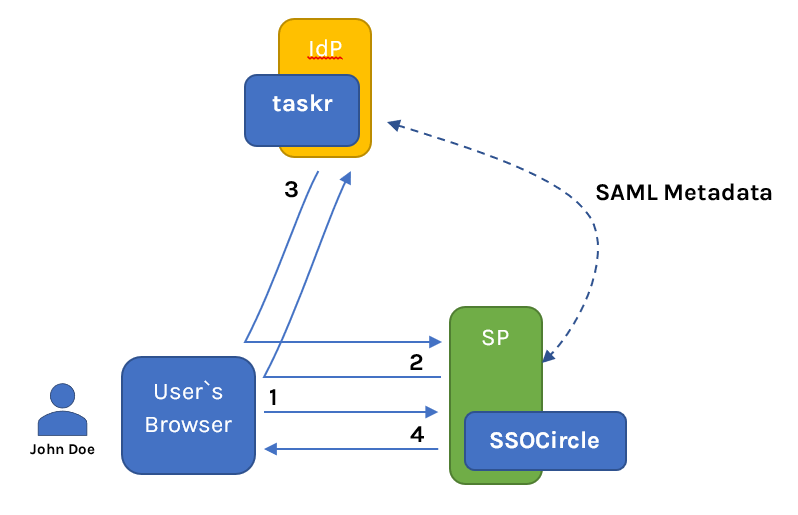
Let's take a look at the SAML configuration of the taskr
xxxxxxxxxx
package com.evil.inc.taskrssosaml.config;
//imports omitted
(basePackages = {"org.springframework.security.saml", "com.evil.inc.taskrssosaml"})
public class SAMLSecurityConfig extends WebSecurityConfigurerAdapter {
public static final int MAX_AUTHENTICATION_AGE = 28800;
private final String idpMetadataUrl = "https://idp.ssocircle.com/idp-meta.xml";
("${taskr.entityId}")
private String entityId;
("${taskr.entityBaseUrl}")
private String entityBaseUrl;
public static PropertySourcesPlaceholderConfigurer propertySourcesPlaceholderConfigurer() {
return new PropertySourcesPlaceholderConfigurer();
}
public static SAMLBootstrap samlBootstrap() {
return new CustomSAMLBootstrap();
}
public SAMLContextProviderImpl contextProvider() {
SAMLContextProviderImpl samlContextProvider = new SAMLContextProviderImpl();
samlContextProvider.setStorageFactory(emptyStorageFactory());
return samlContextProvider;
}
protected void configure(HttpSecurity http) throws Exception {
http.authorizeRequests()
.antMatchers("/**").fullyAuthenticated()
.antMatchers("/saml/**").permitAll()
.anyRequest()
.authenticated();
http.exceptionHandling().defaultAuthenticationEntryPointFor(samlEntryPoint(), new AntPathRequestMatcher("/"));
http.csrf().disable();
http.addFilterBefore(metadataGeneratorFilter(), ChannelProcessingFilter.class);
http.addFilterAfter(samlFilter(), BasicAuthenticationFilter.class);
}
public void configure(WebSecurity web) throws Exception {
web.ignoring()
.antMatchers("/templates/**")
.antMatchers("/login")
.antMatchers("/static/**");
}
protected void configure(AuthenticationManagerBuilder auth) throws Exception {
auth.authenticationProvider(samlAuthenticationProvider());
}
public FilterChainProxy samlFilter() throws Exception {
List<SecurityFilterChain> chains = new ArrayList<>();
chains.add(new DefaultSecurityFilterChain(new AntPathRequestMatcher("/saml/login/**"), samlEntryPoint()));
chains.add(new DefaultSecurityFilterChain(new AntPathRequestMatcher("/saml/logout/**"), samlLogoutFilter()));
chains.add(new DefaultSecurityFilterChain(new AntPathRequestMatcher("/saml/metadata/**"), metadataDisplayFilter()));
chains.add(new DefaultSecurityFilterChain(new AntPathRequestMatcher("/saml/SSO/**"), samlWebSSOProcessingFilter()));
chains.add(new DefaultSecurityFilterChain(new AntPathRequestMatcher("/saml/SingleLogout/**"), samlLogoutProcessingFilter()));
return new FilterChainProxy(chains);
}
public SAMLLogoutProcessingFilter samlLogoutProcessingFilter() {
return new SAMLLogoutProcessingFilter(successLogoutHandler(), logoutHandler());
}
public SAMLAuthenticationProvider samlAuthenticationProvider() {
SAMLAuthenticationProvider samlAuthenticationProvider = new SAMLAuthenticationProvider();
samlAuthenticationProvider.setForcePrincipalAsString(false);
return samlAuthenticationProvider;
}
public SAMLEntryPoint samlEntryPoint() {
SAMLEntryPoint samlEntryPoint = new SAMLEntryPoint();
samlEntryPoint.setDefaultProfileOptions(defaultWebSSOProfileOptions());
return samlEntryPoint;
}
public WebSSOProfileOptions defaultWebSSOProfileOptions() {
WebSSOProfileOptions webSSOProfileOptions = new WebSSOProfileOptions();
webSSOProfileOptions.setIncludeScoping(false);
return webSSOProfileOptions;
}
public SAMLProcessingFilter samlWebSSOProcessingFilter() throws Exception {
SAMLProcessingFilter samlWebSSOProcessingFilter = new SAMLProcessingFilter();
samlWebSSOProcessingFilter.setAuthenticationManager(authenticationManager());
samlWebSSOProcessingFilter.setAuthenticationSuccessHandler(successRedirectHandler());
samlWebSSOProcessingFilter.setAuthenticationFailureHandler(failureRedirectHandler());
return samlWebSSOProcessingFilter;
}
public SavedRequestAwareAuthenticationSuccessHandler successRedirectHandler() {
SavedRequestAwareAuthenticationSuccessHandler successRedirectHandler = new SavedRequestAwareAuthenticationSuccessHandler();
successRedirectHandler.setDefaultTargetUrl("/");
return successRedirectHandler;
}
public SimpleUrlAuthenticationFailureHandler failureRedirectHandler() {
SimpleUrlAuthenticationFailureHandler simpleUrlAuthenticationFailureHandler = new SimpleUrlAuthenticationFailureHandler();
simpleUrlAuthenticationFailureHandler.setUseForward(true);
simpleUrlAuthenticationFailureHandler.setDefaultFailureUrl("/error");
return simpleUrlAuthenticationFailureHandler;
}
public SAMLLogoutFilter samlLogoutFilter() {
return new SAMLLogoutFilter(successLogoutHandler(), new LogoutHandler[]{logoutHandler()}, new LogoutHandler[]{logoutHandler()});
}
public SimpleUrlLogoutSuccessHandler successLogoutHandler() {
SimpleUrlLogoutSuccessHandler simpleUrlLogoutSuccessHandler = new SimpleUrlLogoutSuccessHandler();
simpleUrlLogoutSuccessHandler.setDefaultTargetUrl("/login");
simpleUrlLogoutSuccessHandler.setAlwaysUseDefaultTargetUrl(true);
return simpleUrlLogoutSuccessHandler;
}
public SecurityContextLogoutHandler logoutHandler() {
SecurityContextLogoutHandler logoutHandler = new SecurityContextLogoutHandler();
logoutHandler.setInvalidateHttpSession(true);
logoutHandler.setClearAuthentication(true);
return logoutHandler;
}
public MetadataDisplayFilter metadataDisplayFilter() {
return new MetadataDisplayFilter();
}
public KeyManager keyManager() {
ClassPathResource storeFile = new ClassPathResource("/security/taskrSamlKeystore.jks");
String storePass = "123456";
Map<String, String> passwords = new HashMap<>();
passwords.put("taskrsaml", "123456");
return new JKSKeyManager(storeFile, storePass, passwords, "taskrsaml");
}
public SAMLProcessor processor() {
return new SAMLProcessorImpl(Arrays.asList(httpPostBinding(), httpRedirectDeflateBinding()));
}
public SAMLDefaultLogger samlLogger() {
SAMLDefaultLogger samlDefaultLogger = new SAMLDefaultLogger();
samlDefaultLogger.setLogMessages(true);
return samlDefaultLogger;
}
public EmptyStorageFactory emptyStorageFactory() {
return new EmptyStorageFactory();
}
public WebSSOProfile webSSOprofile() {
return new WebSSOProfileImpl();
}
public WebSSOProfileConsumerHoKImpl hokWebSSOProfile() {
WebSSOProfileConsumerHoKImpl webSSOProfileConsumerHoK = new WebSSOProfileConsumerHoKImpl();
webSSOProfileConsumerHoK.setMaxAuthenticationAge(MAX_AUTHENTICATION_AGE);
return webSSOProfileConsumerHoK;
}
public WebSSOProfileConsumer webSSOprofileConsumer() {
WebSSOProfileConsumerImpl webSSOProfileConsumer = new WebSSOProfileConsumerImpl();
webSSOProfileConsumer.setMaxAuthenticationAge(MAX_AUTHENTICATION_AGE);
return webSSOProfileConsumer;
}
public WebSSOProfileConsumerHoKImpl hokWebSSOprofileConsumer() {
WebSSOProfileConsumerHoKImpl webSSOProfileConsumerHoK = new WebSSOProfileConsumerHoKImpl();
webSSOProfileConsumerHoK.setMaxAuthenticationAge(MAX_AUTHENTICATION_AGE);
return webSSOProfileConsumerHoK;
}
public SingleLogoutProfile logoutprofile() {
return new SingleLogoutProfileImpl();
}
public MetadataGeneratorFilter metadataGeneratorFilter() {
return new MetadataGeneratorFilter(metadataGenerator());
}
public MetadataGenerator metadataGenerator() {
MetadataGenerator metadataGenerator = new MetadataGenerator();
metadataGenerator.setEntityId(entityId);
metadataGenerator.setExtendedMetadata(extendedMetadata());
metadataGenerator.setIncludeDiscoveryExtension(false);
metadataGenerator.setEntityBaseURL(entityBaseUrl);
metadataGenerator.setKeyManager(keyManager());
return metadataGenerator;
}
public ExtendedMetadata extendedMetadata() {
ExtendedMetadata extendedMetadata = new ExtendedMetadata();
extendedMetadata.setIdpDiscoveryEnabled(false);
extendedMetadata.setSignMetadata(false);
return extendedMetadata;
}
("metadata")
public CachingMetadataManager metadata() throws MetadataProviderException {
List<MetadataProvider> providers = new ArrayList<MetadataProvider>();
providers.add(idpExtendedMetadataProvider());
return new CachingMetadataManager(providers);
}
public ExtendedMetadataDelegate idpExtendedMetadataProvider() throws MetadataProviderException {
HTTPMetadataProvider httpMetadataProvider = new HTTPMetadataProvider(backgroundTimer(), httpClient(), idpMetadataUrl);
httpMetadataProvider.setParserPool(parserPool());
ExtendedMetadataDelegate extendedMetadataDelegate = new ExtendedMetadataDelegate(httpMetadataProvider, extendedMetadata());
extendedMetadataDelegate.setMetadataTrustCheck(true);
extendedMetadataDelegate.setMetadataRequireSignature(false);
return extendedMetadataDelegate;
}
public Timer backgroundTimer() {
return new Timer(true);
}
public HttpClient httpClient() {
return new HttpClient(multiThreadedHttpConnectionManager());
}
public MultiThreadedHttpConnectionManager multiThreadedHttpConnectionManager() {
return new MultiThreadedHttpConnectionManager();
}
(initMethod = "initialize")
public StaticBasicParserPool parserPool() {
return new StaticBasicParserPool();
}
(name = "parserPoolHolder")
public ParserPoolHolder parserPoolHolder() {
return new ParserPoolHolder();
}
public HTTPPostBinding httpPostBinding() {
return new HTTPPostBinding(parserPool(), VelocityFactory.getEngine());
}
public HTTPRedirectDeflateBinding httpRedirectDeflateBinding() {
return new HTTPRedirectDeflateBinding(parserPool());
}
}
Cryptography
Basically what you see is what the Spring documentation already offers with some small adjustments. Now I want to talk about some things that in my opinion are tricky.
First of all, is the keyManager
xxxxxxxxxx
public KeyManager keyManager() {
ClassPathResource storeFile = new ClassPathResource("/security/taskrSamlKeystore.jks");
String storePass = "123456";
Map<String, String> passwords = new HashMap<>();
passwords.put("taskrsaml", "123456");
return new JKSKeyManager(storeFile, storePass, passwords, "taskrsaml");
}
SAML communication uses cryptography for signing and encryption of the data and everything this related is done through the keyManager which relies on a single JKS key store containing all the private and public keys. To generate a key store I've used the following command:
keytool -genkeypair -alias taskrSaml -storepass 123456
-dname "CN=John Doe, OU=Taskr, O=EvilInc, L=Cupertino, S=California, C=US"
-keypass 123456 -keyalg RSA -keysize 2048 -sigalg SHA256withRSA
-keystore taskrSamlKeystore.jks
And then you can place it under your resources and provide the path. Also, note that there is KeyStore Explorer which facilitates easy handling of the key stores and it comes in very handy when you have to deal with importing the IdP certificates. Another thing to mention here is that Maven might corrupt your .jks file during the build process and it becomes unusable, so to deal with that I added the following plugin in pom.xml under the build plugins.
xxxxxxxxxx
<plugin>
<groupId>org.apache.maven.plugins</groupId>
<artifactId>maven-resources-plugin</artifactId>
<version>3.0.2</version>
<configuration>
<nonFilteredFileExtensions>
<nonFilteredFileExtension>jks</nonFilteredFileExtension>
</nonFilteredFileExtensions>
</configuration>
</plugin>
Since I've already mentioned the IdP signing/encryption certificates let's discuss them. IdP certificates may be provided by the person handling the IdP or you can grab them from the IdP's metadata. SSOCircle's metadata URL is https://idp.ssocircle.com/idp-meta.xml (please note this is the same URL used for the HTTPMetadataProvider bean initialization) and opening that you want to search for the following 2 tags
<KeyDescriptor use="signing"><KeyDescriptor use="encryption">
These are client certificates provided by SSOCircle as a mean of strong authentication, but the integration works without adding them into your key store too. Some IdPs might require a signature trust establishment, so for that reason, I'm going to explain this. Under them, in the <ds:X509Certificate> tag you'll find IdP's certificates. I created 2 files with the .p12 extension, one for the signing certificate, and the other for the encryption certificate and I pasted the content of the X509 Certificates between these 2 lines.
-----BEGIN CERTIFICATE-----
-----END CERTIFICATE-----
After that, I imported them into my key store using KeyStore Explorer – Import Certificate.
Being on the cryptography topic, let's discuss another interesting thing - samlBootstrap bean. Though integrating with SSOCircle most probably you won't encounter this problem, but dealing with other IdPs you might get an error saying that the message is not signed with the expected signature algorithm, and that message is signed with the signature algorithm SHA1 whilst the expected one is SHA256. That is because SAML by default signs its messages with SHA1 and to overcome that, we need to explicitly specify the signature algorithm and digest method via a custom SAML bootstrap.
xxxxxxxxxx
final class CustomSAMLBootstrap extends SAMLBootstrap {
public void postProcessBeanFactory(ConfigurableListableBeanFactory beanFactory) throws BeansException {
super.postProcessBeanFactory(beanFactory);
BasicSecurityConfiguration config = (BasicSecurityConfiguration) Configuration.getGlobalSecurityConfiguration();
config.registerSignatureAlgorithmURI("RSA", SignatureConstants.ALGO_ID_SIGNATURE_RSA_SHA256);
config.setSignatureReferenceDigestMethod(SignatureConstants.ALGO_ID_DIGEST_SHA256);
}
}
Communication
Let's talk about communication, how IdP is going to know where to redirect, or where to address its requests. It is already mentioned in the Spring SAML documentation.
In case you use automatically generated metadata make sure to configure entityBaseURL matching the front-end URL in your metadataGeneratorFilter bean - Spring Docs
so setting this URL in metadataGenerator bean in the metadata you'll get generated the following URLs :
http://localhost:8080/saml/SingleLogout
http://localhost:8080/saml/SSO
This usually is enough to establish the communication between the SP and IdP, but if you're facing a situation where multiple back-end servers process SAML requests forwarded by a reverse-proxy/load balancer or you're trying to expose your local URL using ngrok, then you might need to configure another SAMLContextProvider.
xxxxxxxxxx
public SAMLContextProviderLB contextProvider() {
SAMLContextProviderLB samlContextProviderLB = new SAMLContextProviderLB();
samlContextProviderLB.setScheme(scheme);
samlContextProviderLB.setServerName(serverName);
samlContextProviderLB.setContextPath(contextPath);
samlContextProviderLB.setServerPort(serverPort);
samlContextProviderLB.setIncludeServerPortInRequestURL(true);
samlContextProviderLB.setStorageFactory(emptyStorageFactory());
return samlContextProviderLB;
}
As it is already well-documented I want to mention just one thing, make sure to set samlContextProviderLB.setIncludeServerPortInRequestURL(true); if you're dealing with your server port and you need it in your URL. Also pay attention that if the server port is less or equal to 0 the port won't be included in the URL, might come in handy when you are dealing with multiple environments with different URLs.
Since we are talking about URLs, I want to tell you another interesting thing that I encountered, I call it “Cyclic SAML Authentication”, but first a little preface. When you are dealing with SAML you can configure 2 kinds of logouts: local logout and global logout.
- Local logout logs you out just out of the current SP's session, but keeps your IdP session and allows the user to use other SPs still being authenticated. Local logout can be invoked at
saml/logoutby specifying thelocalrequest parameter equal totrue(http://localhost:8080/saml/logout?local=true). - Global logout logs you out of IdP terminating all the SPs sessions forcing the user to enter his credentials once again at the IdP to access any of the SP and can be invoked at
saml/logoutwithout specifying any parameters.
xxxxxxxxxx
<form class="left" th:action="@{/saml/logout}" method="get" style="margin-left: auto; margin-right: 5px;">
<input class="btn btn-primary" type="submit" value="Global Logout" data-toggle="tooltip" data-placement="bottom" title="Log out from SSOCircle"/>
</form>
<form class="left" th:action="@{/saml/logout}" method="get">
<input type="hidden" name="local" value="true"/>
<input class="btn btn-secondary" type="submit" value="Local Logout" data-toggle="tooltip" data-placement="bottom" title="Log out from taskr"/>
</form>
Another thing to mention related to the user's session is that you might get a message stating that the authentication statement is too old to be used if you don't get in sync the maximum authentication age of your SP and IdP. You can fix this problem by setting the property on the webSSOprofileConsumer bean. You might be tempted to use the Integer.MAX_VALUE as a maximum authentication age, but this will result in not checking the authentication statement at all or it won't even work as it happened to me.
xxxxxxxxxx
public WebSSOProfileConsumer webSSOprofileConsumer() {
WebSSOProfileConsumerImpl webSSOProfileConsumer = new WebSSOProfileConsumerImpl();
webSSOProfileConsumer.setMaxAuthenticationAge(MAX_AUTHENTICATION_AGE);
return webSSOProfileConsumer;
}
Now, what happens after you log out? What I have experienced is that either you log out locally or globally you get redirected to "/" and therefore not being authenticated you automatically get redirected to the login page at IdP in case of a global logout or you're getting a new session which redirects you to the requested page in case of a local logout.
So from a UX perspective, the local logout doesn't make any sense you try to logout from the current SP and then you get to use it again after some redirection as if you never logged out. A solution would be to create an unsecured login or logout page on the SP side and whenever the user locally logs out you redirect him there and let him decide if he wants to login again or not (saml/login). So to configure that you need to specify the logout success URL
x
public SimpleUrlLogoutSuccessHandler successLogoutHandler() {
SimpleUrlLogoutSuccessHandler simpleUrlLogoutSuccessHandler = new SimpleUrlLogoutSuccessHandler();
simpleUrlLogoutSuccessHandler.setDefaultTargetUrl("/login");
simpleUrlLogoutSuccessHandler.setAlwaysUseDefaultTargetUrl(true);
return simpleUrlLogoutSuccessHandler;
}
And for it to work I registered the authentication entry point like this
xxxxxxxxxx
http.exceptionHandling().defaultAuthenticationEntryPointFor(samlEntryPoint(), new AntPathRequestMatcher("/"));
IdP Configuration — SSOCircle
And last but not least I wanted to share my experience on SSOCircle configuration. First what you want to do is to create an account on SSOCircle. The user that you'll be creating here will be the user of your SP.
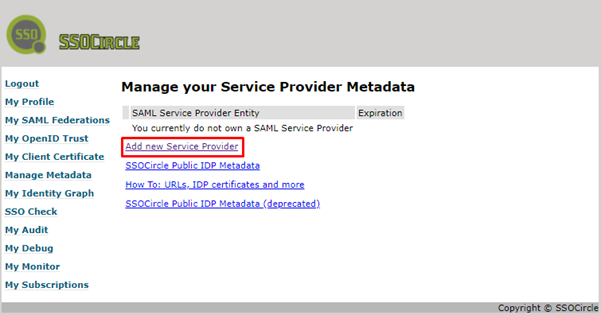
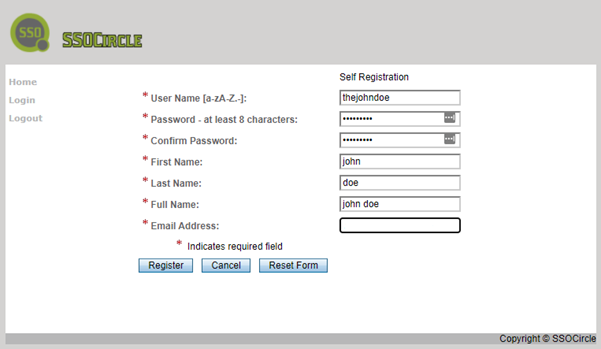 Once you have your user you need to add the service provider to SSOCircle.
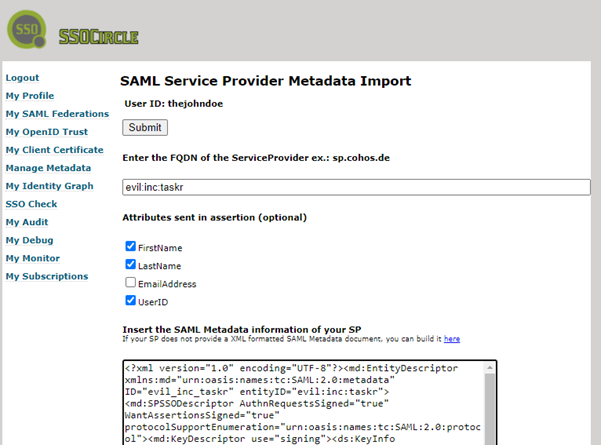
On the next page, you need to enter the SP's id, metadata, and check the needed assertions that you're going to validate via your custom SAMLUserDetailsService.
The SP's id is the same id used in the metadataGenerator as the entityId and the SP's metadata can be grabbed at http://localhost:8080/saml/metadata
That's it, I hope, you've learned something.
Opinions expressed by DZone contributors are their own.
Comments