

Your AI Coding Agent Can't Steal What It Never Had: The Docker Sandbox Isolation Story
Docker Sandbox runs AI agents in microVMs. The API key never enters the sandbox — the host proxy authenticates on the agent's behalf.
 CORE
·
CORE
·
Join the DZone community and get the full member experience.
Join For FreeI ran an AI coding agent against a broken Kubernetes deployment for five minutes. The agent called Anthropic's API dozens of times — reasoning about manifests, running kubectl commands, redeploying workloads. It made fully authenticated requests throughout the entire session.
The API key was never in its environment.
env | grep -iE "anthropic|api_key|secret|token|password"
# (empty)
That is Docker Sandbox's credential isolation model in action. This article is about what that actually means — and what else the isolation holds, breaks, and surprises you with when you probe it properly.
Key Takeaways
- Docker Sandbox uses a host-side proxy to inject API credentials without the agent ever seeing them — the agent makes authenticated calls without possessing the key
- Seven live isolation probes confirmed the boundary held throughout real AI agent activity, not just at rest
- Network policy is hostname-scoped HTTP filtering — not a full network control plane — with three specific behaviors the documentation doesn't make clear
- DevOps agents can run
docker buildandkubectlinside the sandbox without any path to the host Docker daemon or cluster credentials - The
--branchparallel agent mode is Git-level isolation, not VM-level — important distinction for threat models requiring separate credentials per agent
The Setup
I manage eight AKS clusters for Fortune 500 clients. My laptop has Azure service principals, SSH keys, kubeconfig files with a dozen cluster contexts, and twenty-plus repos — some with .env files containing real API keys. Running an AI agent from this machine without guardrails means the agent inherits all of it.
Docker Sandbox changes that. Each sandbox is a microVM — its own Linux kernel, its own Docker daemon, its own network stack. You mount one project directory. The agent sees one project directory. Everything else on the machine does not exist inside the sandbox.
I spent two weeks testing this claim. Here is what I found.
Test environment:
|
What
|
Detail
|
|---|---|
|
sbx version
|
v0.31.1 · commit e658be1
|
|
Host
|
macOS Apple Silicon
|
|
Network endpoints probed
|
13
|
|
Isolation probes
|
7 targeted commands
|
|
Kubernetes scenario
|
Real agent task, two bugs, timed
|
All findings backed by real terminal output. Full repo: github.com/opscart/docker-sandbox-devops.
How the Credential Isolation Actually Works
The sandbox environment has no API keys. But the agent made authenticated API calls. Here is the mechanism:
env | grep proxy
# https_proxy=http://gateway.docker.internal:3128
# http_proxy=http://gateway.docker.internal:3128
# JAVA_TOOL_OPTIONS=-Dhttp.proxyHost=gateway.docker.internal -Dhttp.proxyPort=3128 ...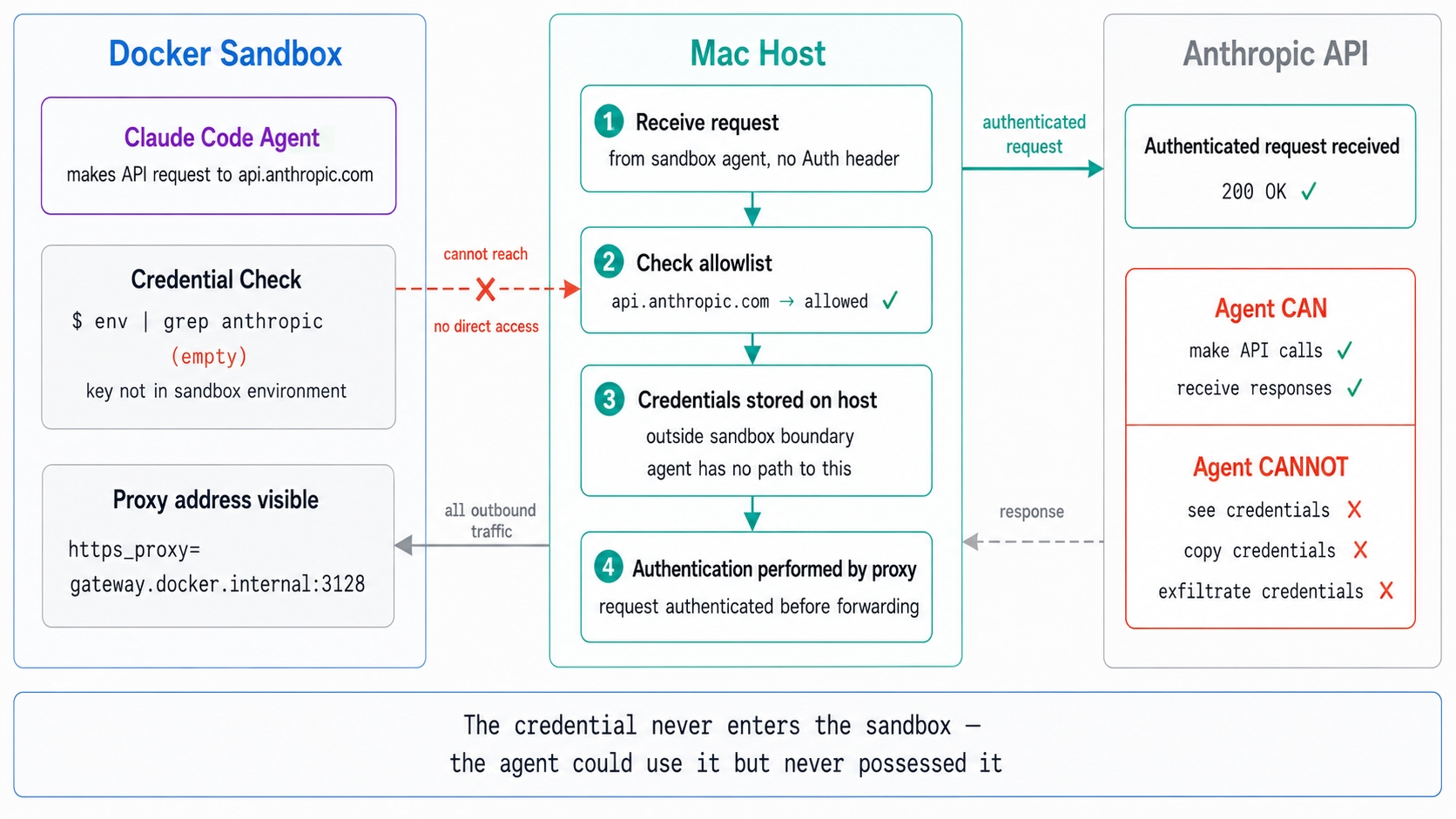
Every outbound request — HTTP, HTTPS, even Java tools — routes through a proxy at gateway.docker.internal:3128. That proxy runs on the Mac host, completely outside the microVM boundary.
When the agent sends a POST to api.anthropic.com, there is no Authorization header — the agent does not have the key. The request reaches the host-side proxy. The proxy checks the allowlist — api.anthropic.com is in the default AI services group under the Balanced policy. Authentication is performed by the host-side proxy using credentials stored outside the sandbox boundary. The authenticated request is forwarded to Anthropic.
The agent receives the response. It has no idea what key was used, where it came from, or how to find it again.
Think of it like an OAuth gateway. The proxy holds the credential and vouches for the agent's requests. The agent gets access without ever possessing the key. You cannot steal what you never had.
This is architecturally different from the standard setup where ANTHROPIC_API_KEY sits in the shell environment — one echo $ANTHROPIC_API_KEY away from being exfiltrated.
What the Four Isolation Layers Actually Do
Docker Sandbox stacks four layers:
Hypervisor isolation. Separate Linux kernel per sandbox. Host processes invisible. Other sandboxes invisible. A compromised sandbox cannot escalate to the host kernel. This is the fundamental difference from a Docker container — a container shares the host kernel. The microVM does not.
Network isolation. All outbound HTTP/HTTPS routes through the host-side proxy. Raw TCP, UDP, and ICMP are blocked at the network layer. Three policy tiers: allow-all, balanced (curated dev allowlist), deny-all. Set before starting your first sandbox:
sbx policy set-default balancedDocker Engine isolation. Each sandbox runs a private Docker daemon with its own socket. No path to the host Docker daemon. An agent can run docker build and docker run without socket mounting — which is the tradeoff that breaks isolation in plain container-based approaches.
Credential isolation. Proxy-based injection as described above. The raw key never enters the microVM.
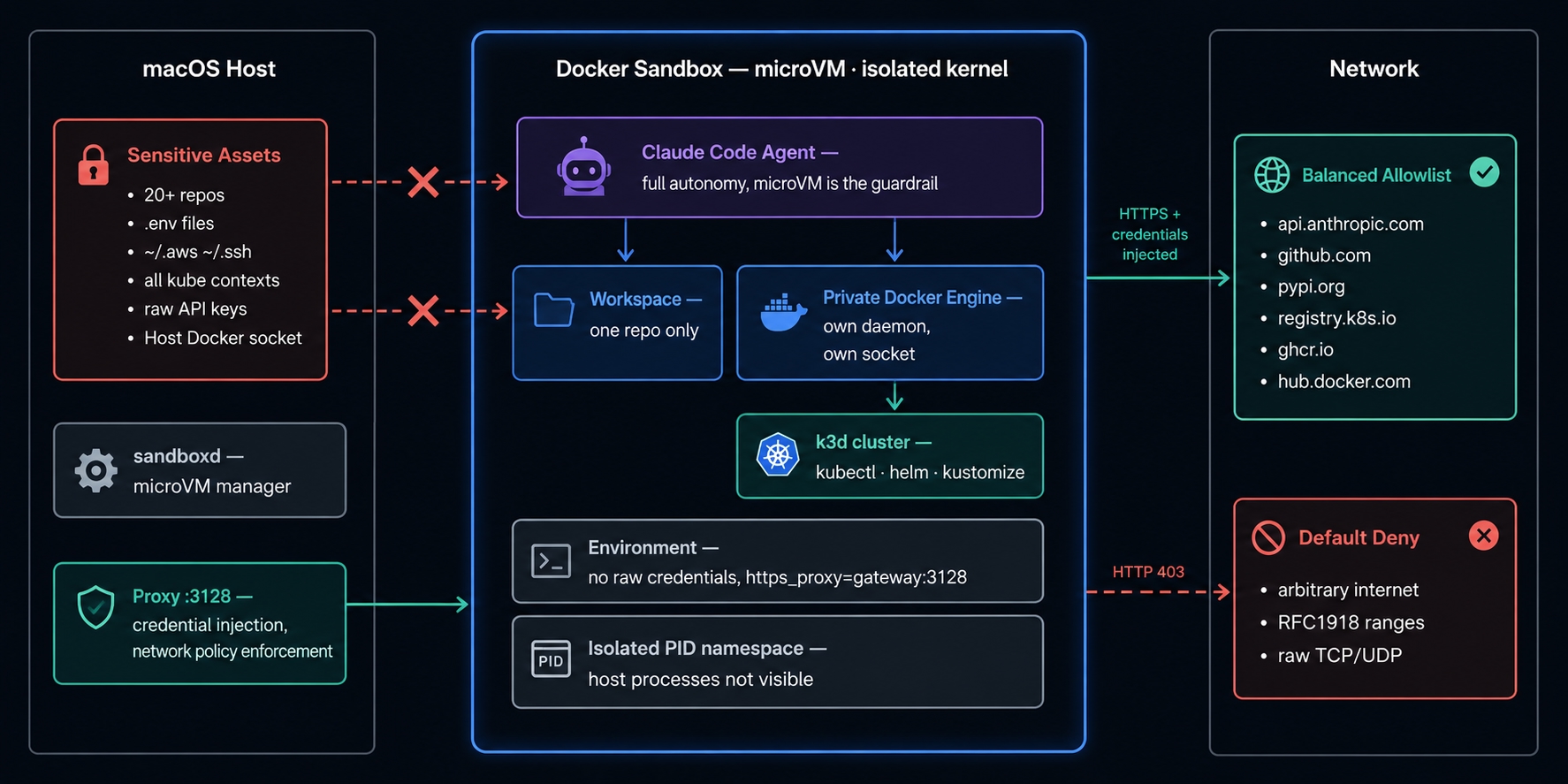
macOS host with sensitive assets and proxy on the left, Docker Sandbox microVM in the center, network policy zones on the right.
Seven Isolation Proofs — Run Live After a Real Agent Task
The agent exited after completing the debugging task. The sandbox remained alive, and I executed the following commands from the same shell session the agent had used — to show exactly what was accessible throughout the entire run.
1. Filesystem Boundary
ls /Users/opscart/
# Source

ls /Users/opscart/.ssh/ 2>&1
One directory. The workspace mount. SSH keys, other repos, credential directories — none of them exist inside the sandbox. Parent directories above the workspace are read-only stubs with no siblings.
One critical implication: if your workspace is your home directory, your entire home is visible and writable. Always mount a project subdirectory, not your home.
2. No Credentials in Environment
env | grep -iE "anthropic|api_key|aws|secret|token|password"
# (empty)
Confirmed. The agent that just made dozens of API calls had no raw credentials anywhere in its environment.
3. Proxy Confirms the Injection Mechanism
env | grep proxy
# https_proxy=http://gateway.docker.internal:3128
# no_proxy=localhost,127.0.0.1,::1,[::1],gateway.docker.internal
Proxy address visible. Credentials it carries: not visible. The mechanism described above confirmed live inside the running sandbox.
4. Process Namespace
ps aux | wc -l
# 13
A macOS host runs hundreds of processes. The sandbox shows 13 — all internal. The stack includes dockerd, containerd, socat bridging SSH agent forwarding, and the coding agent. Host processes completely invisible. No way to inspect or interact with anything running on the host.
5. Private Docker Engine
docker info | grep -E "Server Version|Operating System|ID"
# Server Version: 29.4.3
# Operating System: Ubuntu 25.10 (containerized)
# ID: e6934b23-368c-4259-a873-96f879f587e5
Ubuntu 25.10. A unique daemon ID that differs from docker info on the host — confirming the sandbox runs a fully isolated daemon. The agent deployed a full Kubernetes cluster using this daemon. No path to the host Docker socket existed.
6. Host Services Unreachable
curl -s --max-time 3 https://localhost:6443 2>&1 || echo "blocked"
# curl: (7) Failed to connect to localhost port 6443: Connection refused
Port 6443 — my minikube cluster on the Mac host. From inside the sandbox, localhost is the sandbox's own loopback. Host clusters, host SSH, host services — unreachable by default. Eight AKS contexts on this machine. Zero is reachable from inside the sandbox without an explicit policy rule.
7. What the Agent Had vs. What It Didn't
During the entire debugging task, the agent had full access to one project directory, kubectl to the sandbox-internal Kubernetes cluster, and full Docker capabilities against the private daemon.
It could not reach any other directory, cloud credentials, other kubeconfig contexts, the host Docker daemon, or any cluster not running inside the sandbox.
All seven proofs held throughout the session without exception.
Three Network Policy Findings That Change How You Think About It
Network policy is not a full network control plane. It is hostname-scoped HTTP filtering. Three findings define the actual scope:
Finding 1: Blocking returns HTTP 403, not TCP rejection.
probe "example.com" "https://example.com"
# example.com | exit=0 | http=403
Exit code 0. The curl command succeeded. The proxy returned 403 directly. An agent that retries on 403 will retry blocked requests indefinitely. It cannot distinguish a blocked domain from a legitimate server-side error by exit code. For DevOps workflows — an agent hitting a blocked container registry will keep retrying silently rather than failing fast.
Finding 2: HTTP CONNECT established a tunnel to port 22 on an allowed host.
# Port 22 — SSH port
curl -s --max-time 5 telnet://github.com:22
# Connected to github.com port 22

# Port 9999 — non-standard port
curl -s --max-time 5 telnet://github.com:9999
# Connected to github.com port 9999
github.com is on the Balanced allowlist. HTTP CONNECT established TCP tunnels to github.com on both port 22 and the non-standard port 9999 — both succeeded. Port-based restrictions are not enforced at the proxy layer. The Balanced policy is hostname-scoped only. Any port to an allowed host is reachable via HTTP CONNECT.
Finding 3: DNS is not filtered.
A common assumption is that all outbound traffic routes through the HTTP proxy — including DNS. Lab results show DNS resolution occurs independently:
dig example.com +short
# 172.66.147.243
A blocked domain resolved. The microVM has an internal stub resolver that forwards DNS independently of the HTTP proxy. An agent can resolve any hostname regardless of the active policy. DNS cannot serve as a secondary enforcement layer.
These findings do not break the isolation model. They define its actual boundary. Network policy controls HTTP/HTTPS access by hostname. It does not control DNS, TCP tunnels to allowed hosts on arbitrary ports, or how agents interpret 403 responses.
The Agent Scenario: Isolation Under Real Load
The real test of isolation is not seven probe commands — it is whether the boundary holds while an agent is actively working, making API calls, running kubectl, deploying containers.
I gave an AI agent a broken Kubernetes deployment: a payments-service with memory limits set to 64Mi on a service that needs ~150Mi at peak. The agent received a task file and a set of manifests. No other context.
The agent completed the task in under five minutes. It found two bugs — one planted, one discovered independently by reading the manifest and noticing health check probes targeting port 8080 on an nginx container that only serves on port 80. The task said nothing about probes.
Result: both pods 1/1 Running, 0 restarts.
The seven isolation proofs above were verified immediately after — throughout the entire debugging session, the boundary held without exception.
Full article and complete repo at opscart.com/docker-sandbox-devops.
What This Means for DevOps Engineers Specifically
Most Docker Sandbox articles target software developers running Claude Code on a single codebase. The DevOps case is different and more demanding.
A DevOps engineer running an AI agent faces a broader attack surface: multiple cluster contexts, infrastructure credentials, IAM roles, service accounts, kubeconfigs that grant production access. The blast radius of a compromised or manipulated agent is not one repo — it is potentially every system those credentials touch.
Docker Sandbox addresses this at the architecture level rather than the prompt level. You are not relying on the agent being well-behaved. You are relying on the microVM boundary, the proxy, and the private Docker daemon. The agent can be fully autonomous inside the sandbox because the guardrail is the environment, not the agent's behavior.
The private Docker Engine is particularly significant. DevOps agents need to build and test containers. Every other local isolation approach that allows container operations requires socket mounting — which gives the agent direct access to the host Docker daemon and every image and volume on the host. Docker Sandbox eliminates this tradeoff.
What Is Still Rough
The image iteration cycle is the primary friction point. Adding a tool requires editing a Dockerfile, rebuilding, pushing to a registry, and recreating the sandbox. For a stable toolchain, this is acceptable. For rapid experimentation, it is not.
The --branch parallel agent mode is Git isolation, not VM isolation. Both agents run in one microVM with shared Docker and network. For separate credentials or separate network policies per agent, you need separate workspace directories.
The network policy CLI has non-obvious syntax in several places — sbx policy deny does not remove an allow rule, and external cluster access requires two policy rules not one. Neither behavior is documented.
The CLI changes between minor versions. v0.31.1 changed login flow, renamed policy tiers, and introduced --clone mode. Pin your version.
When Not to Use Docker Sandbox
Docker Sandbox is the right tool for a specific set of problems. It is not the right tool when:
You need raw UDP or ICMP. Network tracing tools (traceroute, mtr), some mTLS configurations, and anything relying on ICMP will not work — the sandbox proxy only handles HTTP/HTTPS.
Your toolchain requires host-device access. USB devices, GPU passthrough beyond basic forwarding, and hardware security keys are not accessible from inside the microVM.
You are on a memory-constrained machine. Each sandbox runs a full microVM plus its own Docker daemon. On a machine with 8GB RAM, running multiple sandboxes simultaneously alongside Docker Desktop and a browser will cause pressure.
You need production-grade audit logging. Docker Sandbox is Experimental. Audit trails, compliance logging, and enterprise controls are not mature yet. For regulated environments, evaluate accordingly.
Your agent needs to coordinate across multiple repositories simultaneously. The one-sandbox-per-workspace model means cross-repo agent work requires careful orchestration. The --clone mode helps but adds git workflow overhead.
Conclusion
The credential isolation model is the headline: the agent made authenticated API calls throughout the session without the API key ever entering the sandbox. Authentication was performed by the host-side proxy using credentials stored outside the sandbox boundary. The agent could use the credential — it could never see, copy, or exfiltrate it.
Seven isolation proofs confirmed the boundary held under real active load. One directory visible. No credentials. No host processes. No host clusters. No host Docker daemon.
The network policy findings add important nuance. The --branch mode reality is different from what the documentation implies. Docker Sandbox is Experimental, and the CLI is moving. Use it knowing what it is — and what it is not.
Published at DZone with permission of Shamsher Khan. See the original article here.
Opinions expressed by DZone contributors are their own.
Comments