

Edge-First AI Architecture: Designing Low-Latency, Offline-Capable Intelligence
Most Android AI features stall on flaky networks; an edge-first architecture runs key models on-device, with cloud used only as an optional upgrade.
Join the DZone community and get the full member experience.
Join For FreeMost mobile AI features silently depend on a “good enough” network. That’s fine on your office Wi-Fi. It’s not fine:
- On spotty 3G
- In the subway
- In a warehouse with terrible coverage
- When your cloud endpoint is down or throttled
If your “AI feature” turns into a spinner or a generic error in those cases, users will stop trusting it.
An edge-first AI architecture flips the default:
- Assume the network is unreliable.
- Treat the cloud as an enhancement, not a requirement.
This article walks through what that architecture looks like on Android: how to keep latency low, make features work offline, and still take advantage of powerful cloud models when available.
Why Edge-First, Not Cloud-First?
Cloud-only AI has obvious downsides on Android:
- Latency: Round trips easily add 200–1000 ms, especially on mobile networks.
- Availability: Airplane mode, offline zones, flaky Wi-Fi, captive portals.
- Cost: Cloud inference and bandwidth get expensive at scale.
- Privacy: Shipping raw text, images, or sensor data off-device is sensitive.
Edge-first doesn’t mean “no cloud.” It means:
- Critical UX paths must run on-device.
- Cloud makes results better, not required.
Think:
- On-device OCR that always works, with optional cloud-enhanced recognition.
- On-device ranking that’s “good enough,” refined by cloud personalization when available.
- On-device safety checks, with cloud review for complex cases.
Architecture Overview
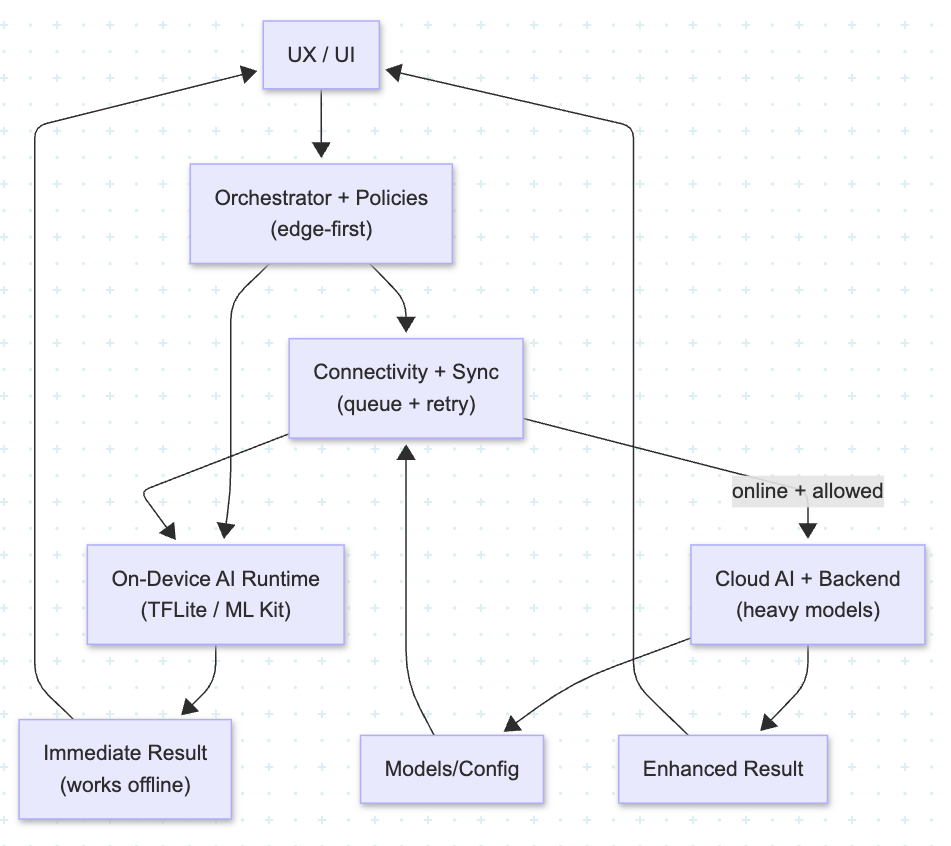
A practical edge-first AI architecture on Android usually has five layers:
- UX & Interaction Layer
- Orchestration and Policy Engine
- On-Device AI Runtime
- Connectivity and Sync Layer
- Cloud AI and Backend Services
1. UX and Interaction Layer
This is your Compose UI, fragments, or activities.
Key idea: The UI shouldn’t care whether the model ran on-device or in the cloud. It just renders a UiState:
data class AiResultUiState(
    val status: Status,
    val primaryResult: String?,
    val enhanced: Boolean,
    val offline: Boolean
)
The ViewModel exposes this state and a few intents (onCapture, onRetry, onImproveResults).
2. Orchestration & Policy Engine
This layer decides how to answer a request:
- Can we handle it fully on-device?
- Should we call the cloud as a second step?
- Are we currently offline, metered, or low on battery?
- What policy applies for this user or region?
Model it as a use case or small “engine”:
interface AiOrchestrator {
    suspend fun handle(request: AiRequest): AiResult
}
This keeps branching logic out of the UI and individual model wrappers.
Policies to consider:
- Connectivity: offline-only, prefer-edge, prefer-cloud.
- Battery: avoid heavy models on low battery or thermal throttling.
- Privacy: keep PII on-device; send only embeddings or redacted text.
3. On-Device AI Runtime
Run:
- TF Lite / NNAPI models
- ML Kit (vision, language, barcode, etc.)
- Lightweight classifiers or ranking models
Patterns:
- Package models as AARs or download them via Remote Config + CDN.
- Run inference on a background dispatcher; expose structured results to the orchestrator.
- Cache frequent results when useful (e.g., embeddings for common phrases or past scans).
Principle: On-device is the source of truth for “minimum viable intelligence.” If everything else fails, the on-device path must still provide a meaningful answer.
4. Connectivity & Sync Layer
This layer hides network weirdness and supports eventual enhancement.
Responsibilities:
- Detect connectivity state (online/offline/unmetered)
- Queue “upgrade requests” when offline
- Retry with backoff
- Sync updated models, configs, and personalization data
Example:
- User scans a document offline.
- On-device OCR gives a decent result immediately.
- A background job enqueues the image/text for cloud OCR when back online.
- When the enhanced result arrives, the app updates the record and optionally notifies the user.
From the user’s perspective:
- It worked instantly.
- It “magically improved” later.
- No manual sync required.
5. Cloud AI & Backend Services
The cloud provides:
- Heavy models (LLMs, multi-modal transformers)
- Cross-user intelligence (global ranking, anomaly patterns)
- Long-term storage, audit logs, and feature generation
- Model management APIs (versioning, thresholds, flags)
Architectural boundary:
- The contract between app and cloud should be stable: request/response schemas, error semantics, version negotiation.
- The app should survive temporary cloud outages by falling back to edge-only behavior.
Example Flow: Edge-First Smart Scanner
Use case: Scan receipts and extract structured data
- User takes a photo.
- UI shows preview and “Processing…” state.
- On-device path runs first: ML Kit / TFLite model performs OCR and simple field extraction.
- Orchestrator returns results quickly (total amount, date, merchant).
- UI updates within a second.
Cloud enhancement (optional):
- If network is available and allowed:
- App sends compressed image/redacted text to cloud
- Cloud applies specialized model or LLM parser
- Backend returns cleaner fields, tax breakdown, category, anomalies
- App updates local record; user sees “Improved by cloud AI”
Offline scenario:
- Steps 1–2 still work
- Cloud request is queued and retried later once connectivity returns
Takeaway: Edge guarantees a usable experience; cloud improves accuracy and richness when possible.
Capability Tiers: Not All Devices Are Equal
Edge-first architecture should acknowledge device diversity:
- High-end devices can run heavier, quantized models.
- Low-end devices might only handle smaller models or even pure heuristics.
Introduce capability tiers:
- Tier 1: Advanced (NNAPI, lots of RAM, modern CPU/GPU)
- Tier 2: Standard (mid-range phones)
- Tier 3: Basic (low-end, constrained devices)
Your orchestrator can pick different model variants or even different flows per tier, without the UI knowing the details.
Testing and Observability
Edge-first adds complexity — so you need visibility.
Test:
- On-device inference in isolation (unit tests around wrappers).
- Orchestrator decisions with fake connectivity and battery states.
- Offline/online transitions (queued requests, sync, conflict resolution).
Observe:
- Latency: on-device vs cloud; p50/p95.
- Fallback rates: how often did you hit degraded mode?
- Success metrics: extraction accuracy, task completion, user satisfaction.
Even simple counters and structured logs help you discover:
- “Cloud endpoint is flakey in region X.”
- “Low-end devices are timing out on this model.”
- “Offline users use this feature far more than we thought.”
Wrapping Up
Edge-first AI on Android isn’t just about shipping a TFLite model. It’s an architecture choice:
- Run critical logic on-device for low latency and offline support
- Layer cloud AI on top as an enhancement, not a dependency
- Use an orchestrator and clear policies so the UI stays simple and predictable
Do that well, and your AI features don’t just impress in demos — they keep working in airplanes, basements, warehouses, and everywhere your users actually live.
Opinions expressed by DZone contributors are their own.
Comments