

Getting Started With AVRO
Evaluating different protocols like AVRO, Thrift, Protobuff, and MessagePack. Let's cover each one in-depth starting with AVRO—a data serialization framework.
 ·
·
Join the DZone community and get the full member experience.
Join For FreeRecently we want very fast communication between our distributed system, our payload was also considered so we try to evaluate different protocols like AVRO, Thrift, Protobuff, and MessagePack. I will try to cover each one in-depth starting with AVRO, so stay tuned for others.
So what is AVRO?
AVRO is a data serialization framework. It uses JSON to define the schema and serialize data into a binary compact format that can be store in persistent storage or transfer across the wire. We are not going to go in details of definition but will concentrate on implementation and its pros and cons.
You can get more details about AVRO from here and here.
Why Would We Want to Move Out of JSON?
Even though JSON is widely accepted, flexible, and can send dynamic data but there is no schema enforcing. JSON objects can be quite big because of repeated keys when we want to send the list of the same items.
Let’s get into implementation with a simple use-case. Use-case is that ordered service will call order confirmation service to confirm the order added in the cart. Communication between the two services will happen with AVRO+binary encoding over Rest. Other communication mechanisms like AVRO+JSON encoding, AVRO+JSON+gzip are there in the code repository we are not going to explore here but will be useful in comparison.
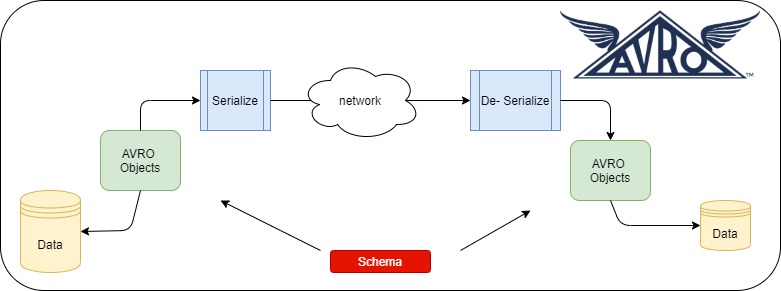
AVRO is schema-based so first let’s try to create the schema. We are going to construct AVRO schema from JSON using the online tool.
AVRO Schema:
{
"name": "Order",
"type": "record",
"namespace": "com.milind.avro.order.request",
"fields": [
{
"name": "orderId",
"type": "string"
},
{
"name": "cartUrl",
"type": [
"string",
"null"
]
},
{
"name": "lineItems",
"type": {
"type": "array",
"items": {
"name": "LineItemRecord",
"type": "record",
"fields": [
{
"name": "sku",
"type": "string"
},
{
"name": "description",
"type": [
"string",
"null"
]
},
]
}
}
}
]
}
If you notice cartUrl and description there are two types of string and null. This is called union in AVRO schema where the value can be of type null or string. Note AVRO schema is strong types so when you don’t set any field while creating the object you will get an exception while building the object itself. After finalizing the schema we need to compile the schema and generate the POJO classes. There are two ways to do it:
1) Via Command Line
java -jar /path/to/avro-tools-1.10.0.jar compile schema java -jar /path/to/avro-tools-1.10.0.jar compile schema
java -jar /path/to/avro-tools-1.10.0.jar compile schema orderrequest.avsc .
2) Via Maven Plugin
xxxxxxxxxx
<plugin>
<groupId>org.apache.avro</groupId>
<artifactId>avro-maven-plugin</artifactId>
<version>${avro.version}</version>
<executions>
<execution>
<id>schemas</id>
<phase>generate-sources</phase>
<goals>
<goal>schema</goal>
<goal>protocol</goal>
<goal>idl-protocol</goal>
</goals>
<configuration>
<sourceDirectory>${project.basedir}/src/main/resources/</sourceDirectory>
<outputDirectory>${project.basedir}/src/main/java/</outputDirectory>
</configuration>
</execution>
</executions>
</plugin>
To generate the code execute mvn clean install.
AVRO specifies two serialization encodings: binary and JSON. Most applications will use binary encoding, as it is smaller and faster. But, for debugging and web-based applications, the JSON encoding may sometimes be appropriate. Following is the generic serialization and de-serialization using the binary. For JSON serialization please go through the code.
Serialization
xxxxxxxxxx
public byte[] serializeBinary(SpecificRecordBase request)
throws IOException{
ByteArrayOutputStream baos = new ByteArrayOutputStream();
DatumWriter<SpecificRecordBase> outputDatumWriter =
new SpecificDatumWriter<>(request.getSchema());
BinaryEncoder encoder = EncoderFactory.get().binaryEncoder(baos,
null);
outputDatumWriter.write(request,encoder);
encoder.flush();
return baos.toByteArray();
}
De-Serialization
xxxxxxxxxx
public <T> T deSerializeBinary(byte[] data, Class<T> t)
throws IOException {
DatumReader<SpecificRecordBase> reader
= new SpecificDatumReader(t);
BinaryDecoder decoder = new DecoderFactory().binaryDecoder(data,
null);
return (T) reader.read(null,decoder);
}
I had created the spring boot application to test all these and you can get the entire code in Github here. Following are the URLs to test different protocols:
1) AVRO + Binary Encoding: http://localhost:8080/test
2) AVRO + JSON Encoding: http://localhost:8080/testjson
3) AVRO + JSON Encoding + Gzip: http://localhost:880/testzip
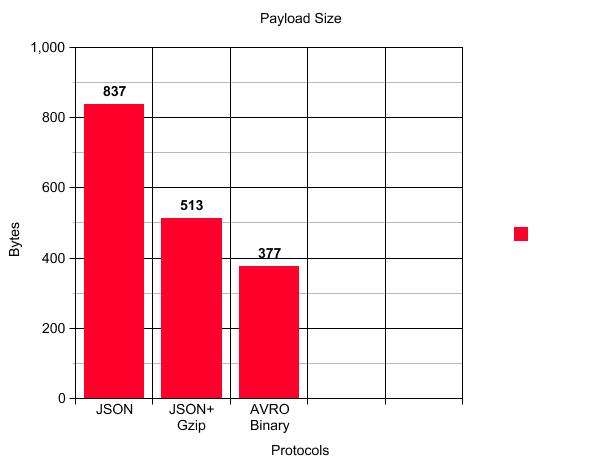
Following is the comparison of the payload size with the same request data:
Conclusion
If you see the above graph the main advantage of AVRO is payload reduction. For our case, there is almost a 55% reduction in payload size when we use AVRO binary compared to JSON and a 26.5% reduction in payload size compared to JSON+Gzip. Apart from this following are the other advantages:
1) Data is fully typed.
2) Data is always accompanied by a schema that permits full processing of that data without code generation, static datatypes, etc.
3) As data is compressed lesser CPU usage.
4) Supports major programming language.
5) Schema can evolve which can benefit both consumer and producer.
The only thing which can create the problem is that data cannot be print without using the AVRO tools which can become a bottleneck for debugging.
Hope you got some familiarity with AVRO.
Happy Coding.
Get the entire code here.
Published at DZone with permission of Milind Deobhankar. See the original article here.
Opinions expressed by DZone contributors are their own.
Comments