

Iterative Processing Using the For Each Scope in Mule
Learn how to implement the For Each scope in Mule applications to simplify the splitting and aggregation of message collections.
The For Each scope is one of the scopes available in Mule, which splits a collection into individual elements and processes them iteratively through the processors embedded in the scope, then returns the original message to the flow. This scope basically simplifies the splitting and aggregation of message collections.
How It Works
The For Each scope does not change the type of the message collection and does not change the contents of the of the original message collection, if the individual collection elements are immutable. That is, after For Each splits a message collection and processes the individual elements, it does not re-aggregate those individual elements into a MuleMessageCollection; rather, it returns the original message (this means “Java in, Java out,” rather than “Java in, MuleMessageCollection out”).
The For Each scope is versatile; it can iteratively process elements from any type of collection, including maps, lists, arrays, and MuleMessageCollection.
IMP Points of For Each:
You can insert any message processor, except inbound connector, in the For Each scope. If we drag a two-way connector into a For Each scope, Mule automatically converts it to an outbound-only connector.
When the For Each scope receives a message payload that is not a collection type like maps, lists, arrays, and MuleMessageCollection, it throws an IllegalArgumentException.
The rootMessage variable (flow variable), which is associated with the message by default, contains a reference of the complete, unsplit message collection.
The counter variable (flow variable) is associated with the message by default. For Each uses a counter variable to record the number of the elements it has processed.
In this example, Mule uses a For Each message processor to extract and iteratively process records from a database.
Flow:
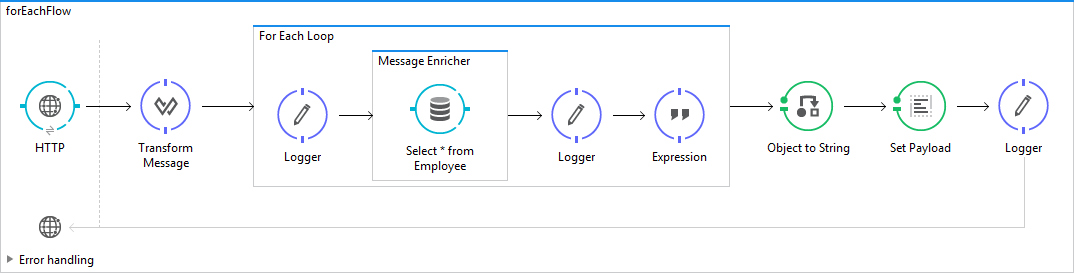
Code:
<?xml version="1.0" encoding="UTF-8"?>

<mule xmlns:dw="http://www.mulesoft.org/schema/mule/ee/dw"
xmlns:db="http://www.mulesoft.org/schema/mule/db" xmlns:http="http://www.mulesoft.org/schema/mule/http"
xmlns:ee="http://www.mulesoft.org/schema/mule/ee/core" xmlns:cxf="http://www.mulesoft.org/schema/mule/cxf"
xmlns="http://www.mulesoft.org/schema/mule/core" xmlns:doc="http://www.mulesoft.org/schema/mule/documentation"
xmlns:spring="http://www.springframework.org/schema/beans" xmlns:xsi="http://www.w3.org/2001/XMLSchema-instance"
xsi:schemaLocation="http://www.mulesoft.org/schema/mule/db http://www.mulesoft.org/schema/mule/db/current/mule-db.xsd
http://www.mulesoft.org/schema/mule/http http://www.mulesoft.org/schema/mule/http/current/mule-http.xsd
http://www.mulesoft.org/schema/mule/ee/core http://www.mulesoft.org/schema/mule/ee/core/current/mule-ee.xsd
http://www.mulesoft.org/schema/mule/cxf http://www.mulesoft.org/schema/mule/cxf/current/mule-cxf.xsd
http://www.springframework.org/schema/beans http://www.springframework.org/schema/beans/spring-beans-current.xsd
http://www.mulesoft.org/schema/mule/core http://www.mulesoft.org/schema/mule/core/current/mule.xsd
http://www.mulesoft.org/schema/mule/ee/dw http://www.mulesoft.org/schema/mule/ee/dw/current/dw.xsd">

<db:generic-config name="Generic_Database_Configuration"
url="jdbc:hsqldb:hsql://localhost:9001" driverClassName="org.hsqldb.jdbcDriver"
doc:name="Generic Database Configuration" />
<http:listener-config name="HTTP_Listener_Configuration"
host="localhost" port="8081" basePath="/foreach" doc:name="HTTP Listener Configuration" />
<flow name="forEachFlow">
<http:listener config-ref="HTTP_Listener_Configuration"
path="/foreach" doc:name="HTTP" />
        <dw:transform-message doc:name="Transform Message">
            <dw:set-payload><![CDATA[%dw 1.0
%output application/java
---
payload]]></dw:set-payload>
        </dw:transform-message>
  <foreach doc:name="For Each Loop">
  <logger level="INFO" message="#[payload]" doc:name="Logger" />
   <enricher doc:name="Message Enricher">
<db:select config-ref="Generic_Database_Configuration"
doc:name="Select * from Employee">
<db:dynamic-query><![CDATA[select name from employee where id='#[payload.id]']]></db:dynamic-query>
</db:select>
<enrich target="#[flowVars.name]" source="#[payload[0].name]"/>
 </enricher>
 <logger level="INFO" message="#[flowVars.name]" doc:name="Logger" />
 <expression-component doc:name="Expression"><![CDATA[
           payload.name= flowVars.name;
         ]]></expression-component>
 </foreach>

<object-to-string-transformer />
<set-payload value="#[payload]"  doc:name="Set Payload"/>
<logger level="INFO" message="#[payload]" doc:name="Logger" />
</flow>
</mule>
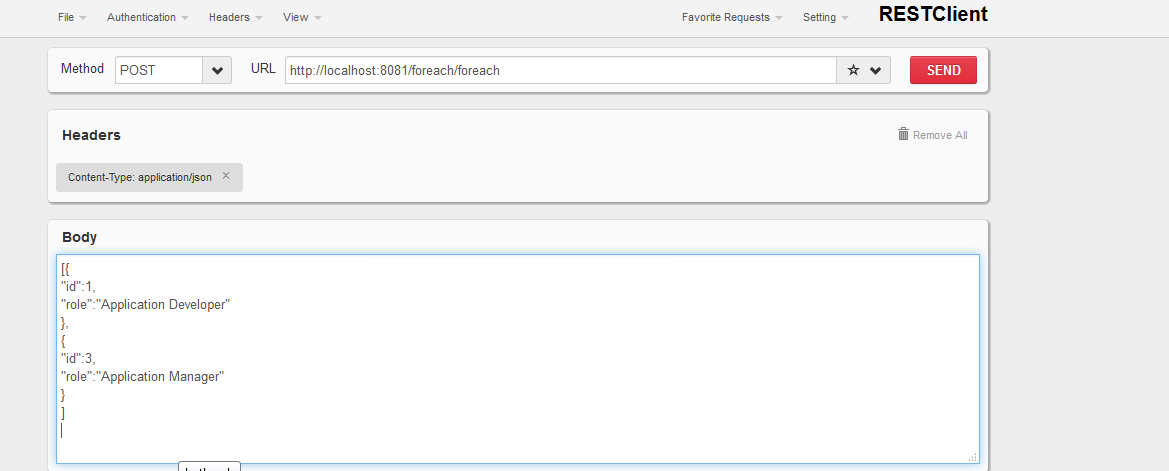
Request:
[{
"id":1,
"role":"Application Developer"
},
{
"id":3,
"role":"Application Manager"
}
]
Response:
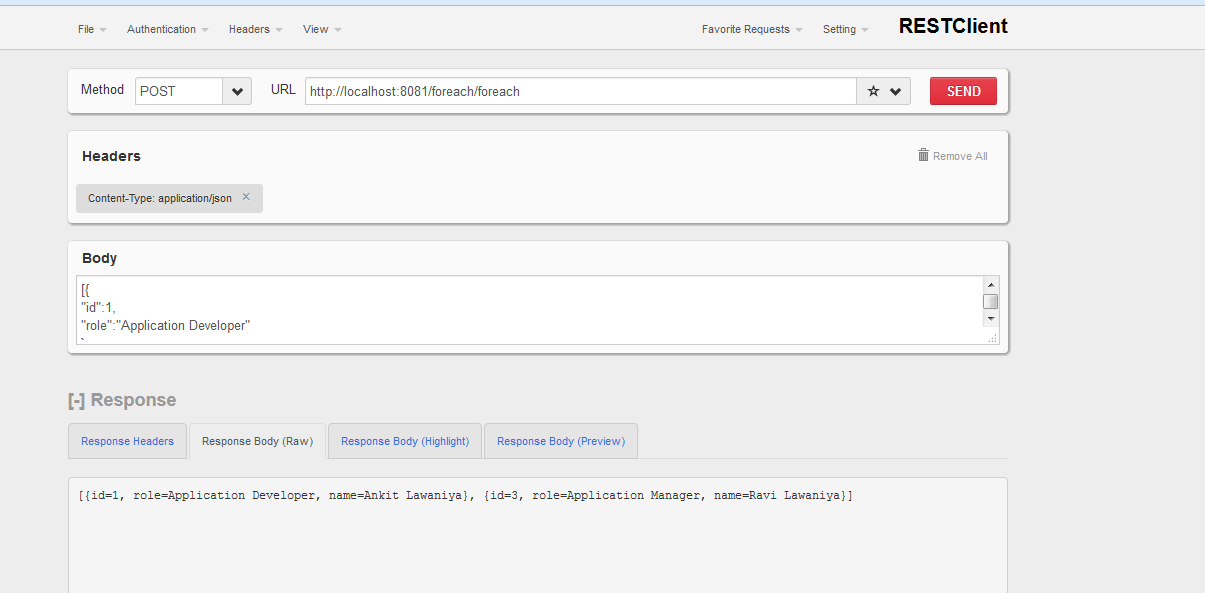
Hope this helps.
Thanks.
Keep learning.
Opinions expressed by DZone contributors are their own.