

Kotlin Microservices With Spring Cloud Netflix: Part 2
Learn how to share data between microservices in Spring Cloud using a Feign client.
Join the DZone community and get the full member experience.
Join For FreeIn Part 1 of this series, we made an introduction to Spring Cloud with Kotlin. We discussed the Config Server, Discovery Server (Eureka), and created a microservice named data-service which is registered to Eureka and retrieves configuration from the onfig Server. At last, we had all three instances up and running.
In this part, we will show how to share data between microservices in Spring Cloud. As we said, there are many ways to achieve data sharing according to business needs. For example, if we want REST-based communication, we can use Feign Client; for asynchronous communication, we can use message brokers, etc. In this example, we will use Feign. We will add another microservice named user-service to contain data about users. We will try to retrieve information from its APIs by calling them from data-service, which we already built. To achieve this, we will use a Feign Client.
Spring Cloud Feign
Feign is a declarative web service client and is a convenient way to test your application’s API, focused on creating tests to verify business logic instead of spending time on the technical implementation of web services clients. The only thing we need to describe is how to reach the remote API service by providing details such as the URL, request and response body, accepted headers, etc. The Feign Client will take care of the implementation details. Feign uses Spring ApplicationContext to create an ensemble of components to send requests to a remote service endpoint described by the Feign Client specification. When using Feign, Spring Cloud integrates with Eureka and Ribbon to provide a load balanced HTTP client. We discussed Eureka in the previous part let’s talk a little bit about Ribbon.
Ribbon provides client-side load balancing. Load balancing automatically distributes incoming application traffic between the number of nodes running for given application. Ribbon component offers a good set of configuration options such as connection timeouts, retry algorithms, etc. It supports many strategies to achieve load balancing.
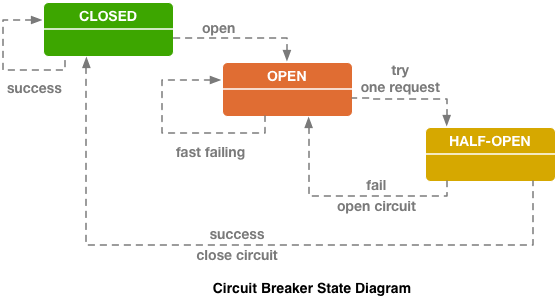
Feign also supports a fallback mechanism using the Hystrix API. Hystrix from Spring Cloud provides an implementation of the Circuit Breaker pattern. Hystrix monitors failures to a method, and if failures build up to a threshold, it opens the circuit so that subsequent calls automatically fail. While the circuit is open, it redirects calls to a specified fallback method.
Now, let’s create user-service by creating a Spring Boot Application with Kotlin, Maven, and dependencies:
  <dependencies>
    <dependency>
      <groupId>org.springframework.cloud</groupId>
      <artifactId>spring-cloud-starter-netflix-eureka-client</artifactId>
    </dependency>
    <dependency>
      <groupId>org.springframework.cloud</groupId>
      <artifactId>spring-cloud-starter-config</artifactId>
    </dependency>
    <dependency>
      <groupId>org.springframework.boot</groupId>
      <artifactId>spring-boot-starter-actuator</artifactId>
    </dependency>
    <dependency>
      <groupId>org.springframework.boot</groupId>
      <artifactId>spring-boot-starter-web</artifactId>
    </dependency>
    <dependency>
      <groupId>org.jetbrains.kotlin</groupId>
      <artifactId>kotlin-stdlib-jre8</artifactId>
    </dependency>
    <dependency>
      <groupId>org.jetbrains.kotlin</groupId>
      <artifactId>kotlin-reflect</artifactId>
    </dependency>
    <dependency>
      <groupId>org.springframework.boot</groupId>
      <artifactId>spring-boot-starter-data-mongodb</artifactId>
    </dependency>
    <dependency>
      <groupId>de.flapdoodle.embed</groupId>
      <artifactId>de.flapdoodle.embed.mongo</artifactId>
    </dependency>
    <dependency>
      <groupId>de.flapdoodle.embed</groupId>
      <artifactId>de.flapdoodle.embed.process</artifactId>
      <version>2.0.5</version>
    </dependency>
    <dependency>
      <groupId>org.springframework.boot</groupId>
      <artifactId>spring-boot-starter-test</artifactId>
      <scope>test</scope>
    </dependency>
  </dependencies>
We added a eureka-client dependency to make the user-service detected by Eureka Server, and dependencies for an embedded MongoDB which will be used to store some user data for our concept.
In the Application class, we add @EnableEurekaClient.
@SpringBootApplication
@EnableEurekaClient
class UserServiceApplication

fun main(args: Array<String>) {
  runApplication<UserServiceApplication>(*args)
}
In the resources folder, we add an application.yml file
spring:
  application:
    name: "users"
  mongodb:
      embedded:
        version: 2.0.5
        features: sync_delay
eureka:
  client:
    healthcheck:
      enabled: true
server:
  port: 8082
There is server port declared, the name "users" which the service will expose to cluster and some configuration for the embedded Mongo. We should note here that configuration in application.yml file it is better to be retrieved from Config Server in a Git repository for all microservices. We have a small implementation here so we let configuration in this service just for the purpose of our example.
If we run it, we can see from Eureka URL: http://localhost:8761 that all services are up and detected.

Let's make a data class User to map our entries in MongoDB:
@Document data class User(@Id val id: String?, val name: String)After that, we can create a UserRepository interface from Spring Data JPA for User class.
interface UserRepository : MongoRepository<User, String> {

}
Now we can initialize our DB with some users.
@SpringBootApplication
@EnableEurekaClient
class UserServiceApplication(private val userRepository: UserRepository): ApplicationRunner {
  override fun run(args: ApplicationArguments?) {
    createUsers(userRepository)
  }

}

  fun main(args: Array<String>) {
    runApplication<UserServiceApplication>(*args)
  }

  private fun createUsers(userRepository: UserRepository) {
    userRepository.save(User(null, "Peter"))
    userRepository.save(User(null, "John"))
    userRepository.save(User(null, "Sofia"))
    userRepository.save(User(null, "George"))
  }
Let's add a UserService Interface with a method which will get all users.
interface UserService {

    fun getAllUsers(): List<User>
}
And the service implementation with UserRepository autowired.
@Service("userService")
class UserServiceImpl : UserService {

    @Autowired
    lateinit var userRepository: UserRepository

    override fun getAllUsers(): List<User> {
        return userRepository.findAll()
    }
}
At last, we create the Controller, which will get all users from UserService and return their names as comma-separated values.
@RestController
@RequestMapping("api")
class UserController {

  @Autowired
  lateinit var userService: UserService

  @GetMapping("/users")
  fun getUsers(): String {
    val users: List<User> = userService.getAllUsers()
    var names: MutableList<String> = users.map { it.name  }.toMutableList()
    return names.joinToString()
  }

}
If we now make a GET request at the URL http://localhost:8082/api/users, we will get the following result:
Peter, John, Sofia, GeorgeNow let's go back to data-service, which we created in Part 1, and add dependencies:
<dependency>
<groupId>org.springframework.cloud</groupId>
     <artifactId>spring-cloud-starter-feign</artifactId>
     <version>1.4.5.RELEASE</version>
</dependency>
<dependency>
<groupId>org.springframework.cloud</groupId>
<artifactId>spring-cloud-starter-ribbon</artifactId>
<version>1.4.5.RELEASE</version>
</dependency>
In the Application class, add @EnableFeignClients:
@SpringBootApplication
@EnableEurekaClient
@EnableFeignClients
class DataServiceApplication

fun main(args: Array<String>) {
  runApplication<DataServiceApplication>(*args)
}
We will create a DataService that will retrieve usernames as comma-separated values from user-service. Let's suppose that this is a data collector service and aggregates data from many microservices in a real-world example.
We create an interface named UserClient that make the call to user-service with Feign Client.
@FeignClient("users")
interface UserClient {

    @RequestMapping(method = arrayOf(RequestMethod.GET), value = "api/users")
    fun getAllUsers(): String
}
We just need to set the annotation @FeignClient and the name of the microservice then declare the call of the API. Feign will take care of the implementation.
After that, we create DataService, which will use UserClient.
interface DataService {

    fun getAllUsers(): String
}
@Service("dataService")
class DataServiceImpl : DataService {
@Autowired
lateinit var userClient: UserClient
override fun getAllUsers(): String {
return userClient.getAllUsers()
}
}Last, we create the Controller that will call DataService.
@RestController
@RequestMapping("api/data")
class DataController {

  @Autowired
  lateinit var dataService: DataService

  @GetMapping("/users")
  fun getAllUsers(): String {
      return dataService.getAllUsers()
  }

}
If we now make a GET request at the URL http://localhost:8080/api/data/users, we will again get the following result:
Peter, John, Sofia, Georgedata-service used Feign Client to reach the remote server only with the property "users" and the API URL, detected user-service's location, and got the results back without the need to provide further information.
I hope that this post will help you get started with Spring Cloud with Kotlin. There are also many other Spring Cloud concepts, like Zuul, that are very interesting and I wish to discuss in the future.
Best regards!
Opinions expressed by DZone contributors are their own.
Comments