

Using LLMs to Automate Root Cause Analysis in Incident Response
LLMs streamline incident response by quickly identifying root causes from logs and alerts, cutting down manual effort and downtime.
Join the DZone community and get the full member experience.
Join For FreeExecutive Summary
In today’s complex cloud and microservices-based systems, it’s no surprise that things break. While we’ve made huge strides in detecting issues quickly with modern observability tools, getting to the actual root of a problem — what really caused the incident — is still a tough, manual, and time-consuming task.
That’s where large language models (LLMs) step in. These AI models are trained to understand logs, alerts, documentation, and natural language — all of which are crucial during incidents. By tapping into the power of LLMs, teams can significantly speed up root cause analysis (RCA), reduce downtime, and even lay the foundation for self-healing systems.
This article explains how LLMs can simplify RCA, provide intelligent insights, and automate what used to take hours into something that happens in minutes.
The Problem With Traditional RCA
1. Tool Overload
Logs are in one place, metrics in another, and traces elsewhere. Trying to piece together the full picture across multiple dashboards slows everything down.
2. Too Many Alerts
One failure might trigger dozens of alerts. Figuring out which alert is the actual cause and which are just noise takes time and effort.
3. Log Diving Is Painful
Digging through massive log files line by line is like finding a needle in a haystack. It’s boring, slow, and prone to human error.
4. Tribal Knowledge
If the right person isn’t on call, the team might miss important context. Not everything is documented.
Why LLMs Work So Well for RCA
Unlike traditional tools that depend on fixed rules or scripts, LLMs understand context. They read logs, alerts, and documentation like a human would — and then make smart suggestions.
| What You're Doing | Traditional Way | LLM-Powered Way |
|---|---|---|
| Parsing logs | Manual grep or regex | Natural language understanding |
| Alert analysis | Rule-based filters | Understands relationships between alerts |
| RCA write-ups | Manually created | Auto-generated with explanation |
| Fix suggestions | Lookup scripts or docs | Personalized, contextual recommendations |
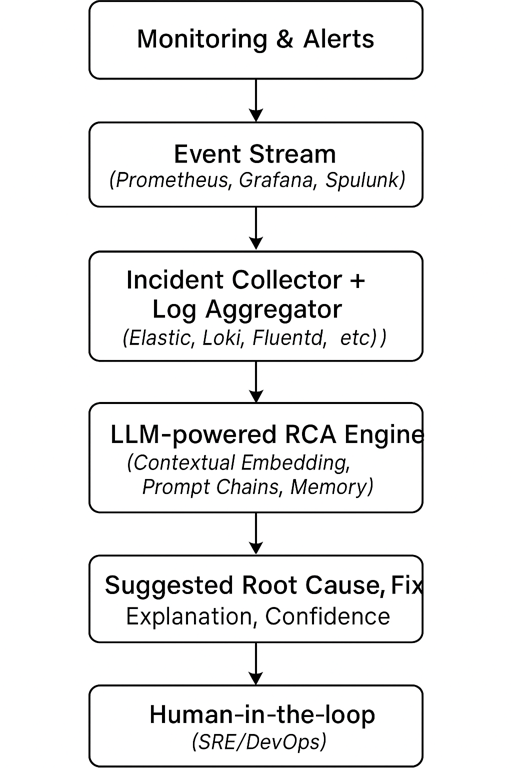
A Look at the LLM-Powered RCA Workflow
Instead of an engineer combing through tools manually, the LLM reads everything and gives you a summary on:
- What failed
- Why it failed
- How to fix it
Your system → Monitoring/Logs → RCA Engine (LLM) → Suggested Cause & Fix → Human ReviewArchitecture: LLM-Powered RCA Workflow
Implementation Patterns
Option 1: Retrieval-Augmented Generation (RAG)
- Use a vector store (like Pinecone, Weaviate, or Chroma) to store logs, alerts, and previous incidents.
- When a new incident occurs, retrieve similar past contexts and use them in the prompt.
- Result: grounded, contextual RCA suggestions.
Option 2: LLM Agents for RCA Automation
Create a multi-step autonomous agent:
- Ingest incident context.
- Parse logs and alerts.
- Correlate anomalies.
- Hypothesize the root cause.
- Recommend a fix.
- Generate summary.
This agent can run with human-in-loop oversight or autonomously during low-priority incidents.
Sample Prompt Chain
System prompt:
“You are an SRE assistant. Your goal is to identify the root cause of incidents using logs, metrics, and system topology.”
User prompt:
“Here are logs from services A, B, and C. What’s the most likely root cause of the incident at 10:24 AM?”
LLM response:
“Service B failed due to a memory leak, leading to cascading timeouts in A and C. The issue originates from a memory-intensive batch job started at 10:18 AM.”
Real-World Impact: Case Snapshot
- Organization: FinTech SaaS platform
- Problem: Daily performance degradation incidents took 4–6 hours to resolve
- Solution: LLM-based RCA assistant integrated with Grafana, Splunk, and PagerDuty
- Outcome:
- RCA time reduced from 4 hours → 15 minutes
- Average MTTR dropped by 58%
- First-call resolution by L1 engineers increased by 40%
Limitations and Guardrails
| Concern | Mitigation |
|---|---|
| Data privacy | Use on-prem LLMs (e.g., LLaMA, Mistral) or private endpoints |
| Hallucinations | Include confidence scores, retrieval context, human review |
| Real-time latency | Preprocess logs with embeddings; use streaming prompt context |
| Tooling integration | Use LangChain or OpenLLM to orchestrate with observability tools |
The Road Ahead: Towards Self-Healing Systems
LLMs are the bridge between observability and autonomy. With RCA automated, we unlock next-gen capabilities like:
- Predictive failure modeling
- Autonomous remediation agents
- Real-time postmortems and continuous learning
- Digital SRE copilots for 24x7 operations
As LLMs evolve, they won’t just help us fix problems — they’ll help us design systems that avoid them altogether.
Code Example: Using LLMs to Make RCA Smarter
Let’s walk through how this works in practice with real code.
Step 1: Embed Your Logs
We convert logs into searchable vectors so we can later retrieve relevant log segments.
from langchain.embeddings import OpenAIEmbeddings
from langchain.vectorstores import Chroma
from langchain.document_loaders import TextLoader
from langchain.text_splitter import CharacterTextSplitter

loader = TextLoader("incident_logs.txt")
documents = loader.load()
text_splitter = CharacterTextSplitter(chunk_size=1000, chunk_overlap=100)
docs = text_splitter.split_documents(documents)

embedding_model = OpenAIEmbeddings()
vectorstore = Chroma.from_documents(docs, embedding_model, persist_directory="./chroma_logs")
Step 2: Ask About the Problem
When an incident happens, search for similar log patterns.
vectorstore = Chroma(persist_directory="./chroma_logs", embedding_function=embedding_model)
query = "Service timeout in payment gateway at 10:15 AM"
relevant_docs = vectorstore.similarity_search(query, k=3)
Step 3: Let the LLM Explain
Give those logs to an LLM and ask what it thinks happened.
from langchain.llms import OpenAI
from langchain.prompts import PromptTemplate
from langchain.chains import LLMChain

llm = OpenAI(temperature=0.2)
rca_prompt = PromptTemplate(
    input_variables=["logs"],
    template="""
    You are an incident response assistant.

    Based on the following logs, identify the most likely root cause of the issue and suggest a remediation step.

    Logs:
    {logs}

    Answer with:
    - Root Cause
    - Explanation
    - Recommended Fix
    """
)

rca_chain = LLMChain(llm=llm, prompt=rca_prompt)
log_input = "\n\n".join([doc.page_content for doc in relevant_docs])
rca_result = rca_chain.run(logs=log_input)
Bonus: Generate a Clean Postmortem
Want a clean summary you can use in a review? Chain the LLM again:
postmortem_prompt = PromptTemplate(
    input_variables=["rca_summary"],
    template="""
    Based on the following RCA summary, generate a professional incident postmortem.

    RCA Summary:
    {rca_summary}

    Output:
    - Incident Summary
    - Impact
    - Root Cause
    - Remediation
    - Lessons Learned
    """
)

postmortem_chain = LLMChain(llm=llm, prompt=postmortem_prompt)
postmortem = postmortem_chain.run(rca_summary=rca_result)
Conclusion
LLMs are changing the game for incident response. Instead of burning hours trying to figure out what went wrong, you can use AI to get there faster, with more clarity and less stress. Whether it’s log analysis, alert correlation, or postmortem generation, language models are turning reactive response into proactive operations.
Opinions expressed by DZone contributors are their own.
Comments