

Managing Monorepos With a Merge Queue: A Game Changer
In this article, the author explains why using a merge queue is a game changer for monorepo management. Learn more here!
 ·
·
Join the DZone community and get the full member experience.
Join For FreeHandling large codebases is a tough job, and it's even harder when dealing with monorepos. A monorepo is a single code repository that contains multiple projects or modules. It's a handy way to share code across teams and manage dependencies.
But dealing with monorepos can be tricky. You have to make sure changes in one module don't mess up things in another. This is where a merge queue steps up.
Monorepos: Why Are They Challenging?
Monorepos have several benefits, such as easier dependency management, better code sharing, and simpler code refactoring. However, managing a monorepo can be challenging, especially as the codebase grows. Some of the main challenges of managing monorepos include the following:
1️. Difficulties With Dependency Management
With so much code in one repository, it can be challenging to ensure that dependencies are correctly managed across all projects and services.
2. Slow Build and Test Times
Building and testing the entire monorepo can take a lot of time, especially as it grows.
3️. Managing Conflicts and Overlapping Changes
With many developers working on the same codebase, it can be challenging to manage conflicts and ensure that changes made in one module do not conflict with changes made in another.

Why Managing Monorepos With a Merge Queue
To help overcome these challenges, betting on a merge queue sounds like a great idea.
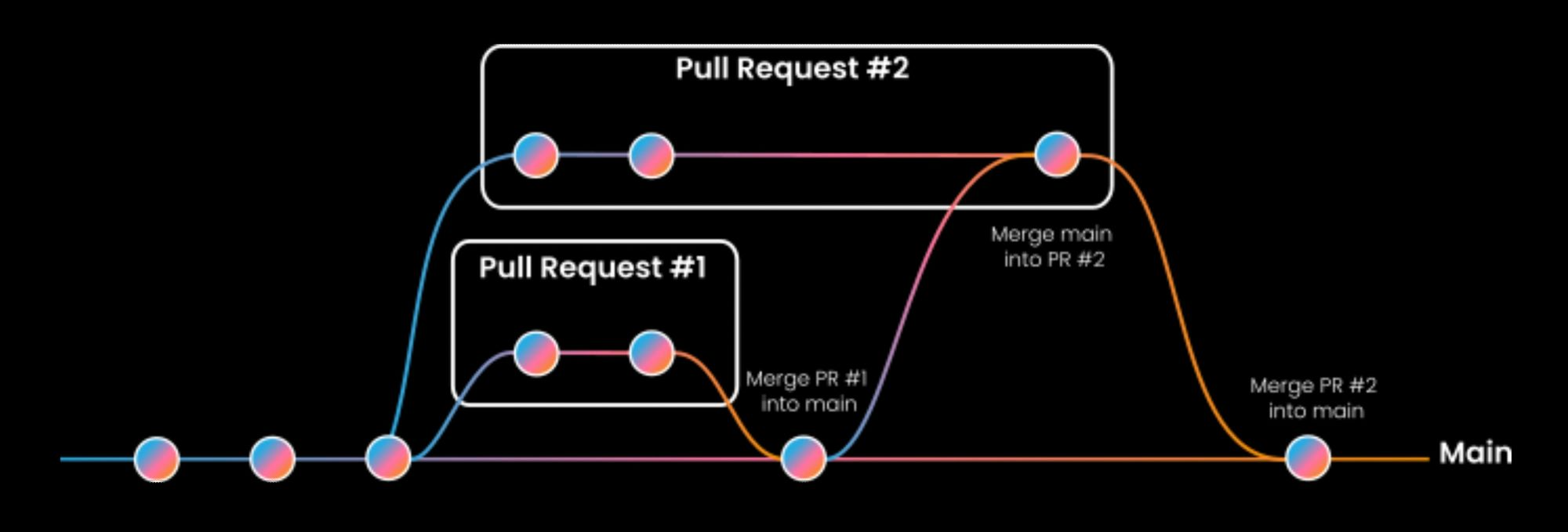
Here are some of the benefits of using a merge queue for managing monorepos:
1️. Reduced Risk of Conflicts and Overlapping Changes
A merge queue ensures that changes made in one module do not conflict with changes made in another by managing the merge order and dependencies.
2️. Increased Efficiency With Automatic Dependency Management
A merge queue automatically manages dependencies, making it easier for developers to work on their individual projects and modules.
3️. Faster Build and Test Times
By managing the merge order, a merge queue reduces build and test times by ensuring that changes that depend on each other are merged together.
Using a merge queue for managing monorepos is a real game changer. Developers can set up a merge queue for their monorepo and customize it to fit their specific needs. For example, they can set up different merge queues for different projects or modules and specify the order in which changes should be merged.
Mergify for Monorepo: How Does It Work?
When you submit a pull request to a monorepo, it can be put in one or multiple queues at the same time. With its feature, Partition Rules, Mergify will not merge the pull request until it has been validated by each queue in which it is. This collaboration ensures that the pull request meets all the requirements of each queue.
If the pull request is in multiple queues and fails to meet the requirements of at least one queue, it cannot be merged. To merge, the pull request must meet all the criteria of each queue it is in.
You can also use queue rules to handle different projects in the monorepo that have different criteria for merging pull requests. To do this, you can replicate the queue rules logic for each project and use the attribute queue-partition-name.
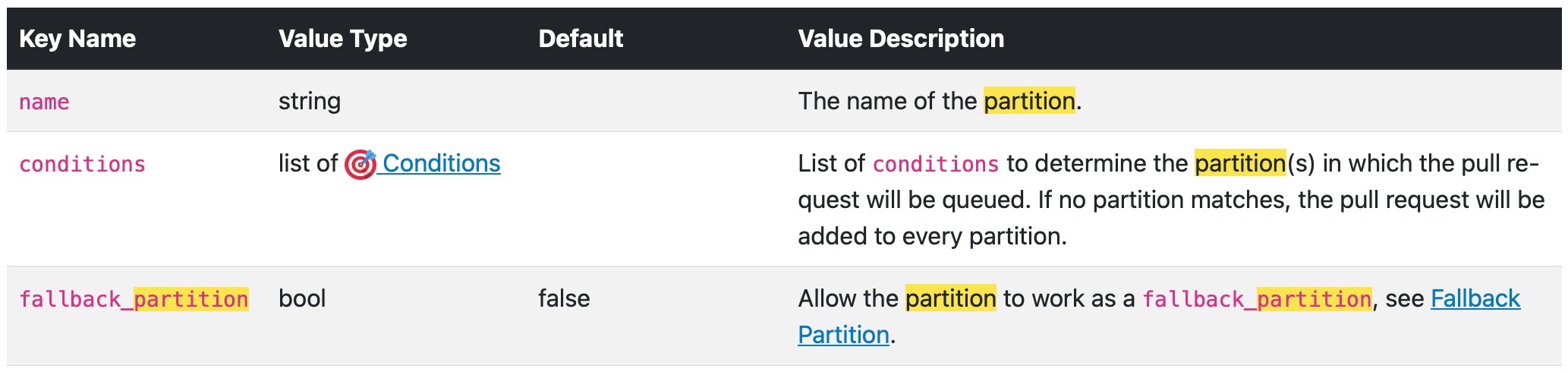
A partition rule has the following parameters:
Handle Different Projects in a Monorepo Using Partition Rules
If a pull request contains a modification on any file in the folder projectA/ it will be added in the partition projectA, if it contains a modification on any file in the folder projectB/ then it will be added in the partition projectB, if it contains a modification in both folder projectA/ and projectB/, then it will be added to both partitions.
If none of the two partitions' rules matches, then the PR will be added in both partitions. The queue_rules will still determine in which queue in the partition(s) the pull request will be added in.
Here is a table representing the partition and queues with the code below:
| Project A | Project B |
|---|---|
| Hotfix | Hotfix |
| default | default |
shared:
    priority_rules: &priority_rules
        - name: hotfix PR detected
          conditions:
            - label=hotfix
          priority: high
        - name: lowprio PR detected
          conditions:
            - author=dependabot[bot]
          priority: low

pull_request_rules:
   - name: queue PR with queue label
     conditions:
       - label=queue
     actions:
       queue:

partition_rules:
  - name: projectA
    conditions:
      - files~=^projectA/

  - name: projectB
    conditions:
      - files~=^projectB/

queue_rules:
  - name: hotfix
    priority_rules: *priority_rules
    routing_conditions:
      - label=hotfix
    merge_conditions:
      - or:
        - and:
          - queue-partition-name=projectA
          - check-success=ciA
        - and:
          - queue-partition-name=projectB
          - check-success=ciB

  - name: default
    priority_rules: *priority_rules
    merge_conditions:
      - or:
        - and:
          - queue-partition-name=projectA
          - check-success=ciA
        - and:
          - queue-partition-name=projectB
          - check-success=ciB
Conclusion
Managing monorepos can be challenging, but with a merge queue, and especially Mergify's one, developers can work more efficiently and with more confidence.
A merge queue allows developers to manage their monorepo as a single codebase while still being able to work on individual projects and modules. This improves collaboration and communication between teams, reduces the risk of conflicts and errors, and speeds up the development process.
Published at DZone with permission of Mathieu Poissard. See the original article here.
Opinions expressed by DZone contributors are their own.
Comments