

MCP Client-Server Integration With Semantic Kernel
Learn to integrate Semantic Kernel with Azure OpenAI and MCP to discover tools, register them as functions, and enable AI agents to invoke them dynamically.
Join the DZone community and get the full member experience.
Join For FreeModern AI applications gain real popularity when they translate natural language prompts to execute external services. This article describes the basic understanding of the key components: semantic kernel, Azure OpenAI, and MCP Client-Server. It also describes the implementation to connect the Semantic Kernel to an Azure-hosted OpenAI resource so that an LLM can be queried directly.
Additionally, you will learn how to create an MCP Client, run the MCP Server, and expose the MCP tools. The tools that are discovered can then be registered as kernel functions in the Semantic Kernel and thus, augment the LLM with the ability to execute external tools as a Service that are provided through the MCP Server.
Semantic Kernel and Azure Open AI Integration
Semantic Kernel
Microsoft SDK that enables integration of LLMs with external tool plugins , memory, and planning capabilities. It acts as a layer between LLM and tool plugins. It enables a prompt to invoke registered external tools or APIs. For a deeper understanding of Semantic Kernel, follow Introduction to Semantic Kernel.
Azure OpenAI Resource
Microsoft Azure Resource that facilitates running an Open AI model (e.g., GPT-4 ) on Azure. It provides access to LLM capabilities. It provides LLM capabilities to the Semantic Kernel. For more details, follow Azure OpenAI.
The code snippet below is responsible for creating and configuring a Semantic Kernel instance. The class uses Azure OpenAI as the backend for the chat completion service and adds it to the kernel builder.
namespace AIWebAPIs.Common
{
    using AIWebAPIs.PlugIns;
    using Azure.Identity;
    using Microsoft.SemanticKernel;

public class KernelBuilder
{
    private const string AZURE_OPENAI_ENDPOINT = "https://tdmintdeveusaoai.openai.azure.com/";
    private const string MODEL_DEPLOYMENT = "gpt-4o";
    private Kernel? _kernel;
    public Kernel BuildKernel()
    {
        var options = new DefaultAzureCredentialOptions
        {
            TenantId = "b1a4f7cb-a159-44a6-ac48-6674e85c4ddc"
        };

        var azureCredential = new DefaultAzureCredential(options);

        // Step 1: Create a Kernel Builder
        var kernelBuilder = Kernel.CreateBuilder();

        // Step 2: Add Azure OpenAI Chat Completion Service
        kernelBuilder.AddAzureOpenAIChatCompletion(
            deploymentName: MODEL_DEPLOYMENT,
            endpoint: AZURE_OPENAI_ENDPOINT,
            credentials: azureCredential
        );

        // Step 3: Build and return the Kernel
        _kernel=  kernelBuilder.Build();

         return _kernel;
    }
    }
}
MCP Client-Server Interaction to Discover MCP Tools
MCP Client
A client that connects to an MCP Server using the MCP protocol. It fetches the MCP Server tools and their execution results. This enables tools discovery and execution from the MCP Server instance.
The code snippet below shows how to create an MCP client and connect to the MCP Server. It also shows how to retrieve all the MCP tools from the MCP Server. This is called Tools Discovery dynamically that can be registered to the Semantic Kernel as a kernel function. If you're unfamiliar with MCP Server setup and MCP tools, refer to this article titled "Build AI Agents With MCP Server in C# and Run in VS Code" for a detailed implementation.
using ModelContextProtocol.Client;
using ModelContextProtocol.Protocol.Transport;

namespace AIWebAPIs.MCPClient
{
    public class MCPClient
    {
        private IMcpClient? _client;
        private List<McpClientTool>? _tools;

        // Public async method for the client, initializes if null
        public async Task<IMcpClient> GetClientAsync()
        {
            if (_client == null)
            {
                _client = await GetMCPClient();
            }
            return _client;
        }

        // Getter property for tools, initializes if null
        public List<McpClientTool> Tools
        {
           get { return _tools; }
            set { _tools = value; }
        }

        // Method to create and return an MCPClient instance
        public async Task<IMcpClient> GetMCPClient()
        {
            // Create a transport channel to communicate with an MCP Server process using standard input/output (stdio).
            var clientTransport = new StdioClientTransport(new StdioClientTransportOptions
            {
                Name = "Everything",
                Command = "dotnet",
                Arguments = ["run",
                            "--project",
                            "C:/Users/anupra/source/repos/AIWebAPIs/AIWebAPIs/AIWebAPIs.csproj"],
            });

            var client = await McpClientFactory.CreateAsync(clientTransport);

            Tools = (await client.ListToolsAsync()).ToList();

            _client = client;
            return client;
        }
    }
}
Discovering and Registering MCP Tools as Semantic Kernel Functions for Invocation
using Microsoft.AspNetCore.Mvc;
using AIWebAPIs.Common;
using Microsoft.SemanticKernel;

namespace AIWebAPIs.Controllers
{
    [ApiController]
    [Route("[controller]")]
    public class ChatController : ControllerBase
    {

        [HttpPost("GenerateResponse")]
        public async Task<IActionResult> GenerateResponse([FromBody] ChatRequest request)
        {
            // Check if Messages is null or empty
            if (request.Messages == null || !request.Messages.Any())
            {
                return BadRequest("Messages cannot be null or empty.");
            }

            // Aggregate messages into a single string with each message on a new line
            var prompt = string.Join(Environment.NewLine, request.Messages.Select(m => m.Content));

            // create mcp client
            var mcpClientObj = new MCPClient();
            var client  = await mcpClientObj.GetClientAsync();

			// create openAIclient obj to access Semantic Kernel obj
            var openaiClient = new Common.OpenAI();

            #pragma warning disable SKEXP0001
            openaiClient.Kernel.Plugins.AddFromFunctions("mcptools", mcpClientObj.Tools.Select(tool => tool.AsKernelFunction()));
            #pragma warning restore SKEXP0001

             // Create a function using the prompt
            var chatFunction = openaiClient.Kernel.CreateFunctionFromPrompt(prompt);

            // Invoke the function
            var result = await openaiClient.Kernel.InvokeAsync(chatFunction);

            return Ok(new { Response = result });
        }
    }
}
Sequence Diagram: Registering MCP Tools as Semantic Kernel Functions and Invoking via Semantic Kernel
Below is a complete flow diagram of how all the components communicate. The below diagram shows an end-to-end flow for discovering and invoking MCP tools via Semantic Kernel and LLM.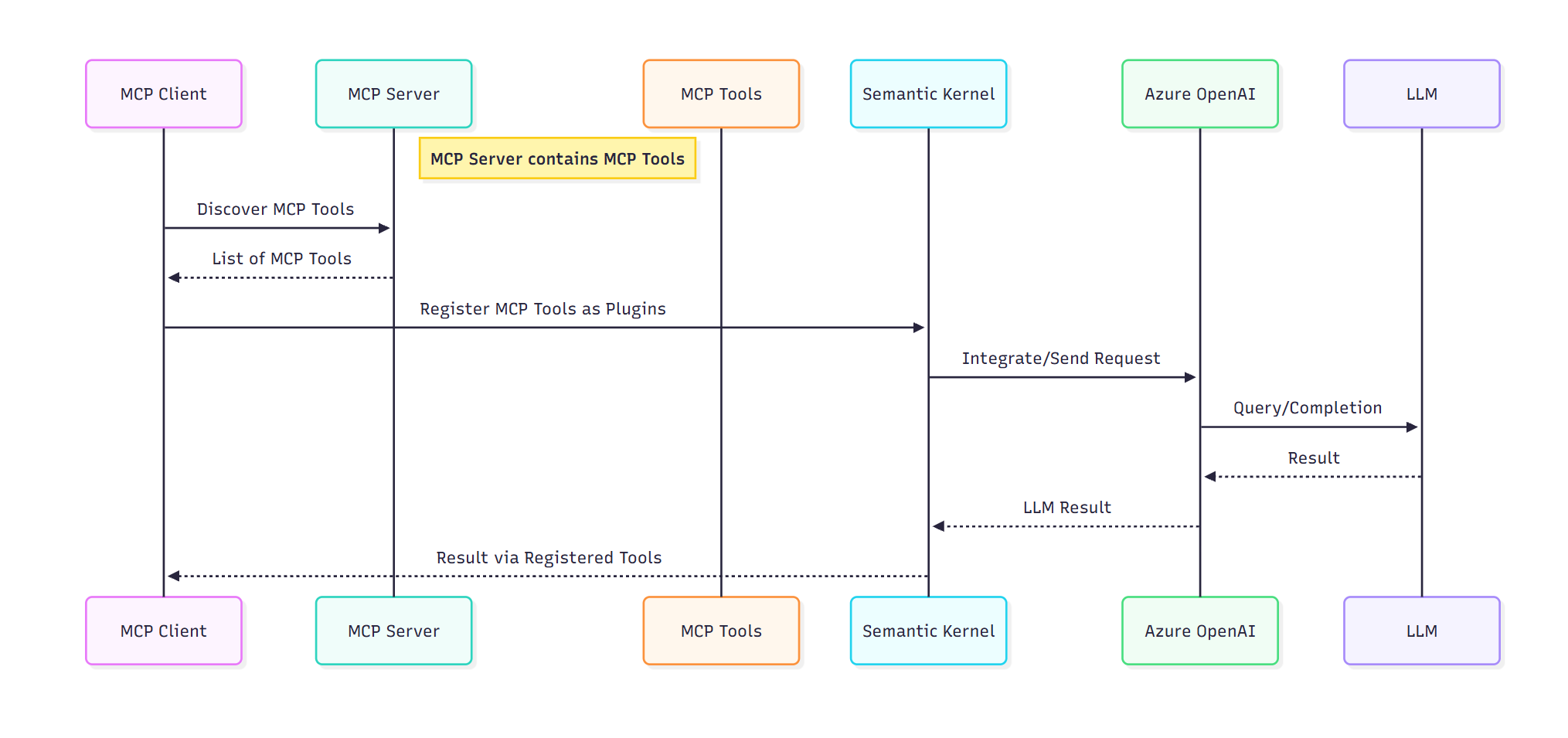
Component Interaction Flow Summary
- MCP Client connects to the MCP server for tools discovery: Sends a request to the MCP Server to retrieve available tools from the MCP Server.
- Tools are registered as Kernel functions: The MCP Client uses the returned tool list to register them with the Semantic Kernel as kernel functions.
- Semantic Kernel processes the prompt: Semantic kernel receives the prompt and sends it along with the MCP tools to Azure OpenAI, which hosts LLM (e.g., GPT 4 ) for chat completion.
- LLM generates a response: LLM evaluates the prompt against the descriptions of the MCP tools to select the relevant MCP tool for invocation. If tool execution is needed, the Semantic kernel invokes the selected tool. and the final result returned to the MCP Client.
Conclusion
Integration of MCP with Semantic Kernel using Azure OpenAI, demonstrates a powerful architecture where LLM can provide domain-specific answers by invoking MCP tools. With the MCP Client-Server ecosystem, tools hosted in the MCP Server are available to the client. These tools can be registered as kernel functions in the Semantic Kernel. This setup provides the LLM to evaluate prompts against kernel functions by mapping them to relevant tools, which makes the LLM more capable of beyond text generation. This approach is ideal for building AI agents.
Opinions expressed by DZone contributors are their own.
Comments