

How My AI Agents Learned to Talk to Each Other With A2A
In the finale of this series, I use the A2A protocol to let my AI agents communicate and delegate tasks—unlocking true collaboration and orchestration.
 CORE
·
CORE
·
Join the DZone community and get the full member experience.
Join For FreeAlright, welcome to the final post in this three-part series. Let's do a quick recap of the journey so far:
- In Part 1, I laid out the problem with monolithic AI "brains" and designed the architecture for a specialist team of agents to power my "InstaVibe Ally" feature.
- In Part 2, we did a deep dive into the Model Context Protocol (MCP), and I showed you exactly how I connected my Platform Interaction Agent to my application's existing REST APIs, turning them into reusable tools.
But my agents are still living on isolated islands. My Social Profiling Agent has no way to give its insights to the Event Planner. My platform integrator can create post and event. I've built a team of specialists, but I haven't given them a way to collaborate. They're a team that can't talk.
This is the final, critical piece of the puzzle. To make this a true multi-agent system, my agents need to communicate. This is where the Agent-to-Agent (A2A) protocol comes in.
A2A: Giving Your Agents a Shared Language
So, what exactly is A2A? At its core, it’s an open standard designed for one agent to discover, communicate with, and delegate tasks to another. If MCP is about an agent using a non-sentient tool, A2A is about an agent collaborating with a peer—another intelligent agent with its own reasoning capabilities.
This isn't just about making a simple API call from one service to another. It’s about creating a standardized way for agents to understand each other's skills and work together to achieve complex goals. This was the key to unlocking true orchestration. It meant I could build my specialist agents as completely independent microservices, and as long as they all "spoke A2A," my Orchestrator could manage them as a cohesive team.
The Big Question: A2A vs. MCP: What's the Difference?
This is a point that can be confusing, so let me break down how I think about it. It’s all about who is talking to whom.
- MCP is for Agent-to-Tool communication. It’s the agent's key to the tool shed. My Platform Agent uses MCP to connect to my MCP Server, which is a simple gateway to a "dumb" tool—my InstaVibe REST API. The API can't reason or think; it just executes a specific function.
- A2A is for Agent-to-Agent communication. It’s the agent's phone number to call a colleague. My Orchestrator uses A2A to connect to my Planner Agent. The Planner Agent isn't just a simple function; it has its own LLM, its own instructions, and its own tools (like Google Search). I'm not just telling it to do something; I'm delegating a goal to it.
Here’s the simplest way I can put it:
- Use MCP when you want your agent to use a specific, predefined capability (like
create_postorrun_sql_query). - Use A2A when you want your agent to delegate a complex task to another agent that has its own intelligence.
Making It Real: The a2a-python Library in Action
Theory is great, but let's look at the code. To implement this, I used the a2a-python library, which made the whole process surprisingly straightforward. It breaks down into two parts: making an agent listen (the server) and making an agent talk (the client).
First, I needed to take my specialist agents (Planner, Social, etc.) and wrap them in an A2A server so they could receive tasks. The most important part of this is creating an Agent Card.
An Agent Card is exactly what it sounds like: a digital business card for your agent. It’s a standard, machine-readable JSON object that tells other agents: "Hi, I'm the Planner Agent. Here's what I'm good at (my skills), and here's the URL where you can reach me."
Here’s a snippet from my planner/a2a_server.py showing how I defined its card and started the server.
# Inside my PlannerAgent class...
skill = AgentSkill(
    id="event_planner",
    name="Event planner",
    description="This agent generates fun plan suggestions tailored to your specified location, dates, and interests...",
    tags=["instavibe"],
    examples=["What about Boston MA this weekend?"]
)
self.agent_card = AgentCard(
    name="Event Planner Agent",
    description="This agent generates fun plan suggestions...",
    url=f"{PUBLIC_URL}",  # The public URL of this Cloud Run service
    skills=[skill]
)

# And in the main execution block...
request_handler = DefaultRequestHandler(...)
server = A2AStarletteApplication(
    agent_card=plannerAgent.agent_card,
    http_handler=request_handler,
)
uvicorn.run(server.build(), host='0.0.0.0', port=port)
With just that little bit of boilerplate, my Planner Agent, running on Cloud Run, now has an endpoint (/.well-known/agent.json) that serves its Agent Card. It’s officially on the grid and ready to take requests.
Now for the fun part: my Orchestrator agent. Its primary job is not to do work itself, but to delegate work to the others. This means it needs to be an A2A client.
First, during its initialization, the Orchestrator fetches the Agent Cards from the URLs of all my specialist agents. This is how it "meets the team."
The real magic is in how I equipped the Orchestrator. I gave it a single, powerful ADK tool called send_message. The sole purpose of this tool is to make an A2A call to another agent.
The final piece was the Orchestrator's prompt. I gave it a detailed instruction set that told it, in no uncertain terms: "You are a manager. Your job is to understand the user's goal, look at the list of available agents and their skills, and use the send_message tool to delegate tasks to the correct specialist."
Here's a key snippet from its instructions:
You are an expert AI Orchestrator. Your primary responsibility is to...delegate each action to the most appropriate specialized remote agent using the send_message function. You do not perform the tasks yourself.

Agents:
{self.agents}  <-- This is where I inject the list of discovered Agent Cards
This instruction allows the LLM inside the Orchestrator to reason about the user's request, look at the skills listed on the Agent Cards, and make an intelligent decision about which agent to call.
The Grand Finale: A Symphony of Agents
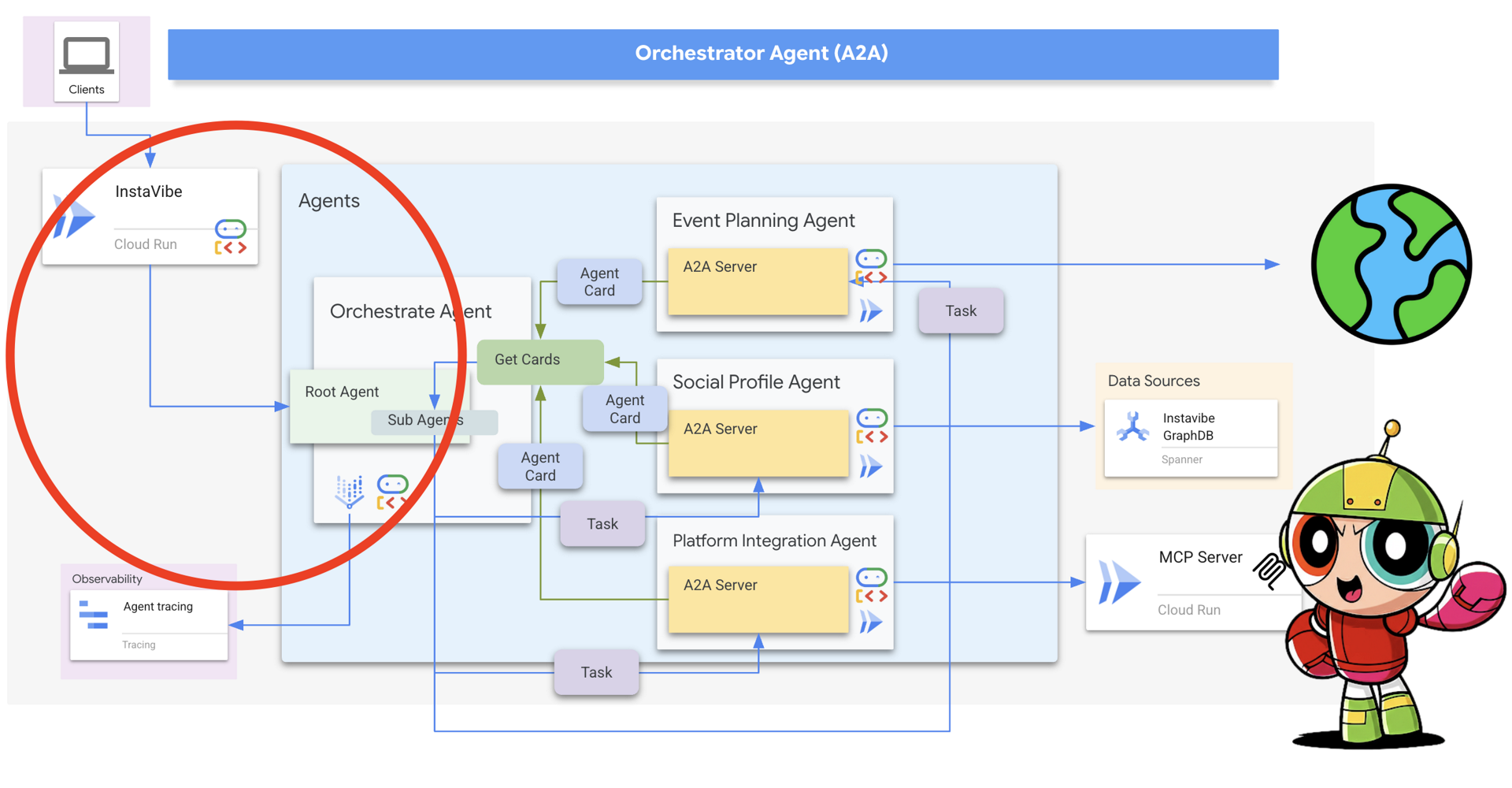
Now, let's trace the full, end-to-end flow.
- A user in the InstaVibe app says: "Plan a fun weekend in Chicago for me and my friends, Ian and Nora."
- The app calls my Orchestrator Agent, now running on Vertex AI Agent Engine.
- The Orchestrator’s LLM reasons: "This is a two-step process. First, I need to understand Ian and Nora's interests. Then, I need to create a plan based on those interests."
- It consults its list of available agents, sees the "Social Profile Agent," and determines it's the right specialist for the first step.
- It uses its send_message tool to make an A2A call to the Social Agent, asking it to profile Ian and Nora.
- The Social Agent on Cloud Run receives the A2A request, does its work (querying my Spanner Graph Database), and returns a summary of their shared interests.
- The Orchestrator receives this summary. It now reasons: "Okay, step one is done. Time for step two."
- It consults its agent list again, sees the "Event Planner Agent," and makes a new A2A call, delegating the planning task and passing along the crucial context: "Plan an event in Chicago for people who enjoy [shared interests from step 1]."
- The Planner Agent on Cloud Run receives the request, uses its own tool (Google Search) to find relevant events and venues, and returns a structured JSON plan.
- The Orchestrator receives the final plan and presents it to the user.
This is the power of a multi-agent system. Each component did what it does best, all coordinated through a standard communication protocol.
Conclusion of the Series
And there you have it. Over these three posts, we've gone from a simple idea to a fully functioning, distributed AI system. I started with a user problem, designed a modular team of agents to solve it, gave them access to my existing APIs with MCP, and finally, enabled them to collaborate as a team with A2A.
My biggest takeaway from this whole process is this: building sophisticated AI systems requires us to think like software engineers, not just prompt engineers. By using open standards like MCP and A2A and frameworks like the ADK, I was able to build something that is robust, scalable, and—most importantly—maintainable.
You've read the whole story. Now, it's your turn to build it.
I've documented every single step of this process in a hands-on "InstaVibe Multi-Agent" Google Codelab. You'll get to build each agent, deploy the MCP server, and orchestrate the whole thing with A2A, all on Google Cloud. It's the best way to move from theory to practice.
Thank you for following along with this series. I hope it's been helpful. Give the Codelab a try, and let me know what you build
Opinions expressed by DZone contributors are their own.
Comments