

Stop Building Monolithic AI Brains, Build a Specialist Team Instead
I created a team of specialist agents to handle different parts of a complex task. It's basically microservices for AI, making our app smarter, easier to update and more.
 CORE
·
CORE
·
Join the DZone community and get the full member experience.
Join For FreeYou’ve been there. You’ve got a killer app idea, and you want to sprinkle in some AI magic. The first instinct? Build a single, massive AI model—a "genius brain" that can handle anything a user throws at it. But let's be real, as soon as things get even a little complex, that approach starts to fall apart.
Your "genius" model becomes a jack-of-all-trades and a master of none. It gets confused, it becomes a massive bottleneck when traffic spikes, and trying to update one part of its knowledge is a complete nightmare. Sound familiar?
That’s the exact wall I hit. Let me explain.
The Problem: Turning 'Likes' into Actual Plans
So, let me set the scene. "InstaVibe" is my fictional social events platform. Think of it as a place where you discover cool things happening in your city—concerts, pop-up markets, sports games—and see which of your friends are interested. It's great for discovery.
But here's the catch I kept seeing in our user data: discovery wasn't translating into action. A user and their friends would all "like" an event, but the conversation to actually plan on going would move to a messy group chat on another app. The coordination—picking a time, getting RSVPs, making a decision—was a huge point of friction.
I knew I could solve this with AI. But I didn't want to just bolt on a generic chatbot that could answer basic questions. I wanted to build a true digital assistant, something I call the "InstaVibe Ally." It needed to be smart enough to understand the user's friend group, do the tedious research for them, and handle the logistics of creating the event right on our platform. And that's a job too big for any single AI.
The Case for a Team: Why Specialists Beat a Generalist
Think about building a new software feature. You wouldn't hire one person and expect them to be the DBA, backend dev, frontend dev, and UI/UX designer, right? You’d build a team. So why are we trying to make our AIs do everything at once? It’s time to apply the same logic to our intelligent systems.
For my "InstaVibe Ally" feature, I needed to understand social graphs, research real-world events, and call our platform's APIs. A single AI trying to do all that would be a mess of constant context-switching.
A multi-agent system, however, offered clear advantages:
- Specialization Saves Your Sanity: Identified the core jobs-to-be-done and built a specific agent for each one. This modularity makes everything cleaner and easier to manage.
- The Orchestrator (The Project Manager): This agent’s only job is to understand the user's high-level goal (e.g., "plan a fun weekend for my friends and me") and delegate the work. It coordinates, it doesn't execute.
- The Social Profiling Agent (The Data Nerd): This agent is an expert in our Spanner Graph Database. It’s a beast at running complex queries to figure out social connections and shared interests. It knows nothing about Google Search or our platform APIs, and that’s the point.
- The Event Planning Agent (The Creative Researcher): This one is the "boots on the ground." It’s an expert at using external tools like Google Search to find cool venues, check opening times, and find fun activities in real-time.
- The Platform Interaction Agent (The API Guru): Its entire world is the InstaVibe platform API. It's a master of creating posts, sending invites, and updating events. It’s the hands of the operation.
Scalability and Resilience(The Microservices Advantage): Because each agent is its own service, they can scale independently. If we get a flood of users planning trips, the Event Planning Agent can scale up to handle the load without affecting the other agents. If the Social Profiler hits a bug, it doesn’t take the whole system down with it. This makes your life so much easier during production incidents.
Evolve, Don't Rebuild: This architecture is built for the future. Want to swap out Google Search for a new, specialized API on the Planning Agent? No problem. Just deploy the new agent. As long as it speaks the same "language" as the Orchestrator, the rest of the system doesn't even need to know. Good luck doing that with a monolithic AI.
Bringing the AI Team to Life on Google Cloud
An architecture diagram is nice, but making it real is what matters. Google Cloud provides the perfect toolkit to host, connect, and manage this AI team without the usual infrastructure headaches.
Here’s a look at the stack and how I put it together.
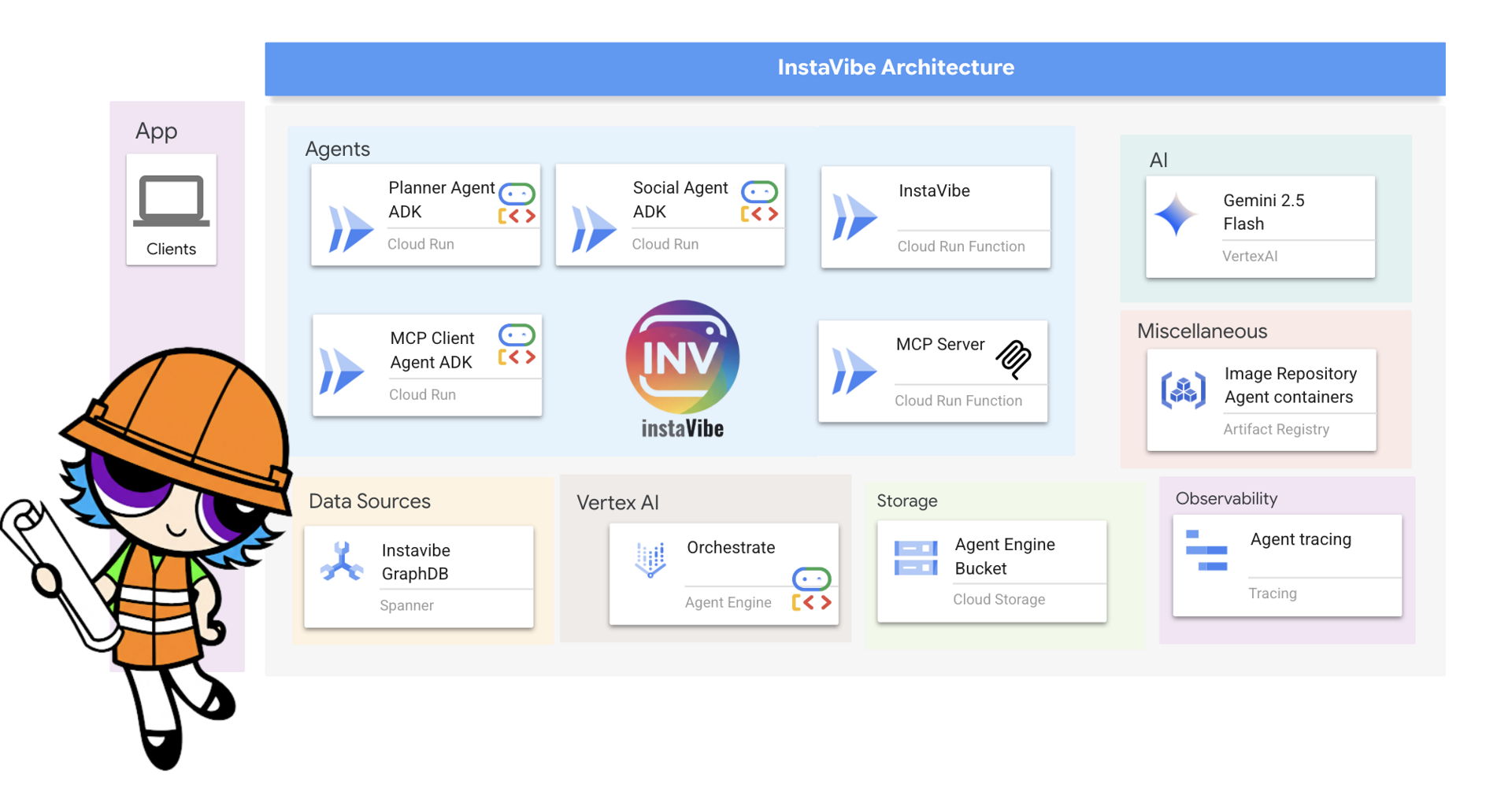
Cloud Run: The Home for Each Specialist Agent
To make our agents truly independent, I packaged each one—the Planner, Social Profiler, and Platform Interactor—into its own Docker container and deployed it as a separate service on Cloud Run.
I love Cloud Run for this because it’s serverless, which means less work for us. I get:
- Unique HTTPS endpoints for each agent out of the box.
- Automatic scaling from zero to… well, a lot. This saves a ton of money because I only pay when an agent is actually working.
- A fully managed environment. No patching servers, no configuring VMs. More time coding, less time managing infra.
This isn't just a logical separation; it's a physical one. Our architecture diagram is now a reality of distinct, scalable microservices.
Spanner as a Graph Database: The Shared Knowledge Base
Our Social Profiling Agent needs to be brilliant at understanding relationships. For this, I used Spanner. I leveraged its graph capabilities. Instead of flat, boring tables, I modeled our data as a rich graph of Users, Events, and Friendships.
This lets our agent ask incredibly powerful questions like, "Find common interests for all friends of User X who also went to Event Y." This is the kind of intelligence that makes the recommendations feel magical, and it’s all built on a globally-distributed, strongly consistent foundation.
Vertex AI: The Command Center
Vertex AI serves as the hub for our AI operations, providing two critical components:
- Gemini Models: The cognitive engine—the actual "smarts"—inside every single agent is a Gemini model. I chose it specifically for its incredible reasoning skills and, most importantly, its native support for tool use (also known as function calling). This is the magic that allows the model to intelligently decide, "Okay, now I need to call the find_events tool" and pass the right arguments. It’s what turns a language model into a true agent.
- Agent Engine: While the specialists live on Cloud Run, I deployed the Orchestrator to Vertex AI Agent Engine. This is a fully managed, purpose-built environment for hosting production agents. It handles the immense complexity of scaling, securing, and managing the state of conversational AI. By deploying our Orchestrator here, I get enterprise-grade reliability that abstract away the infrastructure so I can focus on the agent's logic.
I’ve designed our team of AI specialists and given them a home on Google Cloud. But how do they talk to each other and to the outside world? This is where a set of standardized protocols comes into play, forming the nervous system of our architecture.
The Nervous System: How They All Talk
I’ve designed our team of AI specialists and given them a home on Google Cloud. But how do they talk to each other and to the outside world? This is where a set of frameworks and standardized protocols comes into play. In the workshop that this post is based on, we used:
- Google's Agent Development Kit (ADK) to build the core logic of each agent.
- The Model Context Protocol (MCP) to allow agents to use external tools, like our own InstaVibe APIs.
- The Agent-to-Agent (A2A) protocol to let the agents discover and delegate tasks to each other.
So, What's Next?
Now, this isn't just a theoretical design I dreamed up. It's the exact architecture we built, step-by-step, in a comprehensive Google Codelab. This blog post is the story behind that workshop, explaining the 'why' behind our technical choices.
But there's so much more to unpack. The real magic is in the details of the communication protocols, so I'm planning two more deep-dive posts to follow this one:
- The API-to-Tool Pipeline (MCP Deep Dive): How do you securely let an agent use your own internal APIs? In my next post, I’m going to focus on the Model Context Protocol (MCP). I'll show you exactly how we built a custom MCP server to wrap our existing InstaVibe REST endpoints, effectively turning our platform's functions into tools any agent can use.
- The Agent Intercom (A2A Deep Dive): After that, we'll tackle the Agent-to-Agent (A2A) protocol. We’ll explore how our Orchestrator uses "Agent Cards" to discover its teammates, understand their skills, and delegate complex tasks across a distributed system.
But you don't have to wait to get your hands dirty. If you're itching to see how this all fits together, you can build the entire system right now. The Codelab takes you through everything:
- Building your first agent with the Agent Development Kit (ADK).
- Exposing your application’s APIs as tools using MCP.
- Connecting your agents with the A2A protocol.
- Orchestrating the whole team and deploying it to Cloud Run and Vertex AI Agent Engine.
It's the perfect way to skip the steep learning curves and see these powerful concepts in practice. Stop scrolling and start coding!
Opinions expressed by DZone contributors are their own.
Comments