

PostgreSQL's psql \set vs. SET
How do we differentiate between \set and SET?
Join the DZone community and get the full member experience.
Join For FreeIt is easy for someone who is new to PostgreSQL and who uses PostgreSQL's terminal editor psql to confuse the commands\set and SET. This post contrasts these commands and provides a brief overview of other commands that include the word "set."
The easiest way to remember how to differentiate \set from SET is to keep in mind that the "backslash commands" such as \set are "meta commands" for the command-line psql tool and do not mean anything to the PostgreSQL database itself. The SET command, which lacks a backslash, is a PostgreSQL database command that happens to be executed against the database from the psql command-line client.
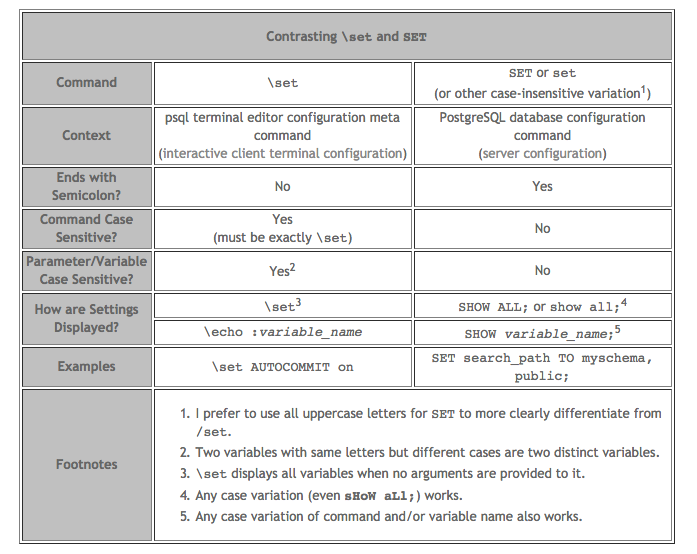
There are two more psql meta commands that "set" things and include the name "set." The \pset met command configures how psql presents "query result tables." Like \set, \pset can be specified without argument to see all of the current presentation settings.
Unlike the psql metacommands, \set and \pset, the \gset psql metacommand does affect the PostgreSQL server because \gset submits the query buffer to the server and then stores the output returned from the server into specified psql variables. I discussed \gset with a few additional details in the blog post "Setting PostgreSQL psql Variable Based Upon Query Result."
Although \set and SET can be used to set variables, the easiest way to distinguish between them is to consider that the backslash commands such as \set are psql commands (and so \pset sets variables in the psql client tool) and commands without the backslash such as SET are PostgreSQL commands sent to the server from psql or from any other client (but ultimately set variables on the server).
Let us know your thoughts in the comments down below.
Published at DZone with permission of Dustin Marx. See the original article here.
Opinions expressed by DZone contributors are their own.
Comments