

Production RAG and LLM Systems: A Simple Q&A Guide
Building a small RAG demo is easy. Making it work at production scale — millions of documents, real users, tight latency — is a different job entirely.
 CORE
·
CORE
·
Building a RAG application is relatively easy. Scaling it for millions of users and millions of documents is a different engineering problem.
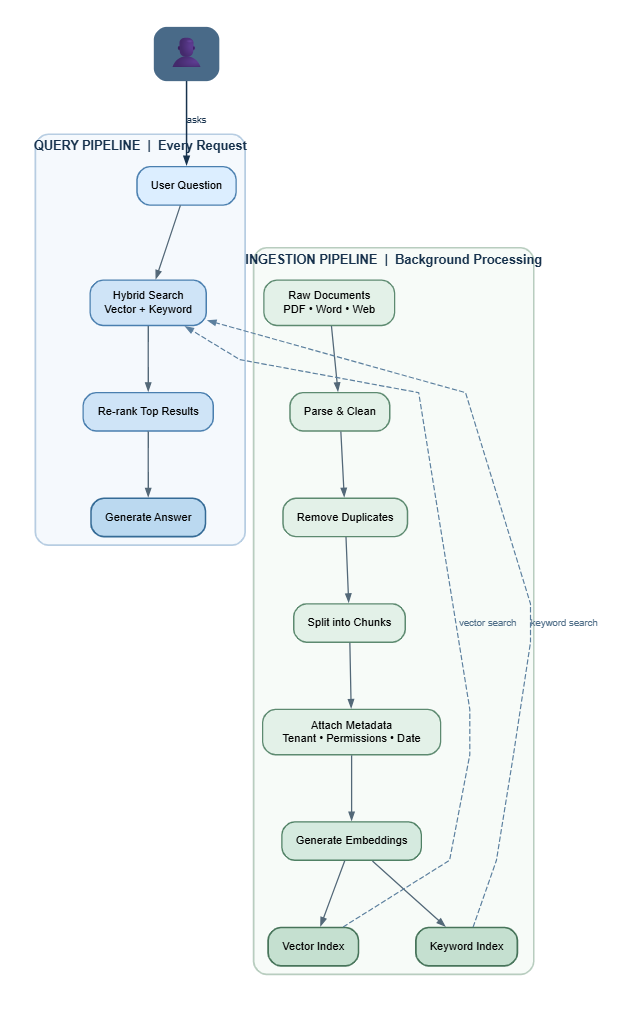
At production scale, the architecture matters. Ingestion, search, indexing, permissions, latency, and updates all need to work independently without slowing down user requests.
The first design decision is to separate document ingestion from user queries.
Q1. Why Should Ingestion and Querying Be Separate?
They have different requirements.
Ingestion runs in the background. It processes documents, cleans them, removes duplicates, creates chunks, generates embeddings, adds metadata, and updates indexes.
Querying runs for every user request. It needs to return relevant results quickly and consistently.
Think of it like a library. Ingestion is the librarian organizing new books. Querying is a visitor looking for a book. The visitor should not have to wait while the librarian processes a new shipment.
This separation allows the ingestion pipeline to optimize for throughput, while the query pipeline can optimize for low latency.
Q2. Why Does Chunking Matter, and Is "Semantic Chunking" Always Right?
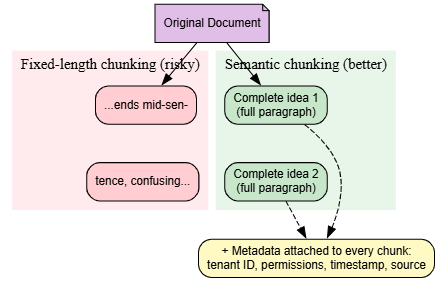
A chunk is a small slice of a document that gets stored and searched. Where you cut that slice matters a lot.
Cut it at a random character count, like every 500 characters, and you might slice a sentence in half, or separate a question from its answer. When that happens, the AI model only sees half the picture and gives a worse answer.
Semantic chunking cuts the text at natural breaks, like the end of a paragraph or a change in topic, instead of a fixed length. This keeps ideas whole.
One honest caveat, since accuracy matters here: semantic chunking is not free. Because chunks come in different sizes, it is harder to batch-process them efficiently, and search scoring can get uneven when some chunks are tiny and others are huge. Many real systems use a middle ground, a target size that still respects natural sentence and paragraph breaks, instead of pure semantic chunking.
Every chunk also needs extra information: which customer it belongs to, who can see it, when it was created, and where it came from. Skip this, and you cannot control access, cannot handle updates properly, and cannot debug problems later.
Q3. Why Use "Approximate" Search Instead of Exact Search?
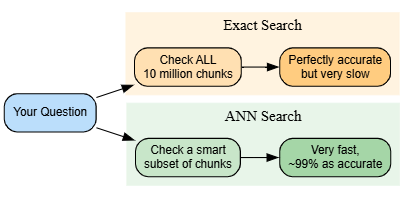
When the AI looks for the most relevant chunks, it is comparing the meaning of your question to the meaning of millions of stored chunks. Doing this comparison perfectly, checking every single one, is called exact search. It gives the truest answer, but it is painfully slow once you have millions of chunks.
Approximate Nearest Neighbor search, called ANN, is a shortcut. It finds chunks that are very likely the best matches, without checking absolutely everything. It is dramatically faster and uses much less memory.
The honest tradeoff: ANN occasionally misses the single best match and returns the second or third best instead. In practice, this loss is small, and the speed gain is large, but it is a real tradeoff, not a magic trick with no downside.
Q4. What Does "Hybrid Retrieval" Mean and Why Bother?
There are two ways to search: by keyword and by meaning.
Keyword search, using a method called BM25, is great at finding exact terms: product codes, error messages, specific names. It struggles when your question uses different words than the document, even if they mean the same thing.
Meaning-based search, using vector embeddings, understands intent. It can match "how do I get my money back" to a document titled "refund policy" even though no words overlap. It struggles with exact codes and rare technical terms.
Hybrid retrieval runs both searches, combines the results, and then uses a stronger, more careful model to re-rank just the top candidates from that combined list. You get the best of both without paying the cost of running the expensive re-ranker on everything.
The standard way to combine two different ranked lists like this is called Reciprocal Rank Fusion. It blends the rankings from both searches fairly, without needing the two scoring systems to be on the same scale, which they usually are not.

Q5. The Chatbot Gives a Confident, Wrong Answer. How Do You Actually Debug That?
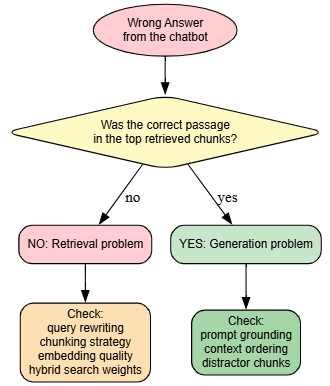
Just calling it "a hallucination" and shrugging does not fix anything. You need to find out exactly where the process broke down. There are only two possible places: retrieval or generation.
Step 1: Check retrieval first. Look at what chunks were actually pulled for that question. Is the correct information even in there? If not, the problem happened before the model ever saw the question. Something upstream failed: maybe the chunking cut the answer in half, maybe the embedding did not capture the right meaning, maybe the search weighting favored the wrong chunks.
Step 2: Check generation. If the right information was retrieved but the model still got it wrong, the problem is how the model used what it was given. Common causes: the prompt did not clearly tell the model to stick to the provided context, the important information was buried in the middle of a long prompt (models pay more attention to the start and end), or a distracting, irrelevant chunk got pulled in alongside the correct one and confused the model.
Build this check into an ongoing habit, not a one-time fix. Keep a running set of real user questions and grade the system against them regularly, so you catch new problems the moment they appear instead of after users complain.
Q6. Why Does an AI Agent Call the Wrong Tool, and How Do You Fix It?
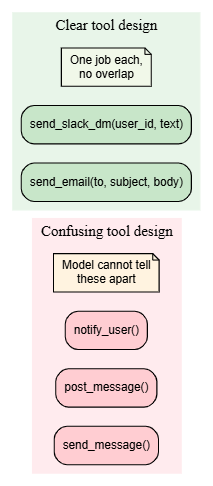
Usually this is not the model being "dumb." It is the tools being poorly described. If two tools sound similar or overlap in what they do, the model genuinely cannot tell them apart, no matter how capable it is.
Fixes that actually work:
- Give every tool exactly one clear job, with no overlap with other tools.
- Use strict rules for inputs: required fields, fixed lists of allowed values where possible, and check the input before running anything.
- Show the model a few examples of correct tool choices, right in the instructions.
- For anything risky, like sending money or deleting data, add a confirmation step before it actually happens.
The tradeoff is real. More rules and more checks mean more time per request, more cost, and more code to maintain. It is worth it for anything with real consequences if it goes wrong.
Q7. Why Can AI Training Run in Parallel, But Generating a Response Cannot?
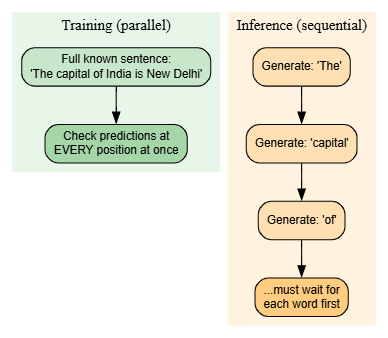
A language model builds its answer one word (technically one "token") at a time, and each new word depends on every word it already wrote. To say "New Delhi," it must generate "New" first, because it needs that word in front of it before it can decide what comes next. This forces the model to work in a strict, one step at a time sequence when generating a response.
Training is different because the model already knows the correct full sentence in advance; it is learning from real examples. So during training, it can check its predictions for every position in the sentence all at once, in one parallel pass, using a trick called teacher forcing. That is why training scales beautifully across many GPUs while generating a single response does not.
One real technique worth knowing: speculative decoding. A small, fast model guesses several words ahead, and the big model checks and confirms them in one pass instead of one word at a time. It does not remove the one-word-at-a-time nature of the model, but it does meaningfully speed up how fast text appears in practice.
Q8. What Problem Does an "LLM Gateway" Solve?
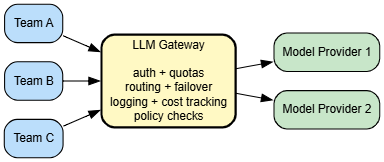
Once more than one team in a company is calling AI models directly, things get messy fast. No shared view of who is spending what. No consistent security checks. Every team is reinventing the same plumbing.
An LLM Gateway is a single front door that every team's requests go through. It handles login and per-team usage limits, picks which model or provider to send a request to, and automatically switches if one goes down, logs everything for cost tracking, and checks requests against safety and policy rules before they reach the model.
The biggest win: if the company wants to switch AI providers or upgrade to a newer model, they change it once, behind the gateway. No product team has to touch their own code.
Q9. Why Not Just Use One Big, Powerful Model for Everything?
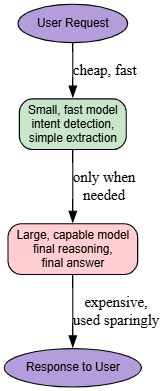
Cost and speed. Big models are expensive per word generated and slower to respond. A lot of the work inside a production system does not need that much intelligence: figuring out what a user is asking for, pulling out a name or date, deciding which of a few tools to call.
Give that simple work to a small, fast, cheap model. Save the big, expensive model for the parts that genuinely need deep reasoning or high-quality writing, usually the final answer the user actually reads.
This only works well if you are checking quality regularly. If the small model starts quietly making mistakes on its part of the job, you will not notice unless you are testing for it.
Q10. Latency Is Not Just One Number. What Should You Actually Measure?
Two separate things, because users experience them differently and they are caused by different parts of the system.
Time to First Token (TTFT). How long the user stares at a blank screen before anything shows up. Mostly caused by how long your prompt is and how much retrieval work has to happen before generation even starts.
Tokens Per Second (TPS). Once text starts appearing, how fast it keeps coming. Caused by the model's size and how busy the GPUs currently are.
TTFT matters more for how the experience feels. If words start appearing right away, the whole thing feels fast, even if the total time to finish is exactly the same as a version that made you wait first and then streamed quickly. This matches general research on perceived speed in interfaces: how fast something feels and how fast it actually is are not the same thing, and feel usually wins for user satisfaction.

Q11. What Changes When You Scale From Ten Million Documents to One Hundred Million?
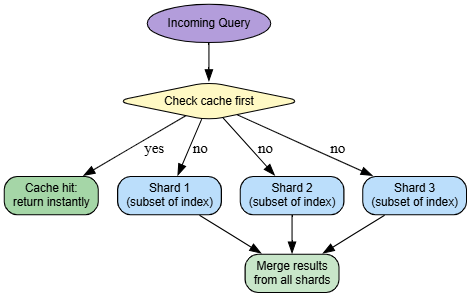
At that size, one machine cannot hold the entire search index anymore, period. This stops being a "make the search better" problem and becomes a distributed systems problem. Every question now has to be sent to several machines at once, called shards, and the results merged back into one final ranked list.
Two more things stop being optional. First, incremental indexing: when a document changes, you update just that piece of the index; you do not rebuild everything from scratch every time; that would be far too slow. Second, caching: repeated or popular questions get served from a fast cache instead of running the full search and generation process every single time.
Q12. How Should an AI Agent's "Memory" Actually Be Organized?
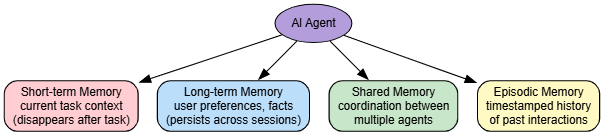
Four separate layers, each solving a different problem. Mixing them together makes the system confusing to build and hard to debug.
- Short-term memory. The working notes for the task happening right now. Lives inside the model's current context window and disappears when the task ends.
- Long-term memory. Facts that should stick around, like a user's preferences. Stored outside the model and pulled back in only when relevant.
- Shared memory. When several agents are working together, this is the common notepad they all read from and write to.
- Episodic memory. A running, timestamped log of what happened before, so the system can look back and learn from past interactions.
This is a useful, commonly used way to think about agent memory, though it is a design pattern, not a fixed rulebook everyone follows the same way. The real cost is honest: better memory makes the agent smarter, but it also means more moving parts to keep consistent and in sync.
Q13. What Does Security Look Like Specifically for a RAG System?
The core rule to remember: treat every retrieved document like it is untrusted input from a stranger, the same caution you would use for a raw form submission on a website. Never let content pulled from your document store trigger an action on its own without a server-side check first. Why this matters: a bad or compromised document sitting in your corpus could contain hidden instructions aimed at tricking the model, a real attack pattern known as prompt injection through retrieved content.
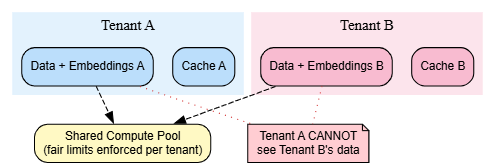
For systems that serve multiple customers, called multi-tenant systems, isolation needs to be enforced at three separate levels, not just checked once in the application code:
- Data isolation. One customer's documents and embeddings must never be retrievable by another customer. This needs to be enforced at the index itself, not just trusted to application logic that could have a bug.
- Compute isolation. One very active customer should never be able to hog all the processing power and slow everyone else down.
- Cache isolation. A cached answer generated for one customer must never accidentally be served to a different customer.
These three checks are especially important in regulated industries like banking and finance, where keeping customer data separated is often a legal requirement, not just good practice.
Q14. Where Is the Real Value Shifting for Engineers Working in AI?
Building a basic AI demo is turning into a baseline skill, something most engineers can put together in an afternoon with existing tools. What actually sets someone apart now is knowing how to run this in production: handling real scale, enforcing real security and tenant separation, and keeping agentic workflows reliable when thousands of real users are hitting the system at once.
Closing
The question engineers get asked is changing. It used to be "can you build this?" Now it is closer to "can you make this work correctly, safely, and affordably for millions of people, every single day, without it falling over."
Opinions expressed by DZone contributors are their own.