

Master Advanced Error-Handling to Make PySpark Pipelines Production-Ready
PySpark jobs often fail because of bad data, network issues, or logic errors. Sometimes, after hours of processing. Learn how to make your Spark pipelines more reliable.
 CORE
·
CORE
·
Join the DZone community and get the full member experience.
Join For FreeIn PySpark, processing massive datasets across distributed clusters is powerful but comes with challenges. A single bad record, missing file, or network glitch can crash an entire job, wasting compute resources and leaving you with stack traces that have many lines.
Spark’s lazy evaluation, where transformations don’t execute until an action is triggered, makes errors harder to catch early, and debugging them can feel like very, very difficult.
With over a decade of experience with Apache Spark, drawing from proven Python error-handling techniques and my own experiences, I discuss here five advanced patterns tailored for PySpark:
- Error aggregation
- Context managers
- Exception wrapping
- Retry logic
- Custom exceptions
Each pattern, I explained with practical PySpark examples, with an end-to-end pipeline that demonstrates how to combine them for debuggable data workflows. Will also share best practices to ensure your Spark jobs are production-ready.
Why Error Handling Is Needed in PySpark
Spark jobs will often read a variety of data formats like CSV, JSON, Parquet, etc, applying transformations like filters, joins, aggregations, and writing results. Failures can arise from malformed/corrupt records, missing files, network issues, or logic errors. By default, Spark stops a task if an executor throws an exception. If the task fails too many times (controlled by 'spark.task.maxFailures', defaulting to 4 retries), the whole job fails. This built-in retry mechanism helps with transient issues like network problems, but doesn’t address logic bugs or bad data. A single corrupt row may cost hours... of computation without proper error handling.
To solve issues, the right error-handling routines are needed to log meaningful details and keep processing valid data. The patterns below adapt Python’s best-of-breed error-handling strategies to PySpark’s distributed environment, making pipelines more reliable and easier to debug.
1. Error Aggregation for Bulk Processing
If you are dealing with a larger set of data, you don’t want one bad record to stop everything.
In error aggregation, you aggregate the errors across many records and simply provide the errors to the report later, with the job completing appropriately. In Python, perhaps you have provided a loop through your records, and simply try and catch exceptions and append the error message to a mutable list, to summarize later.
PySpark Perspective
In Spark, the data is being processed in parallel across partitions, so we need a method to capture errors per record, without the job failing. One of the powerful options is to take advantage of Spark’s data reader options, which can flag corrupt records at the time of ingestion.
For example, when reading a CSV file, on the schema at the column level you could have the
_corrupt_recordcolumn, and set the read mode to PERMISSIVE for the read.
from pyspark.sql import SparkSession
from pyspark.sql.functions import col

spark = SparkSession.builder.appName("ErrorHandling").getOrCreate()

# with _corrupt_record to capture bad rows.. Define schema
schema = "id INT, name STRING, amount DOUBLE, _corrupt_record STRING"

# Read CSV in PERMISSIVE mode
df = spark.read.option("mode", "PERMISSIVE").schema(schema).csv("data/input.csv")

# divide good and bad records
bad_df = df.filter(col("_corrupt_record").isNotNull())
good_df = df.filter(col("_corrupt_record").isNull()).drop("_corrupt_record")

# trace corrupt records.. if dataset is big bad_df.write.mode("overwrite").csv("logs/corrupt_records")
bad_records = bad_df.select("_corrupt_record").collect()
if bad_records:
    print(f"Found {len(bad_records)} corrupt records: {[row._corrupt_record for row in bad_records]}")
Here, malformed CSV rows (e.g., wrong number of columns) are stored in bad_df with their raw text in _corrupt_record. The good_df DataFrame contains only valid rows, allowing the pipeline to proceed. You can save bad_df to a file or log it for later analysis.
For more complex processing, you can aggregate errors using RDDs. Here’s an example where we process records and collect errors instead of failing:
rdd = spark.sparkContext.parallelize([{"id": 1, "value": 10}, {"id": 2, "value": None}])

def process_record(rec):
    try:
        if rec["value"] is None:
            raise ValueError(f"Missing value for ID {rec['id']}")
        result = rec["value"] * 2
        return ("success", rec["id"], result)
    except Exception as e:
        return ("error", rec["id"], str(e))
# collect is for small datasets if records are huge write in to parquet files some where in s3 of hdfs
# use rdd.filter(lambda x: x[0] == "error").saveAsTextFile("logs/errors") if data is huge
results = rdd.map(process_record).collect()
errors = [r for r in results if r[0] == "error"]
if errors:
    print(f"Errors found: {[(r[1], r[2]) for r in errors]}")
This approach tags each record as “success” or “error,” allowing you to filter and log errors while processing continues. For large datasets, consider writing errors to a separate DataFrame or file instead of collecting them in the driver.

2. Context Managers (Using With Statement) for Resource Management
Context managers in Python ensure resources like files or database connections are cleaned up, even if an error occurs. For example, with open('file.txt') as f: guarantees the file is closed after use.
PySpark Perspective
In PySpark, you might interact with external resources (files, databases, APIs) on the driver or within executors. Context managers ensure these resources are properly closed.
For example, when logging results to a file on the driver:
with open("logs/pipeline.log", "w") as log_file:
    try:
        result_df = good_df.groupBy("name").sum("amount")
        result_df.write.mode("overwrite").csv("data/output")
        log_file.write("Successfully wrote results\n")
    except Exception as e:
        log_file.write(f"Failed to write results: {e}\n")
The file is closed automatically, even if the write fails. For executor-side operations, like writing to a database within a foreachPartition, context managers are equally critical:
def write_partition(partition):
    class DBConnection:
        def __enter__(self):
            self.conn = "connected_to_db"  # Simulate DB connection
            return self.conn
        def __exit__(self, exc_type, exc_val, exc_tb):
            self.conn = None  # Simulate closing connection

    with DBConnection() as conn:
        for row in partition:
            # Write row to database using conn
            pass

good_df.foreachPartition(write_partition)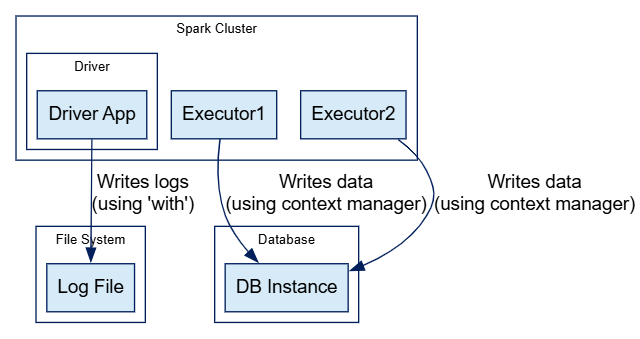
This ensures database connections are closed per partition, preventing resource leaks on executors. Without context managers, unclosed resources could accumulate, especially in long-running jobs.
3. Exception Wrapping for Contextual Debugging
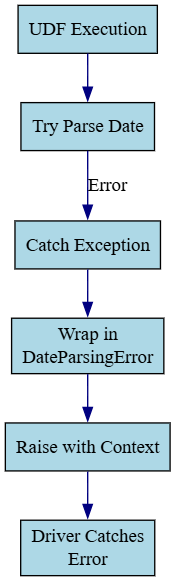
Low-level exceptions often lack context about what went wrong in your application. Exception wrapping catches an error, adds meaningful details, and re-raises it using raise ... from ... to preserve the original cause.
PySpark Perspective
Spark’s executor errors, like Py4JJavaError or AnalysisException, can be vague. Wrapping exceptions in UDFs or processing functions adds context. For example, when parsing dates in a UDF:
from pyspark.sql.functions import udf
from datetime import datetime

class DateParsingError(Exception):
    pass

def parse_date(date_str):
    try:
        return datetime.strptime(date_str, "%Y-%m-%d")
    except Exception as e:
        raise DateParsingError(f"Failed to parse date '{date_str}'") from e

parse_date_udf = udf(parse_date)
df = spark.createDataFrame([("1", "2023-01-01"), ("2", "bad-date")], ["id", "date"])

try:
    df.withColumn("parsed_date", parse_date_udf(col("date"))).show()
except Exception as e:
    print(f"Pipeline error: {e}")
If the date is invalid, the error message includes the problematic value (e.g., “Failed to parse date 'bad-date'”), making debugging easier. The original exception is preserved for further analysis. This pattern is especially useful in distributed settings where errors bubble up to the driver with minimal context.
4. Retry Logic for Transient Failures
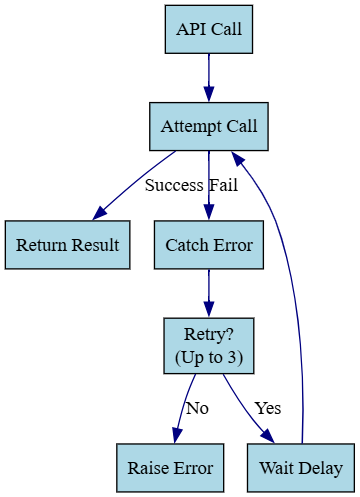
Transient errors, like network timeouts, may resolve if you retry the operation. In Python, you might loop with a delay between attempts, giving up after a set number of tries.
PySpark Perspective
Spark retries failed tasks automatically (spark.task.maxFailures), but for operations within tasks, ike calling an external API, you need custom retry logic. Here’s an example of retrying a flaky API call in an RDD:
import time
import random

def flaky_api_call(x):
    if random.random() < 0.5:  # 50% failure chance
        raise ConnectionError("API timeout")
    return x * 10

def call_with_retry(x, retries=3, delay=1.0):
    for attempt in range(retries):
        try:
            return flaky_api_call(x)
        except ConnectionError as e:
            print(f"Attempt {attempt + 1} failed for {x}: {e}")
            time.sleep(delay)
    raise ConnectionError(f"All {retries} retries failed for {x}")

rdd = spark.sparkContext.parallelize([1, 2, 3])
try:
    results = rdd.map(lambda x: call_with_retry(x)).collect()
    print(f"Results: {results}")
except Exception as e:
    print(f"Job failed: {e}")
This retries each API call up to three times before failing the task. Be cautious with delays in executors, as they can slow down tasks.
5. Custom Exceptions for Domain-Specific Errors
Generic exceptions like 'ValueError' can obscure the nature of an error. Custom exception classes clarify specific failure cases, making code easier to maintain and test.
PySpark Perspective
In a PySpark pipeline, define custom exceptions for domain-specific issues, like data validation or external service failures:
class DataValidationError(Exception):
    pass

class ExternalServiceError(Exception):
    pass

def process_row(row):
    if row["value"] < 0:
        raise DataValidationError(f"Negative value for ID {row['id']}")
    try:
        result = flaky_api_call(row["value"])
        return result
    except Exception as e:
        raise ExternalServiceError(f"Service failed for ID {row['id']}") from e

def safe_process(row):
    try:
        return ("success", process_row(row))
    except DataValidationError as e:
        return ("validation_error", str(e))
    except ExternalServiceError as e:
        return ("service_error", str(e))

rdd = spark.sparkContext.parallelize([{"id": 1, "value": 10}, {"id": 2, "value": -5}])
results = rdd.map(safe_process).collect()
This separates validation errors from service errors, allowing tailored handling (e.g., logging validation errors to one file and service errors to another).
Putting It All Together
Here’s a complete pipeline that integrates all five patterns. It reads a CSV, processes data with retries and custom exceptions, logs errors, and writes results:
from pyspark.sql import SparkSession
from pyspark.sql.functions import col
import logging
import time
import random

# Setup
spark = SparkSession.builder.appName("RobustPipeline").getOrCreate()
logging.basicConfig(filename="logs/pipeline.log", level=logging.INFO)
logger = logging.getLogger("pipeline")

# Custom exceptions
class DataValidationError(Exception):
    pass
class ExternalServiceError(Exception):
    pass

# Pattern 1: Error aggregation on read
schema = "id INT, name STRING, value DOUBLE, _corrupt_record STRING"
df = spark.read.option("mode", "PERMISSIVE").schema(schema).csv("data/input.csv")
bad_df = df.filter(col("_corrupt_record").isNotNull())
good_df = df.filter(col("_corrupt_record").isNull()).drop("_corrupt_record")

if bad_df.count() > 0:
    logger.warning(f"Corrupt records: {bad_df.select('_corrupt_record').collect()}")

# Pattern 4 & 5: Retry logic with custom exceptions
def external_call(x):
    if random.random() < 0.5:
        raise ConnectionError("Service down")
    return x * 2

def call_with_retry(x, retries=2, delay=1.0):
    for attempt in range(retries):
        try:
            return external_call(x)
        except ConnectionError as e:
            logger.info(f"Attempt {attempt + 1} failed: {e}")
            time.sleep(delay)
    raise ExternalServiceError(f"Failed after {retries} retries")

# Pattern 3 & 5: Process with wrapped and custom exceptions
def process_row(row):
    try:
        if row.value is None:
            raise DataValidationError(f"Missing value for ID {row.id}")
        result = call_with_retry(row.value)
        return ("success", row.id, row.name, result)
    except DataValidationError as e:
        return ("validation_error", row.id, row.name, str(e))
    except ExternalServiceError as e:
        return ("service_error", row.id, row.name, str(e))
    except Exception as e:
        raise Exception(f"Unexpected error for ID {row.id}") from e

# Apply processing
processed_rdd = good_df.rdd.map(process_row).cache()
success_df = processed_rdd.filter(lambda x: x[0] == "success").toDF(["status", "id", "name", "result"])
error_df = processed_rdd.filter(lambda x: x[0] != "success").toDF(["status", "id", "name", "error_msg"])

# Pattern 2: Write with context manager
with open("logs/report.txt", "w") as report:
    for row in error_df.collect():
        report.write(f"Error for ID {row.id}: {row.error_msg}\n")
    try:
        success_df.write.mode("overwrite").parquet("data/output")
        report.write("Output written successfully\n")
    except Exception as e:
        report.write(f"Output write failed: {e}\n")
How It Works
- Error sggregation: The CSV read uses PERMISSIVE mode to capture bad records in bad_df.
- Custom exceptions and wrapping: DataValidationError and ExternalServiceError distinguish data issues from service failures, with wrapped exceptions for context.
- Retry logic: call_with_retry retries external calls, logging each attempt.
- Context managers: The report file is safely closed using with.
- Processing of data: The pipeline splits successful and failed records into separate DataFrames, ensuring bad records don’t stop the job.
Best Practices and Considerations
- Lazy evaluation: Errors in transformations only appear during actions (e.g., .show(), .write()). Test error handling with small datasets to catch issues early.
- Logging: Use logging instead of print() for executor logs. Keep messages concise, as Spark stack traces can be verbose.
- Collecting data: Avoid
.collect()on large error sets; write them to storage instead to prevent driver memory issues. - Retries: Use retries sparingly in executors to avoid slowing tasks. Spark’s task retries handle some failures, but custom retries are needed for specific operations.
- Resource cleanup: Always use context managers for resources in foreachPartition or driver-side operations to prevent leaks.
NOTE : collect() used in code is bad for large recods. In case of large number of records save as text file or parquet file
Conclusion
By applying these five ways of error-handling developers can build PySpark pipelines that are resilient to bad data, network issues and logic errors, also these patterns are generally used for custom data quality check components across industry.
These patterns avoid failures, provide clear logs, and let valid data flow through, saving compute resources and debugging time. Let's start with simple techniques like permissive reads, then add retries or custom exceptions as needed. Testing with known bad data ensures your pipeline can handle real-world issues, making it production-ready for large-scale data processing.
Happy coding! :-)
Stay tuned with me for more interesting articles, which are really useful for day-to-day development work.
Opinions expressed by DZone contributors are their own.
Comments