

Setup Postman for MuleSoft Anypoint Platform APIs
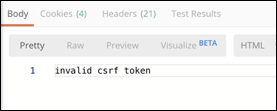
An issue that this article resolves is the “login” request where you run into the “invalid csrf token” issue — follow the steps!
Join the DZone community and get the full member experience.
Join For Free
Overview
Postman has pretty much become the de facto standard for any developer that works with APIs. It provides an intuitive interface that’s easy to use and allows developers an easy way to configure, interact, and test APIs. Out-of-the-box, you can use Postman to call the Anypoint Platform APIs but there are some tips and tricks in this article to help make it easier.
You may also like: API Lifecycle in Anypoint Platform
An example of an issue that this article resolves is the “login” request where you run into the “invalid csrf token” issue. By following the steps and setting up Postman, you’ll save yourself a lot of time by removing some manual steps.
This article assumes you have an Anypoint Platform account and Postman (7.12.0) installed on your machine.
Setup Postman
Setting up a workspace in Postman allows you to store variables that can be propagated to subsequent API calls. Logins, passwords, access tokens, etc…
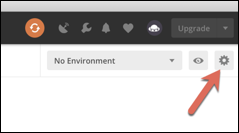
Click on the gear icon in the top right and then click on Add
Give your environment a name. (e.g. MuleSoft)

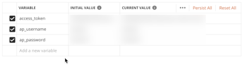
Enter the following Variable names:
- Access_token
- Ap_username
- Ap_password
For the Initial Value column, enter your username and password for the Anypoint Platform.
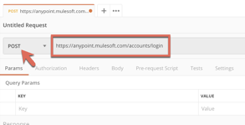
Create a new request by pasting the following into the Enter request URL field: https://anypoint.mulesoft.com/accounts/login and then change the drop-down to POST.
 On the far right of the screen, click on Cookies.
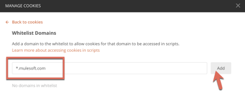
 Click on Whitelist Domains on the bottom left.

Enter in *.mulesoft.com and click on Add. This will allow the script you add later to make changes to the cookies.
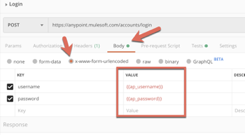
Next, click on the Body tab and check the x-www-form-urlencoded radio button.
Enter the following key/value pairs:
username - {{ap_username}}
password - {{ap_password}}
These correspond to the variables you setup in the workspace.
Click on the Tests tab and copy and paste the following script:
xxxxxxxxxx
const jar = pm.cookies.jar();
jar.clear(pm.request.url, function (error) {
console.log("Clear Cookies");
});
var response = pm.response.json();
var access_token = response["access_token"];
pm.environment.set("access_token", access_token);
console.log("Access Token " + access_token);
The script clears the Cookies, specifically the _csrf cookie, so you can make repeated calls without having to manually clear it every time.

It also stores the access_token into the variable so you can pass that in the header to subsequent calls as well.
Let's test the API call twice by clicking Send. Normally you’d see the invalid csrf token error but the script removes the cookie automatically and allows you to make repeated calls to generate a new access_token.

Lastly, let’s set up a Collection. Click on Save in the top right.

Give your API call a name (e.g. Login) and then click on + Create Collection.

Give your collection a name and click on the checkmark.
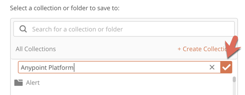
Click on Save to Anypoint Platform.

Setup Subsequent API Calls
This next section walks you through the quick process of leveraging the access_token variable. Click on the ‘+’ sign to add a new request. For this example, just paste the following API and leave the dropdown as a GET request:
https://anypoint.mulesoft.com/cloudhub/api/mule-versions
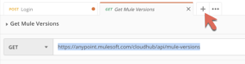
Make sure you are still in the MuleSoft workspace. Click on the Headers tab and enter the following key/value pairs:
Authorization — Bearer {{access_token}}
Content-Type — application/json
The {{access_token}} will leverage the token that was generated in the setup. Postman stores the token from the previous call and allows you to reference that variable in subsequent calls.
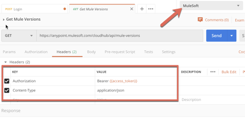
Test the API call by clicking on Send.

Lastly, let’s save this call to the Collection we previously setup. Click on Save and give the request a name (e.g. Get Mule Versions). Then select the existing collection, and click on Save to Anypoint Platform.

Summary
As you can see, setting up Postman with a Workspace will make you more productive. Variables allow you to store and use them for subsequent calls which removes a lot of manual steps. Let me know if you run into any issues, just leave a comment below.
Further Reading
Opinions expressed by DZone contributors are their own.
Comments