

An Introduction to Spring Batch
Want to learn more about using Spring Batch to run large amounts of data on your application? Click here to learn more in this post on Spring Batch using Quartz.
Join the DZone community and get the full member experience.
Join For FreeAre you in a state where your application needs to process a large amount of data in a bunch, generate reports, or run batches for business purposes? Then, this article will tell you how to do it using Spring Batch. First, let's take a look at batch processing:
Batch processing is a processing mode that involves the execution of a series of automated, complex jobs without user interaction. A batch process handles bulk data and runs for a long time.
Now, what is Spring Batch? Spring Batch is a light framework that is used to develop batch applications for the following usages:
Transaction management
Job-processing statistics
Job restart, etc.
Consider the diagram below:
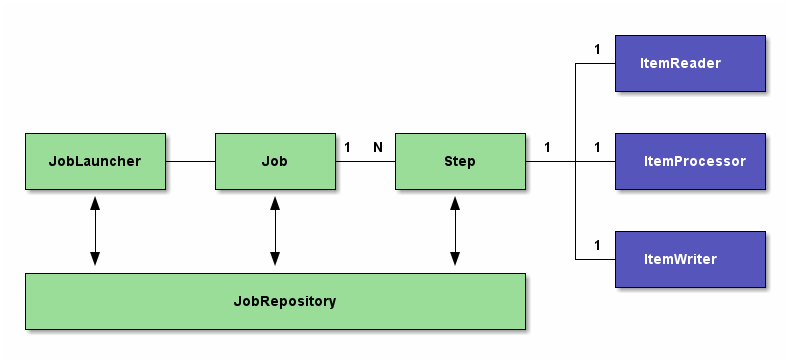
The above diagram represents a Spring Batch flow. As can be seen here, we have several modules. Let's go one-by-one through each module.
1. JobRepository: This represents the persistence of batch meta-data entities in the database.It acts as a repository that contains batch jobs' information, for example, when the last batch job was run, etc.
Below is the XML configuration of the JobRepository :
<bean id = "jobRepository" class = "org.springframework.batch.core.repository.support.JobRepositoryFactoryBean">
    <property name = "dataSource" ref = "dataSource" />
    <property name = "transactionManager" ref="transactionManager" />
    <property name = "databaseType" value = "mysql" />
</bean>
2. JobLauncher: This is an interface used to launch a job or run jobs when the jobs' scheduled time arrives. It takes the jobs name and some other parameters while launching or running the job.
3. Job: This is the main module, which consist of the business logic to be run.
4. Step: Steps are nothing but an execution flow of the job. A complex job can be divided into several steps or chunks, which can be run one after another or ran depending on the result of the previous steps.
5. ItemReader: This interface is used to perform bulk-reading of data, e.g. reading several lines of data from an Excel file when a job starts
6.ItemProcessor: When the data is read using itemreader, ItemProcessor can be used to perform the processing of data, depending on the business logic.
7. ItemWriter: This interface is used to write bulk data — either to a database or any other file disks.
This article gives some basic understanding of Spring Batch. Many of the real-world applications use Spring Batch with Quartz triggers to perform their batch operations. I will give you a little idea here about what is actually running Spring Batch using Quartz.
Quartz has a modular architecture. It consists of several basic components that can be combined as required. In this tutorial, we’ll focus on the ones that are common to every job: Job, JobDetail, Trigger and Scheduler.
Job, as described above, is nothing but the business logic that we need to execute when it runsJobDetail: This conveys the detailed properties of the job instance, such as the name of job, thejobClass, which is used to run the job, a map setting, and the other properties of the job, like theJobLaunchername of the group to which job belongs.Trigger: These are used to start the jobs when the job time arrives. It is used to trigger the job execution. We can use various types of triggers. The most common is theCrontrigger, which sets the cron expressions, for example, when the job is to be run.Scheduler: TheSchedulercontains all the above modules. It sets the triggers and the job details. TheSchedulershould have a unique job name for all the jobs to be run.
This will give you a basic understanding of the modules related when you want to run Spring Batch applications using Quartz.
Opinions expressed by DZone contributors are their own.
Comments