

Understanding Zero-Copy
This article will delve into the concept of zero-copy and provides a practical Python code example demonstrating its performance benefits
 ·
·
Join the DZone community and get the full member experience.
Join For FreeIn the realm of high-performance computing and network applications, efficient data handling is important. Traditional Input/Output (I/O) operations often involve redundant data copies, creating performance bottlenecks that can limit throughput and increase latency. Zero-copy is a powerful optimization technique that minimizes or eliminates these unnecessary data movements, leading to significant performance gains.
Traditional Input/Output Path
Consider a common scenario: an application needs to read a file from disk and transmit it over a network. In a traditional I/O model, this seemingly straightforward operation entails a series of data copies:
- The operating system (kernel) reads the data from the disk and stores it in a kernel buffer.
- The application's
read()system call copies this data from the kernel buffer into a buffer in the application's user space. - When the application wants to send the data, its
write()system call copies the data from the user buffer back into a kernel socket buffer. - Finally, the kernel copies the data from the socket buffer to the Network Interface Card (NIC) for transmission.
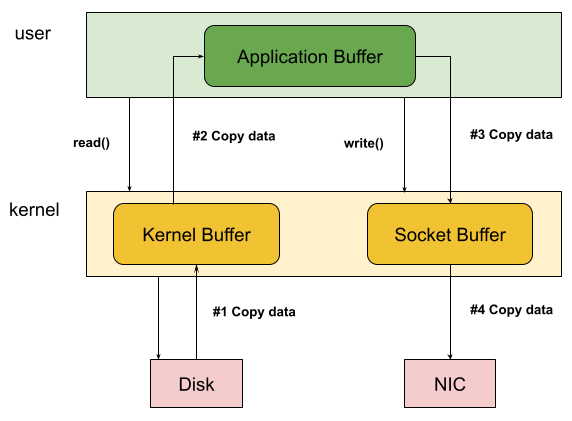
This chain of data copies not only consumes valuable CPU cycles for memory management and data movement but also utilizes precious memory bandwidth. For applications dealing with large datasets or requiring high-frequency I/O, this overhead becomes a significant bottleneck, increasing latency, reducing throughput, and wasting computational resources.
Zero-Copy
Zero-copy techniques aim to streamline the data transfer process by allowing data to move directly between the source and destination without unnecessary intermediary copies, particularly those involving user-space buffers. This is achieved through various mechanisms, depending on the operating system and the specific I/O operation. Some key Zero-Copy mechanisms include:
sendfile()System Call: Available on Linux and other Unix-like systems,sendfile()provides a direct path for transferring data between two file descriptors (e.g., a file and a socket) within the kernel space. This eliminates the need to copy data into and out of user-space buffers, effectively removing two of the typical copy operations.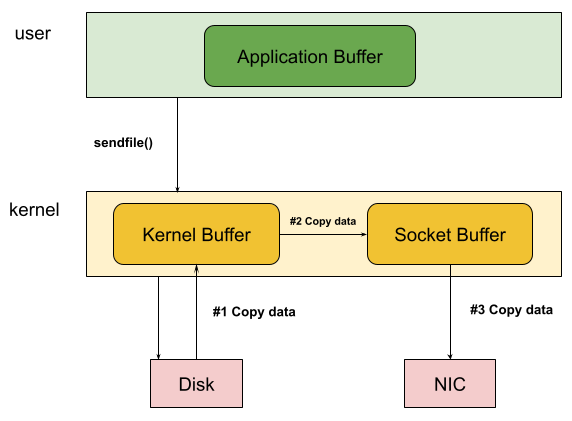 Figure 2: Zero-Copy with sendfile(): Notice the lesser copy operations and the context switches compared to Traditional I/O
- Memory Mapping (
mmap()): While not always strictly considered "zero-copy,"mmap()can drastically reduce copies for file I/O. It maps a file directly into the application's virtual address space. Subsequent access to this memory region directly interacts with the file data (often managed by the OS's page cache), avoiding explicitread()andwrite()system calls and the associated user-kernel data transfers. - Direct Memory Access (DMA) with Scatter-Gather: Modern NICs often leverage DMA, allowing them to read data directly from system memory without constant CPU intervention. Coupled with scatter-gather capabilities, the kernel can provide the NIC with a description of memory buffers (potentially non-contiguous) containing the data to be transmitted. The NIC then assembles the network packets directly from these buffers, potentially eliminating the final kernel-to-NIC copy.
Demonstrating the Performance Advantage
To illustrate the performance benefits of zero-copy, let's write a Python code example that compares the traditional read/write approach with the zero-copy sendfile() method for transferring a large file over the network. We will have a server that will read a 100MB file and return it to the client. The server can do this using the traditional read/write approach and the zero-copy with sendfile() approach.
To begin with let's create a 100MB file that we can move around to measure performance.
head -c 100M /dev/urandom > large_file.binTraditional Read/Write
The send_traditional function demonstrates the conventional method of sending a file over a network socket. It reads the specified file into a user-space buffer and then sends the data through the socket using the standard sendall() method. This approach involves multiple data copies: from disk to kernel buffer, kernel buffer to user buffer, and user buffer to kernel socket buffer, incurring higher CPU overhead and potentially lower throughput compared to zero-copy techniques.
def send_traditional(client_socket, filename):
    start_time = time.time()
    file_size = os.path.getsize(filename)
    with open(filename, 'rb') as f:
        data = f.read()
        client_socket.sendall(data)
    end_time = time.time()

    # Measure time taken and throughput of this operation
    duration = end_time - start_time
    throughput = file_size / duration if duration > 0 else 0
    return duration, throughput
Zero-Copy With sendfile()
The send_zero_copy function leverages the sendfile() system call (via the sendfile module) to perform a zero-copy file transfer over a network socket. Instead of reading the file into a user-space buffer, it instructs the kernel to directly transfer the file data from the file descriptor to the socket descriptor within the kernel space. This eliminates unnecessary data copies between kernel and user space, resulting in significantly reduced CPU utilization and improved transfer performance for large files.
def send_zero_copy(client_socket, filename):
    start_time = time.time()
    file_fd = os.open(filename, os.O_RDONLY)
    socket_fd = client_socket.fileno()
    file_size = os.path.getsize(filename)
    try:
        sent = os.sendfile(socket_fd, file_fd, 0, file_size)
        if sent != file_size:
            print(f"Warning: Only {sent} bytes sent out of {file_size}")
    finally:
        os.close(file_fd)
        client_socket.shutdown(socket.SHUT_WR) # Signal end of transmission

    end_time = time.time()

    # Measure time taken and throughput of this operation
    duration = end_time - start_time
    throughput = file_size / duration if duration > 0 else 0
    return duration, throughput
Results
Transfer Time
Throughput
Traditional Read/Write
0.2037 seconds
490.83 MB/s
Zero Copy sendfile()
0.1438 seconds
695.33 MB/s
| Transfer Time | Throughput | |
| Traditional Read/Write | 0.2037 seconds | 490.83 MB/s |
| Zero Copy sendfile() | 0.1438 seconds | 695.33 MB/s |
We observe lower transfer time and consequently higher throughput when using zero-copy sendfile().
The performance improvements achieved through zero-copy stem from the fundamental reduction in data handling overhead:
- Elimination of User-Space Copies: The most significant gain comes from bypassing the need to copy data between the kernel space (where the file is initially read) and the user space (where the application traditionally processes it before sending).
- Reduced System Calls and Context Switches: Zero-copy mechanisms like sendfile() can often accomplish the data transfer with fewer system calls, minimizing the overhead of switching between user mode and kernel mode.
- Optimized Kernel Operations: The kernel can often perform internal optimizations when managing data transfers directly between kernel buffers, leading to more efficient memory access and management.
Real-World Applications
The benefits of zero-copy are particularly crucial for high-performance and data-intensive applications, including:
- Web Servers: Efficiently serving static content to numerous concurrent users. Eg: Apache and Nginx.
- File Servers and NAS Systems: Enabling high-speed file sharing and backups. Eg: Samba and NFS.
- Streaming Media Servers: Delivering high-bandwidth video and audio content smoothly. Eg: Netflix,
- Message Queues and Data Pipelines: Efficiently move messages between different stages of the pipeline or between brokers and consumers, minimizing the overhead of message processing and improving overall throughput. Eg: Kafka, RabbitMQ, etc.
- Network Appliances: Handling large volumes of network traffic with minimal latency.
Conclusion
Zero-copy is a vital optimization strategy for applications that require high-throughput and low-latency data transfer. By eliminating unnecessary data copies and streamlining the I/O path, it significantly reduces CPU utilization, increases throughput, and improves overall system performance. This technique is widely used under the hood for a variety of applications and quietly improves performance.
Appendix
Code
import socket
import time
import os
import select

def send_traditional(client_socket, filename):
    start_time = time.time()
    file_size = os.path.getsize(filename)
    with open(filename, 'rb') as f:
        data = f.read()
        client_socket.sendall(data)
    end_time = time.time()
    duration = end_time - start_time
    throughput = file_size / duration if duration > 0 else 0
    return duration, throughput

def send_zero_copy(client_socket, filename):
    start_time = time.time()
    file_fd = os.open(filename, os.O_RDONLY)
    socket_fd = client_socket.fileno()
    file_size = os.path.getsize(filename)

    try:
        sent = os.sendfile(socket_fd, file_fd, 0, file_size)
        if sent != file_size:
            print(f"Warning: Only {sent} bytes sent out of {file_size}")
    finally:
        os.close(file_fd)
        client_socket.shutdown(socket.SHUT_WR) # Signal end of transmission

    end_time = time.time()
    duration = end_time - start_time
    throughput = file_size / duration if duration > 0 else 0
    return duration, throughput

def run_server(use_zero_copy, filename, port=12345):
    server_socket = socket.socket(socket.AF_INET, socket.SOCK_STREAM)
    server_socket.bind(('localhost', port))
    server_socket.listen(1)
    print(f"Server listening on port {port} (Zero-copy: {use_zero_copy})")

    client_socket, addr = server_socket.accept()
    print(f"Client connected: {addr}")

    if use_zero_copy:
        duration, throughput = send_zero_copy(client_socket, filename)
        method = "Zero-copy (sendfile)"
    else:
        duration, throughput = send_traditional(client_socket, filename)
        method = "Traditional (read/write)"

    if duration is not None:
        print(f"\n--- {method} Performance ---")
        print(f"File size: {os.path.getsize(filename) / (1024 * 1024):.2f} MB")
        print(f"Transfer time: {duration:.4f} seconds")
        print(f"Throughput: {throughput / (1024 * 1024):.2f} MB/s")

    client_socket.close()
    server_socket.close()

def run_client(port=12345):
    client_socket = socket.socket(socket.AF_INET, socket.SOCK_STREAM)
    try:
        client_socket.connect(('localhost', port))
        # Simply receive and discard data for this demonstration
        total_received = 0
        buffer_size = 4096
        while True:
            ready = select.select([client_socket], [], [], 1) # Wait for a short time
            if ready and ready != ([], [], []):
                data = client_socket.recv(buffer_size)
                if not data:
                    break
                total_received += len(data)
            else:
                break # No more data for a while
        print(f"Client received {total_received / (1024 * 1024):.2f} MB")
    except ConnectionRefusedError:
        print("Error: Connection refused. Make sure the server is running.")
    finally:
        client_socket.close()

if __name__ == "__main__":
    filename = "large_file.bin"
    port = 12345

    # Ensure the large file exists
    if not os.path.exists(filename):
        print(f"Error: The file '{filename}' does not exist. Please create it (e.g., 'head -c 100M /dev/urandom > {filename}')")
        exit()

    import threading

    print("\n--- Running with Traditional I/O ---")
    server_thread_traditional = threading.Thread(target=run_server, args=(False, filename, port))
    client_thread = threading.Thread(target=run_client, args=(port,))
    server_thread_traditional.start()
    time.sleep(0.1) # Give server a moment to start
    client_thread.start()
    server_thread_traditional.join()
    client_thread.join()

    print("\n--- Running with Zero-Copy (sendfile) ---")
    server_thread_zerocopy = threading.Thread(target=run_server, args=(True, filename, port + 1))
    client_thread_zerocopy = threading.Thread(target=run_client, args=(port + 1,))
    server_thread_zerocopy.start()
    time.sleep(0.1) # Give server a moment to start
    client_thread_zerocopy.start()
    server_thread_zerocopy.join()
    client_thread_zerocopy.join()

    print("\nDone.")
Opinions expressed by DZone contributors are their own.
Comments