

Vertical Scaling and Horizontal Scaling in AWS
Vertical and horizontal scaling are two distinct ways of ramping up your cloud capabilities, depending on the amount of traffic you recieve.
Join the DZone community and get the full member experience.
Join For Free
Scaling an on-premise infrastructure is hard. You need to plan for peak capacity, wait for equipment to arrive, configure the hardware and software, and hope you get everything right the first time. But deploying your application in the cloud can address these headaches. If you plan to run your application on an increasingly large scale, you need to think about scaling in cloud computing from the beginning, as part of your planning process.
There are mainly two different ways to accomplish scaling, which is a transformation that enlarges or diminishes. One is vertical scaling and the other is horizontal scaling. Let’s understand these scaling types with AWS.
Vertical Scaling
For the initial users up to 100, a single EC2 instance would be sufficient, e.g. t2.micro/t2.nano. The one instance would run the entire web stack, for example, web app, database, management, etc. The original architecture is fine until your traffic ramps up. Here you can scale vertically by increasing the capacity of your EC2 instance to address the growing demands of the application when the users grow up to 100. Vertical scaling means that you scale by adding more power (CPU, RAM) to an existing machine. AWS provides instances up to 488 GB of RAM or 128 virtual cores.
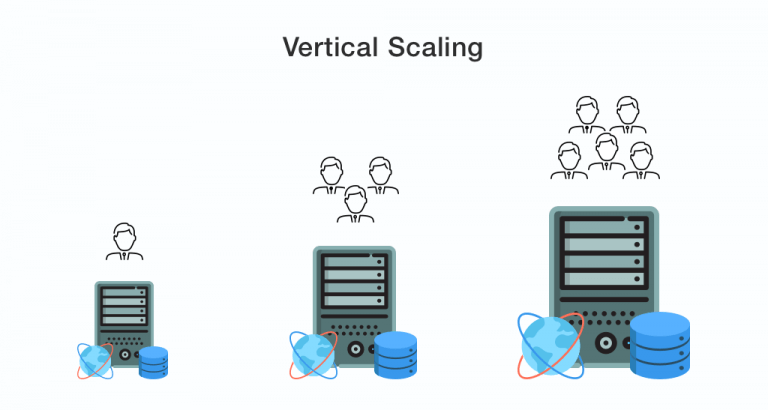
There are few challenges in basic architecture. First, we are using a single machine which means you don’t have a redundant server. Second, machine resides in a single AZ, which means your application health is bound to a single location.
To address the vertical scaling challenge, you start with decoupling your application tiers. Application tiers are likely to have different resource needs and those needs might grow at different rates. By separating the tiers, you can compose each tier using the most appropriate instance type based on different resource needs.
Now, try to design your application so it can function in a distributed fashion. For example, you should be able to handle a request using any web server and produce the same user experience. Store application state independently so that subsequent requests do not need to be handled by the same server. Once the servers are stateless, you can scale by adding more instances to a tier and load balance incoming requests across EC2 instances using Elastic Load Balancing (ELB).
Horizontal Scaling
Horizontal scaling essentially involves adding machines in the pool of existing resources. When users grow up to 1000 or more, vertical scaling can’t handle requests and horizontal scaling is required. Horizontal scalability can be achieved with the help of clustering, distributed file system, and load balancing.
Loosely coupled distributed architecture allows for scaling of each part of the architecture independently. This means a group of software products can be created and deployed as independent pieces, even though they work together to manage a complete workflow. Each application is made up of a collection of abstracted services that can function and operate independently. This allows for horizontal scaling at the product level as well as the service level.
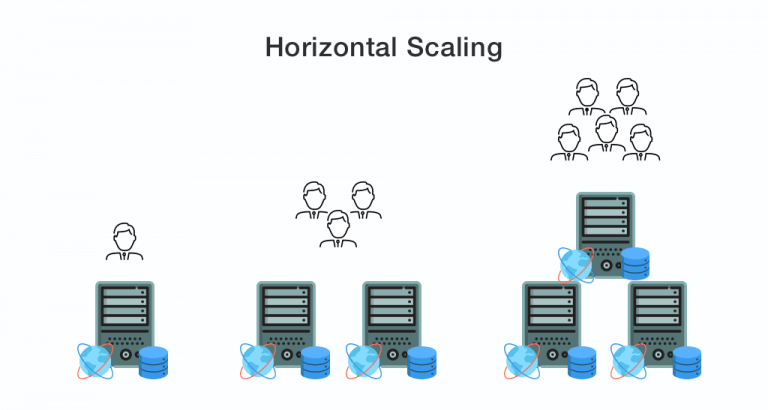
How To Achieve Effective Horizontal Scaling
The first is to make your application stateless on the server side as much as possible. Any time your application has to rely on server-side tracking of what it’s doing at a given moment, that user session is tied inextricably to that particular server. If, on the other hand, all session-related specifics are stored browser-side, that session can be passed seamlessly across literally hundreds of servers. The ability to hand a single session (or thousands or millions of single sessions) across servers interchangeably is the very epitome of horizontal scaling.
The second goal to keep square in your sights is to develop your app with a service-oriented architecture. The more your app is comprised of self-contained but interacting logical blocks, the more you’ll be able to scale each of those blocks independently as your use load demands. Be sure to develop your app with independent web, application, caching and database tiers. This is critical for realizing cost savings – because, without this microservice architecture, you’re going to have to scale up each component of your app to the demand levels of the services tier getting hit the hardest.
When designing your application, you must factor a scaling methodology into the design – to plan for handling increased load on your system, when that time arrives. This is should not be done as an afterthought, but rather as part of the initial architecture and its design.
Published at DZone with permission of Jignesh Solanki. See the original article here.
Opinions expressed by DZone contributors are their own.
Comments