

How to Create Microservices Using http4k
Learn how to create a simple microservice-based application using http4k, Kotlin, and JDBI.
Join the DZone community and get the full member experience.
Join For FreeIn this article, we will build a simple microservice based on Kotlin, the http4k toolkit , and JDBI.
Our Use Case
Let's consider a simple functionality: registering companies and generating a ranking system. Each company has a score based on their foundation date. Companies are classified by their score, so we have a simple solution, as described below:
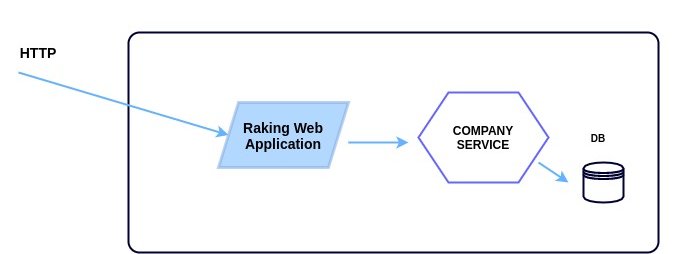
The above diagram shows a simple service with it own database. We are assuming that the Ranking Web (UI) Application will interact with Company Service to show the company list. Let's take a look at some design points:
- Language/Toolkit: We are using the http4k toolkit. This toolkit provides a simple and uniform way to serve, consume, and test HTTP services. It was entirely written in Kotlin and brings with it the concept of "function as service." http4k provides many server runtimes, such as Netty, Apache, Ktor, etc.
- Persistence: all data will be managed via JDBI. JBDI is a library that provides an idiomatic access to relational data in the Java world. All data will be stored in a PostgreSQL database.
- Testing: All services need to be tested and require a lot of testing. To create our unit tests, we are using Kotest and JUnit. Kotest has an amazing DSL for testing, making our tests more fluent.
Getting Started
We will start from the repository, ranking-service. All boilerplate code is provided in this initial repository. Let's build the registration operation. First, when we create a company record, we need to set the company's score in our ranking system. The score calculation is based on its foundation date, so we have some rules for that:
- Companies less than 2-years-old cannot be included in our rankings.
- Companies between 2- and 3-years-old have a score of "C".
- Companies between 4- and 5-years-old have a score of "B".
- Companies that are 6-years-old or more have a score of "A".
Once the company is registered, we can perform an evaluation using the following:
- Like
- Dislike
Those values must be cumulative, and only allowed to go up, not down, based on votes. The company table should look like:
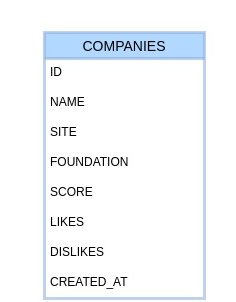
Our entity's code looks like the following:
import java.time.LocalDate
import java.time.LocalDateTime
data class Company(
val id: String,
val name: String,
val site: String,
val foundation: LocalDate,
val score: Char,
val likes: Int = 0,
val dislikes: Int = 0,
val createdAt: LocalDateTime = LocalDateTime.now()
)
Operations
Our service must provide three operations, as shown in the table below:
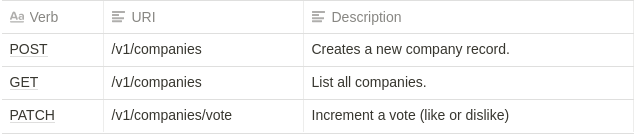
Register a New Company
Now we need to implement our company registration functionality. Let's implement our HTTP handler that represents the first operation shown in the table above. First, let's see the code below:
x
// creates application routes
fun routes(): RoutingHttpHandler = routes(
"/" bind GET to index(),
"/v1/companies" bind routes(
"/" bind POST to registerHandler(service),
"/" bind GET to rankingHandler(service),
"/vote" bind PATCH to voteHandler(service)
)
)
fun registerHandler(service: CompanyService): HttpHandler {
val registerData = Body.auto<RegisterRequest>().toLens()
return { request ->
val data = registerData(request)
when(val result = service.register(data)) {
is Success -> Response(Status.CREATED).body(result.value)
is Fail -> Response(Status.BAD_REQUEST).body(result.cause)
}
}
}
Inside the Router.kt file, we're defining a function, registerHandler, that receives a service as an argument. http4k defines a Handler like a function: (Request) → Response. Now, let's see the register function from the CompanyService class.
xxxxxxxxxx
fun register(data: RegisterRequest): Result<String> {
val foundationCompanyDate = LocalDate.parse(data.foundation, DateTimeFormatter.ofPattern(DATE_FORMATTER))
val companyScore = calculateScore(foundationCompanyDate)
if (companyScore == '0') return Fail("This company is too much younger.")
val currentCompany = repository.fetchBySite(data.site)
if (currentCompany != null) return Fail("There is a company with same site.")
val entity = Company(
id = UUID.randomUUID().toString(),
name = data.name,
site = data.site,
foundation = foundationCompanyDate,
score = companyScore
)
return when(val result = repository.save(entity)) {
is Success -> Success("Company has been created successfully.")
is Fail -> Fail(cause = result.cause)
}
}
The function above implements the business logic to register a new company. Basically, we validate the foundation date and check if another company with the same site exists. Our service depends on CompanyRepository, which implements a persistence contract with the database. Let's check the code for the repository's implementation:
xxxxxxxxxx
class CompanyRepositoryImpl : CompanyRepository {
override fun save(value: Company): Result<Unit> = try {
Database.runCommand {
it.createUpdate(Database.getSql("db.insertCompany"))
.bindBean(value)
.execute()
}
Success(Unit)
} catch(ex: Exception) {
Fail("Cannot insert company", ex)
}
override fun fetchBySite(value: String): Company? {
val entity = Database.runCommand {
it.createQuery(Database.getSql("db.fetchBySite"))
.bind("site", value)
.mapTo<Company>()
.findOne()
}
return if (entity.isPresent) entity.get() else null
}
}
The implementation uses a helper class, Database, which abstracts the boilerplate code used by JDBI under the hood. The function getSql() loads external files which contain SQL statements. Our functionality for company registration has been completed with two persistence functions.
Company Ranking
Once our registration operation is complete, we can build the company listing functionality to display our Rankings page.
xxxxxxxxxx
fun rankingHandler(service: CompanyService): HttpHandler = {
val rankingResponse = Body.auto<List<RankingResponse>>().toLens()
rankingResponse(service.ranking(), Response(Status.OK))
}
As you can see in code below, our handler defines a body lens that will returns a list of based onRankingResponse. The lens concept is a functional paradigm used by http4k that can read or get a value from an object passed by an argument through the lens. The code for the service is really simple, as we can see below:
xxxxxxxxxx
fun ranking(): List<RankingResponse> = repository.fetchRankingList().map { company ->
RankingResponse(company.id, company.name, company.site, company.score, company.likes, company.dislikes)}
}
The service basically transforms an entity into a Model object, which will be serialized in response. Now, let's see the repository function to fetch companies.
xxxxxxxxxx
override fun fetchRankingList(): List<Company> = Database.runCommand {
it.createQuery(Database.getSql("db.fetchCompanies"))
.mapTo(Company::class.java)
.list()
}
Voting
Let's finish our simple service by implementing a Voting operation. Our vote handler must look like:
x
fun voteHandler(service: CompanyService): HttpHandler = { request ->
val voteRequestBody = Body.auto<VoteRequest>().toLens()
val voteRequest = voteRequestBody(request)
service.vote(voteRequest)
Response(Status.NO_CONTENT)
}
Now let's see the vote function from the CompanyService class. It has a simple logic that identifies which type of vote we are performing and updates the counter.
x
fun vote(data: VoteRequest) {
when(data.type) {
"like" -> repository.like(data.id)
"dislike" -> repository.dislike(data.id)
else -> logger.warn("Invalid vote type ${data.type}")
}
}
The repository implementation is very straightforward, as we can see below:
xxxxxxxxxx
override fun like(id: String) {
Database.runCommandInTransaction {
it.createUpdate("UPDATE companies SET likes = likes + 1 WHERE id = :id")
.bind("id", id).execute()
}
}
override fun dislike(id: String) {
Database.runCommandInTransaction {
it.createUpdate("UPDATE companies SET dislikes = dislikes + 1 WHERE id = :id")
.bind("id", id).execute()
}
}
Wrapping Up
I hope this little tutorial has shown you the power and simplicity that http4k brings to us. Creating services is really simple and enjoyable using http4k and in the future we will explore more features. If you want a deep dive into more of http4k, take a look at the many examples and documentation from the http4k website. The complete code of this tutorial can be found at https://github.com/keuller/tutorial-ranking-service. See you next time!
Opinions expressed by DZone contributors are their own.
Comments