

How to Scale Hazelcast Cluster With Docker Compose
During webinar about 'Distributed Caching for you next Node.js project' I was asked if we provide examples of running Hazelcast with Compose or Swarm. Now you have it!
intro
from the perspective of containerization and cloud deployment, hazelcast imdg is a perfect candidate.
since it's elastically scalable, you can just add more servers, and they form the cluster automatically and contribute their memory to the 'shared memory.'
i’ve been working with few clients who have embraced containerization of their imdg deployments. and in this blog post, i explore how to use docker compose to scale hazelcast imdg cluster. additionally, i will use management center to monitor imdg cluster state.
getting docker images
in this demonstration, i will be using official hazelcast imdg docker images. my demo application will contain three components:
- hazelcast imdg cluster.
- hazelcast management center.
- client application.
i will build a docker image for my client app that will read and write to the hazelcast imdg cluster.
official stuff
you can find officially supported images in docker hub. i will be using:
- hazelcast/hazelcast - oss bits of hazelcast.
-
hazelcast/management-center
- management center
.war(free with 2 hazelcast nodes).
client app
a client app is a simple hazelcast client:
public class myclient {
    public static void main(string[] args) throws interruptedexception {

        clientconfig clientconfig = new xmlclientconfigbuilder().build();   (1)
        final hazelcastinstance client = hazelcastclient.newhazelcastclient(clientconfig); (2)

        system.out.println(clientconfig.tostring());

        iqueue<string> queue = client.getqueue("queue");
        queue.put("hello!");    (3)
        system.out.println("message sent by hazelcast client!");

        hazelcastclient.shutdownall();
    }
}-
configured with
hazelcast-client.xml - connects to the cluster.
- sends a message to the iqueue.
building client app docker image
in this example, to build a docker image from 'fat' jar, i used spotify’s
docker-maven-plugin
.
below is my maven snippet for generating a fat jar and building a docker image:
<plugins>
    <plugin>
        (1)
        <artifactid>maven-assembly-plugin</artifactid>
        <configuration>
            <archive>
                <manifest>
                    <mainclass>myclient</mainclass>
                </manifest>
            </archive>
            <descriptorrefs>
                <descriptorref>jar-with-dependencies</descriptorref>
            </descriptorrefs>
        </configuration>
        <executions>
            <execution>
                <id>make-assembly</id> <!-- this is used for inheritance merges -->
                <phase>package</phase> <!-- bind to the packaging phase -->
                <goals>
                    <goal>single</goal>
                </goals>
            </execution>
        </executions>
    </plugin>
    <plugin>
        (2)
        <groupid>com.spotify</groupid>
        <artifactid>docker-maven-plugin</artifactid>
        <version>${docker-maven-plugin.version}</version>
        <configuration>
            <imagename>hazelcast_client_app</imagename>
            <dockerdirectory>src/main/docker</dockerdirectory>
            <resources>
                <resource>
                    <targetpath>/</targetpath>
                    <directory>${project.build.directory}</directory>
                    <include>${project.build.finalname}-jar-with-dependencies.jar</include>
                </resource>
            </resources>
        </configuration>
    </plugin>
</plugins>
- builds a fat jar to be deployed as a docker image.
- builds a docker image with the hazelcast client app and dependencies.
enter docker compose
docker compose allows you to define a multi-container application with all of its dependencies in a single file, then spin your application and dependencies up in a single command. navigate to the directory, like so:
hazelcast-code-samples/hazelcast-integration/docker-compose/src/main/docker
. then, run the following command to start the cluster, client, and management center containers:
docker-compose -f hazelcast.yml up -d
the
docker-compose
command will pull the images from docker hub and then link them together based on the information inside the
docker-compose.yml
(
hazelcast.yml
in our case) file. this will create ports, links between containers, and configure applications as required. after the command completes, we can now view the status of our cluster with the
docker-compose ps
command.
scaling
the fun part comes with scaling. let’s scale out our hazelcast imdg cluster to 2 nodes.
below is the
docker-compose
command i used for scaling my hazelcast cluster.
docker-compose scale hazelcast=5
with the
docker-compose ps
command, you can see which containers are running.
❯ docker-compose -f src/main/docker/hazelcast.yml ps
           name                         command               state            ports
---------------------------------------------------------------------------------------------
docker_hazelcast-client_1    /bin/sh -c echo "the appli ...   exit 0
docker_hazelcast_1           ./server.sh                      up       5701/tcp
docker_hazelcast_2           ./server.sh                      up       5701/tcp
docker_hazelcast_3           ./server.sh                      up       5701/tcp
docker_hazelcast_4           ./server.sh                      up       5701/tcp
docker_hazelcast_5           ./server.sh                      up       5701/tcp
docker_management-center_1   /bin/sh -c ./start.sh            up       0.0.0.0:8080->8080/tcp
if you open the management center url you should see that cluster consists of 5 nodes now.
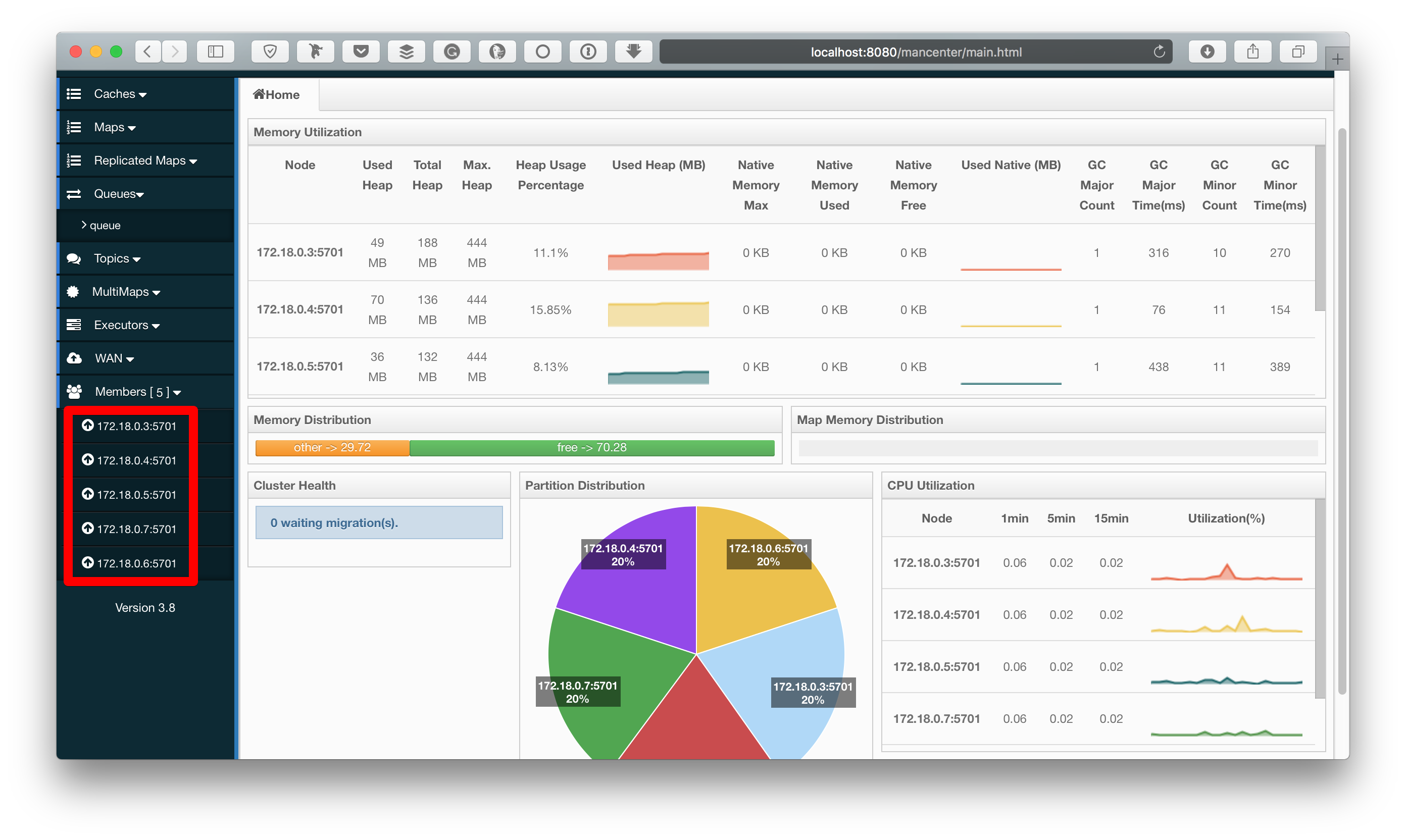
figure 2. management center web app displays imdg cluster of 5 nodes.
if at this point you get a message from the management center to enter the license, you can request a trial key.
also, i can use the
curl
command to get the clusters' status and the list of members.
below is hope i got the query cluster status using management center:
❯ curl http://localhost:8080/mancenter/rest/clusters/hz-compose/members
["172.18.0.3:5701","172.18.0.4:5701","172.18.0.5:5701","172.18.0.6:5701","172.18.0.7:5701"]
you can shut down those application stacks (imdg cluster, management center, hazelcast client java application) with a single command:
docker-compose -f src/main/docker/hazelcast.yml downwhat’s next?
in my future posts, i will explore other tools that allow you to deploy, scale, and orchestrate your hazelcast imdg cluster with different tools like swarm, kubernetes, and mesos. if you have questions or suggestions, feel free to comment below.
sources:
https://hazelcast.com/resources/distributed-caching-next-node-js-project/
https://github.com/hazelcast/hazelcast-code-samples/tree/master/hazelcast-integration/docker-compose
https://docs.docker.com/compose/gettingstarted/
https://hazelcast.com/services/consulting/
Published at DZone with permission of Vik Gamov. See the original article here.
Opinions expressed by DZone contributors are their own.