

Kafka Topics Naming
In this post, learn how you can easily enforce a naming convention on Apache Kafka Topics.
Join the DZone community and get the full member experience.
Join For FreeCreating a Topic in a Kafka cluster is easy and is well documented for kafka-topics.sh or even the official API documentation.
bin/kafka-topics.sh --helpThe complexity arises when you are trying to enforce a standard way of defining topic naming. There are many ways to identify the right convention based on your need, but to enforce such a topic convention while you are creating one is explained in this 5-step blog.
There is no right convention: it is always determined based on what your business needs.
For my example, I wish to define a topic convention that follows the semantics:
<organizationname>.<productname>It is simple enough to get started and can be easily extended, as you will observe as you follow along.
From the official documentation, if you wish to define a custom topic policy creation you will have to define the property:
create.topic.policy.class.name=mypackage.classNameThe className should implement the interface:
org.apache.kafka.server.policy.CreateTopicPolicy
Step 1: Building the Project
With these two building blocks, let's define a Maven project:
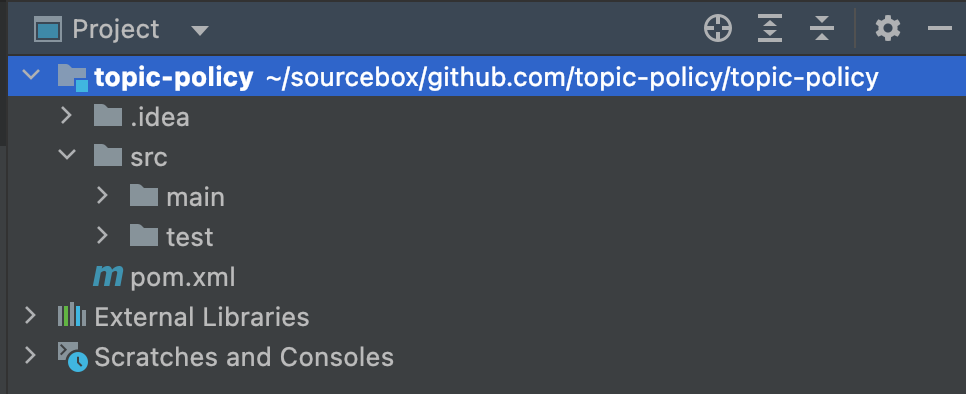
Step 2: Define the Dependency
Let's define a package "me.samarthya" and also add the dependency of the Kafka clients in the "pom.xml."
 <dependency>
   <groupId>org.apache.kafka</groupId>
   <artifactId>kafka-clients</artifactId>
   <version>3.2.0</version>
   <scope>compile</scope>
</dependency>
Step 3: Implementation
Let's define the main class TopicPolicy:
public class TopicPolicy implements CreateTopicPolicy {
    private final Logger logger = Logger.getLogger(TopicPolicy.class.toString());

    private final static String TopicPattern = "\\w+\\.{1}\\w+";

    @Override
    public void validate(RequestMetadata requestMetadata) throws PolicyViolationException {
        StringBuilder bd = new StringBuilder().append(" Topic Name=").append(requestMetadata.topic());
        logger.info(bd.toString());
        if ( requestMetadata.topic().isEmpty() || !Pattern.matches(TopicPattern, requestMetadata.topic())) {
            throw new PolicyViolationException("Topic name " + requestMetadata.topic() + " should match the pattern " + TopicPattern);
        }
    }

    @Override
    public void close() throws Exception {
        logger.info(" Close & release.");
    }

    @Override
    public void configure(Map<String, ?> configs) {
        if (configs != null) {
            for( String k: configs.keySet()) {
                logger.info(configs.get(k).toString());
            }
        }
    }
}
With the class defined, the main thing to observe is that the TopicPattern that has been defined as the format will be matched for the name. If it is not found, a PolicyViolationException will be thrown.
Step 4: Repeat for Each Broker in the Cluster
Package the jar. It has to be placed under the "lib" folder of the Kafka (classpath).
4 -rw-r--r--. 1 vagrant vagrant 3881 Jul 12 06:28 topic-policy-1.0-SNAPSHOT.jarAlso, in the "server.properties," you can define two properties:
create.topic.policy.class.name=me.samarthya.TopicPolicy
auto.create.topics.enable=false
Restart your cluster.
Step 5: Test Your "Topics"
Let's go back to the Kafka binary folder (local machine) and issue the topic creation command again.
bin/kafka-topics.sh --bootstrap-server mybroker.test:9092 --topic invalid_topic --createIf the jar has been loaded successfully, you should see an error reported as below:
WARNING: Due to limitations in metric names, topics with a period ('.') or underscore ('_') could collide. To avoid issues it is best to use either, but not both.
Error while executing topic command : Topic name invalid_topic should match the pattern \w+\.{1}\w+
[2022-07-13 09:49:21,805] ERROR org.apache.kafka.common.errors.PolicyViolationException: Topic name invalid_topic should match the pattern \w+\.{1}\w+
 (kafka.admin.TopicCommand$)
You can modify the pattern now as per your convenience and re-deploy the jar to check the new custom topic policies.
Example
bin/kafka-topics.sh --bootstrap-server mybroker.test.test:9092 --topic invalid.valid --createWARNING: Due to limitations in metric names, topics with a period ('.') or underscore ('_') could collide. To avoid issues it is best to use either, but not both.
Created topic invalid.validNote
Since the auto-topic creation has been disabled, if you try and create an invalid topic through producer, it will not work (see below).
bin/kafka-console-producer.sh --bootstrap-server mybroker.test:9092 --topic testThis will result in the following error:
[2022-07-13 09:54:21,196] WARN [Producer clientId=console-producer] Error while fetching metadata with correlation id 4 : {test=UNKNOWN_TOPIC_OR_PARTITION} (org.apache.kafka.clients.NetworkClient)For an existing topic invalid.valid, it should work as follows:
bin/kafka-console-producer.sh --bootstrap-server mybrokers.test:9092 --topic invalid.validOpinions expressed by DZone contributors are their own.
Comments