

MCP for Agentic Systems: The Missing Protocol for Autonomous AI
To build scalable AI agents, replace custom state logic with MCP to manage the agent's entire lifecycle of planning, tool use, and memory.
 ·
·
Join the DZone community and get the full member experience.
Join For FreeIntroduction: Why Agentic Systems Need MCP
Model Context Protocol (MCP) is a standardized communication framework specifically designed to manage complex, stateful interactions between AI agents and backend infrastructure. If you've moved beyond simple LLM completions and are building agentic applications, you've likely experienced the complexity. An agent, unlike a basic chatbot, perceives, reasons, plans, and acts dynamically. Managing its evolving state — plans, internal reasoning, tool usage history, and environmental understanding — rapidly becomes complex, brittle, and difficult to scale using traditional REST APIs.
MCP provides a structured solution, centralizing state management and enabling clean, maintainable agent implementations.
From Conversational Context to Rich Agentic State
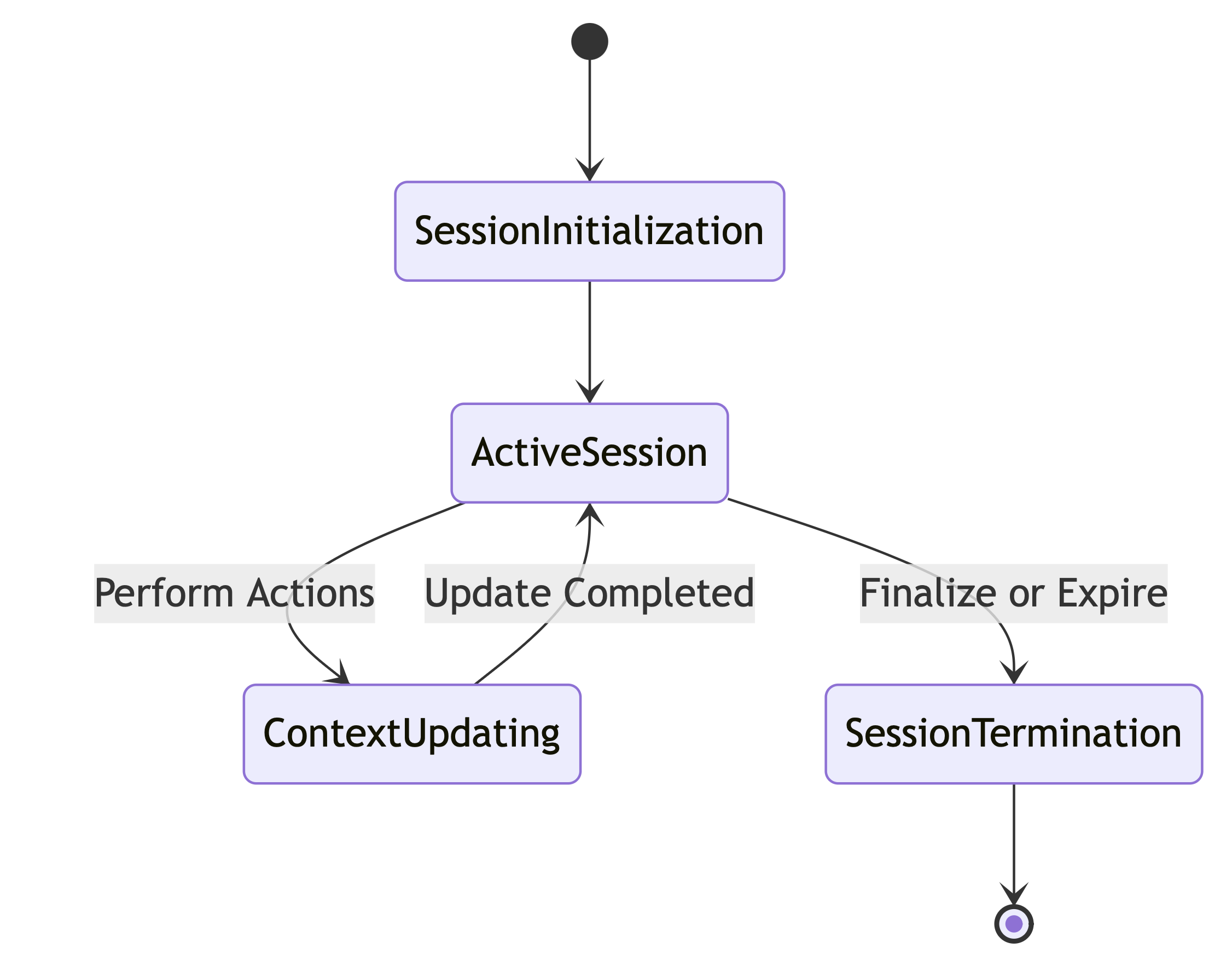
For agentic systems, context isn't merely a list of previous interactions. Instead, it's a structured representation of the agent's complete operational state. MCP defines and manages a sophisticated state model including components such as objectives, plans, scratchpads (internal reasoning), tool manifests, action histories, and world models. This structured approach ensures clarity, traceability, and easier debugging.
The Agentic Loop Driven by MCP
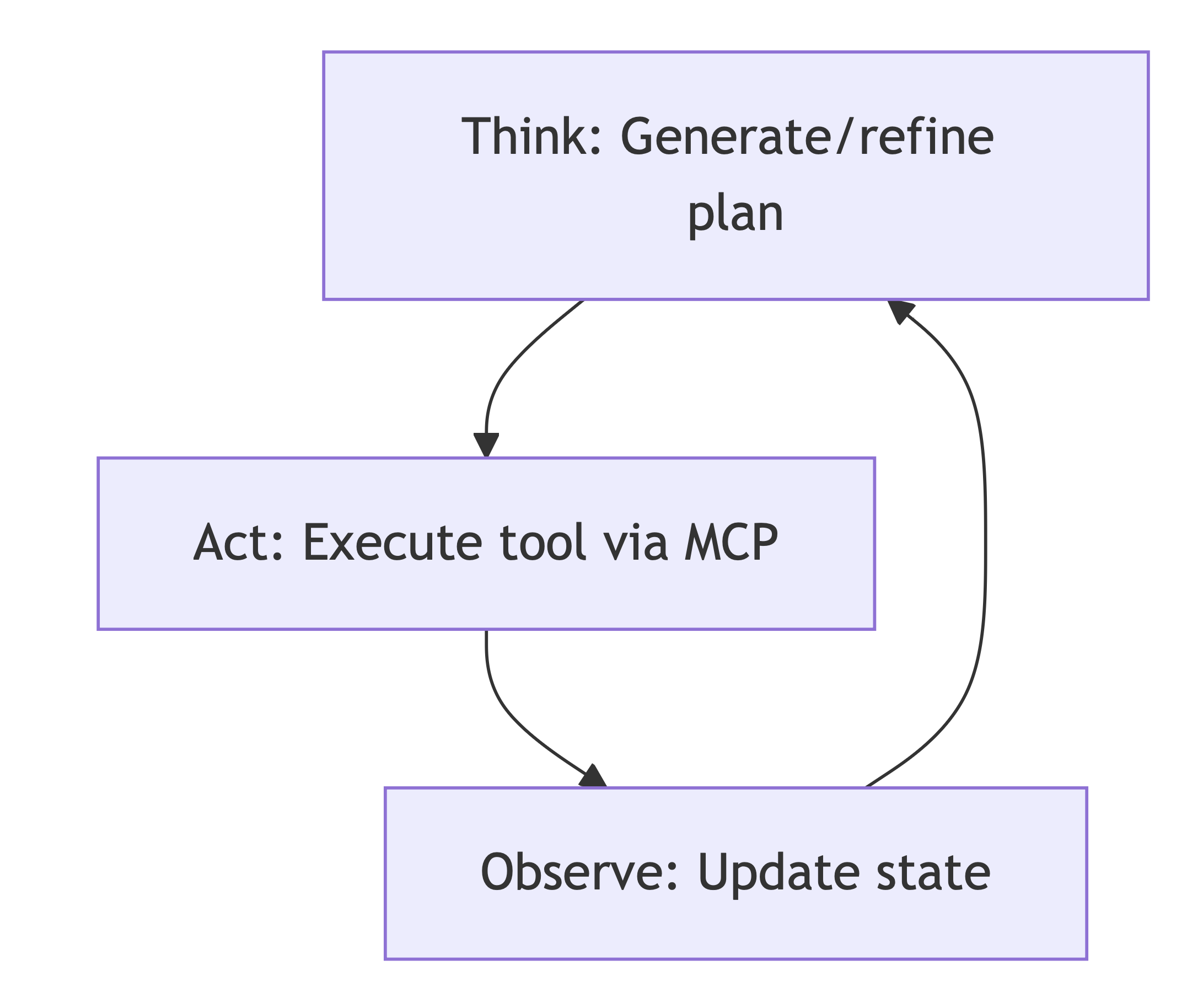
An agent operates in a Think-Act-Observe loop. Here's how MCP facilitates each stage:
- Think: The agent client sends the current state object to the LLM (via the MCP Gateway) with a prompt to generate or refine a plan. The LLM's response (a new plan or a next action) is received.
- Act: If the next step is a tool call, the client doesn't execute it directly. Instead, it sends a structured
REQUEST_TOOL_EXECUTIONmessage to the MCP Gateway. This is a critical security and observability pattern. The Gateway validates the request, executes the tool in a sandboxed environment, and records the outcome. - Observe: The client fetches the updated state from the Gateway, which now includes the result of the action in its
Action History. This updated state becomes the input for the next "Think" cycle.
This loop continues until the Objective is met. The MCP Gateway acts as the durable, transactional state machine, while the agent client is the ephemeral cognitive driver.
Technical Deep Dive: Python Implementation
Let's make this concrete. We'll design Python structures and a FastAPI server that acts as our MCP Gateway. We'll skip the boilerplate and focus on the core logic.
1. Defining the Agent's State With Pydantic
Pydantic is perfect for defining our structured state.
# mcp_models.py
from pydantic import BaseModel, Field
from typing import Any, List, Dict, Literal

class ToolCall(BaseModel):
    tool_name: str
    arguments: Dict[str, Any]

class ActionHistoryItem(BaseModel):
    action_type: Literal["TOOL_CALL", "LLM_RESPONSE", "USER_INPUT"]
    content: ToolCall | str
    result: str | None = None

class AgentState(BaseModel):
    session_id: str

    # Core Agent Components
    objective: str
    plan: List[str] = Field(default_factory=list)
    scratchpad: List[str] = Field(default_factory=list)
    action_history: List[ActionHistoryItem] = Field(default_factory=list)
    world_model: Dict[str, Any] = Field(default_factory=dict)

    # Status
    status: Literal["RUNNING", "PLANNING", "WAITING_FOR_TOOL", "SUCCESS", "FAILED"] = "RUNNING"

# MCP message formats
class MCPRequest(BaseModel):
    action: Literal["REQUEST_LLM_COMPLETION", "REQUEST_TOOL_EXECUTION", "FINALIZE_OBJECTIVE"]
    payload: Dict[str, Any]

class MCPResponse(BaseModel):
    success: bool
    data: Dict[str, Any] | None = None
    error: str | None = None
2. The MCP Gateway: A FastAPI Implementation
The Gateway's job is to manage state and securely execute tools. Here, we'll use a simple dictionary as a state store; in production, you'd use Redis or a transactional database.
# mcp_gateway.py
import uuid
from fastapi import FastAPI, HTTPException
from mcp_models import AgentState, MCPRequest, MCPResponse, ActionHistoryItem, ToolCall
import your_llm_library # Placeholder for your LLM client (e.g., OpenAI, Anthropic)
import available_tools   # Placeholder for a module defining your agent's tools

app = FastAPI()

# WARNING: In-memory store. Replace with Redis/Postgres for production.
STATE_STORE: Dict[str, AgentState] = {}

@app.post("/sessions", response_model=AgentState)
async def create_session(objective: str):
    """Initializes a new agent session."""
    session_id = str(uuid.uuid4())
    initial_state = AgentState(session_id=session_id, objective=objective)
    STATE_STORE[session_id] = initial_state
    return initial_state

@app.get("/sessions/{session_id}", response_model=AgentState)
async def get_session_state(session_id: str):
    if session_id not in STATE_STORE:
        raise HTTPException(status_code=404, detail="Session not found")
    return STATE_STORE[session_id]

@app.post("/sessions/{session_id}/execute", response_model=MCPResponse)
async def execute_mcp_action(session_id: str, request: MCPRequest):
    """The main entrypoint for the agent's Think-Act loop."""
    if session_id not in STATE_STORE:
        raise HTTPException(status_code=404, detail="Session not found")

    state = STATE_STORE[session_id]

    match request.action:
        case "REQUEST_LLM_COMPLETION":
            # The "Think" step
            prompt = request.payload.get("prompt")
            # In a real system, you'd build a complex prompt from the state
            # llm_response = your_llm_library.generate(prompt=prompt, context=state.dict())
            llm_response = f"LLM thought based on: {prompt}" # Dummy response
            state.scratchpad.append(llm_response)
            STATE_STORE[session_id] = state
            return MCPResponse(success=True, data={"llm_response": llm_response})

        case "REQUEST_TOOL_EXECUTION":
            # The "Act" step
            tool_name = request.payload.get("tool_name")
            arguments = request.payload.get("arguments", {})

            if not hasattr(available_tools, tool_name):
                return MCPResponse(success=False, error=f"Tool '{tool_name}' not found.")

            tool_func = getattr(available_tools, tool_name)

            try:
                # Securely execute the tool
                result = await tool_func(**arguments)
                # Update state
                history_item = ActionHistoryItem(
                    action_type="TOOL_CALL",
                    content=ToolCall(tool_name=tool_name, arguments=arguments),
                    result=str(result)
                )
                state.action_history.append(history_item)
                # A more advanced agent would update its world_model here
                state.world_model[f"{tool_name}_result"] = result
                STATE_STORE[session_id] = state
                return MCPResponse(success=True, data={"result": result})

            except Exception as e:
                return MCPResponse(success=False, error=f"Tool execution failed: {str(e)}")

        case "FINALIZE_OBJECTIVE":
            state.status = "SUCCESS"
            final_answer = request.payload.get("answer")
            state.scratchpad.append(f"Final Answer: {final_answer}")
            STATE_STORE[session_id] = state
            return MCPResponse(success=True, data={"message": "Objective finalized."})

    return MCPResponse(success=False, error="Invalid MCP action")
3. The Client-Side Agent Logic
The agent client is now dramatically simpler. Its job is to run the cognitive loop and communicate with the Gateway via structured MCP messages.
# agent_client.py
import httpx

class Agent:
    def __init__(self, objective: str, gateway_url: str):
        self.gateway_url = gateway_url
        self.client = httpx.AsyncClient()
        self.session_id = None
        self.objective = objective

    async def _init_session(self):
        response = await self.client.post(f"{self.gateway_url}/sessions", params={"objective": self.objective})
        response.raise_for_status()
        self.session_id = response.json()["session_id"]
        print(f"Agent session started: {self.session_id}")

    async def _execute_action(self, action: str, payload: dict) -> dict:
        url = f"{self.gateway_url}/sessions/{self.session_id}/execute"
        mcp_request = {"action": action, "payload": payload}
        response = await self.client.post(url, json=mcp_request)
        response.raise_for_status()
        mcp_response = response.json()
        if not mcp_response["success"]:
            raise RuntimeError(f"MCP Action failed: {mcp_response['error']}")
        return mcp_response["data"]

    async def run(self):
        await self._init_session()

        # This is a highly simplified loop. A real agent would have more complex logic
        # for planning, replanning, and deciding when the objective is met.
        for i in range(5): # Limit loops to prevent infinite runs
            print(f"\n--- Iteration {i+1} ---")

            # 1. Think: Ask the LLM what to do next based on the current state.
            print("Agent is thinking...")
            prompt = "Given the objective and history, what is the next single tool to call? Respond in JSON format: {'tool_name': '...', 'arguments': {...}} or {'final_answer': '...'}"
            llm_decision = await self._execute_action("REQUEST_LLM_COMPLETION", {"prompt": prompt})

            # Dummy logic to parse LLM decision. In reality, you'd parse a JSON response.
            # Here we'll just hardcode a tool call for demonstration.
            if i == 0:
                action_to_take = {"tool_name": "get_stock_price", "arguments": {"ticker": "GOOG"}}
            else:
                action_to_take = {"final_answer": "The stock price for GOOG was retrieved."}


            # 2. Act: Execute the decision via the MCP Gateway
            if "tool_name" in action_to_take:
                print(f"Agent decided to act: call tool '{action_to_take['tool_name']}'")
                tool_result = await self._execute_action("REQUEST_TOOL_EXECUTION", action_to_take)
                print(f"Tool Result: {tool_result}")

            elif "final_answer" in action_to_take:
                print(f"Agent decided to finalize objective.")
                await self._execute_action("FINALIZE_OBJECTIVE", action_to_take)
                print("Objective complete.")
                break
Advanced Considerations for Production Agents
- State persistence: The
STATE_STOREdict is a single point of failure. Use a distributed cache like Redis for active session states for speed, potentially backed by a transactional database like Postgres for long-term persistence and auditability. - Security and sandboxing: The MCP Gateway becomes a critical security boundary. Never
eval()orexec()code from an LLM. Tool execution must be heavily sandboxed. The Gateway should enforce strict ACLs on which agent (or user) can access which tools. - Asynchronous tool execution: Tools can be slow (e.g., long-running API calls, database queries). The Gateway should execute tools asynchronously, allowing the agent to potentially perform other tasks or update its state while waiting. The
statusfield inAgentStatebecomes crucial here (WAITING_FOR_TOOL). - Observability: The structured nature of MCP is a massive win for debugging. Every state transition is a discrete, logged event. You can easily build dashboards to view an agent's
scratchpadandaction_historyin real-time to understand its behavior.
Conclusion
Building autonomous agents introduces a new tier of complexity beyond simple request-response interactions. By adopting a structured protocol for state management like the one proposed here, we can move away from fragile, custom solutions.
An MCP for agentic systems provides a clear separation of concerns: the client drives the cognitive loop, while the gateway provides a secure, stateful, and observable foundation. This isn't just a design pattern; it's a necessary piece of infrastructure for building the next generation of robust and reliable AI applications. The community needs to converge on these patterns, as they will be as fundamental to AI as HTTP has been to the web.
Opinions expressed by DZone contributors are their own.
Comments