

POV on Best Fit Solution for Managing Secure Properties in MuleSoft
This article is a point of view on numerous ways to manage the secure properties in MuleSoft. It talks about the pros and cons of each option.
Join the DZone community and get the full member experience.
Join For FreeWhat Are Secure Properties?
One of the best practices in any application development is to keep the application properties configurable rather than hard-coded. This is achieved by keeping the properties in property files. These application properties are very much required in order to run the application. There will be different sets of application properties defined for each environment, such as development, testing, and production. We have different types of properties defined in the property files, such as host, port, log level, timeout, etc.
However, there are many configuration properties (such as User, Password, AccessKey, SecretAccesskey, client id, client secret, etc.) that are quite security-sensitive in nature and can’t be kept as plain text in application property files. Just imagine, if we keep the credentials as clear text in the application property file, anyone can read this information and misuse it. This could be more disastrous if this information is exposed to hackers or bad actors.
 Fig-1 API Led Integration
These credentials are either passed as encrypted values retrieved from property files, or it is passed as encrypted values retrieved from secure vaults. Even if we use the vault to store and retrieve credentials, vault connection parameters will be stored in the property file.
How To Address It
In order to avoid this type of severe security vulnerability, we must have a proper mechanism to store these sensitive configuration properties. This can be achieved in numerous ways.
- There must be a way to keep these properties encrypted in property files.
- Maintain it externally and pass it to the application at runtime.
Even if we keep the property external to the application, we need to maintain the connection security for a system that maintains the property.
MuleSoft supports the following algorithm and modes to encrypt/decrypt these properties.
Supported Algorithms:AES (default) Blowfish DES DESede RC2 RCA
|
Supported Confidentiality Modes:CBC (default) CFB ECB OFB |
The following snapshot depicts how a connection for Salesforce is created in MuleSoft APIs and how the properties are stored in property files and referred to in the connection configuration from the properties file.

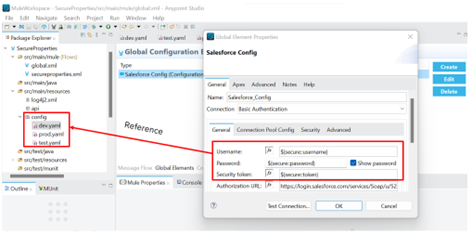 Fig-3 Config Credentials

Possible Options to Encrypt the Security Sensitive Properties, Pros and Cons
MuleSoft provides secure property place holder for encrypting and decrypting the properties. However, encryption/decryption of properties can be achieved via multiple ways.
Secure Property Generator of MuleSoft
We can use the online tool provided by MuleSoft to encrypt properties:
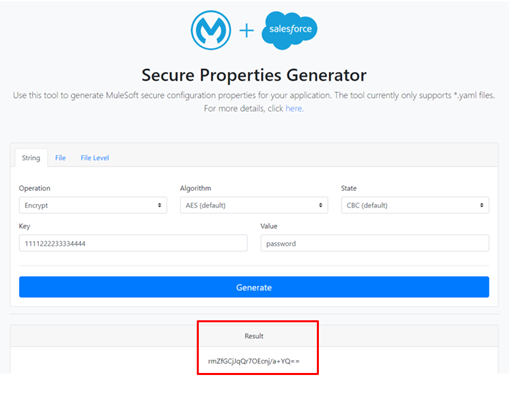
Fig-5 Online Secure Property Generator Tool
Pros |
Cons |
Readily available tool from MuleSoft with nice user interface |
The secure Key must be known to developer/specific person who is responsible for encrypting the password |
Supports all the encryption module and security mode |
There are chances for key exposure to the outer world |
|
Password/secret is not easy to rotate and re-encryption and deployment is required. |
|
Additional Secure key management will be required. |
Secure Property Plugin
Secure property plugin can be installed in Anypoint Studio. Property files can be opened with Mule Properties editor. We can double click on the property name and we will get option to encrypt or decrypt properties.

Pros |
Cons |
No need to refer external tool |
The Key must be known to developer/specific person who is responsible for encrypting the password |
Easy to edit property file within Anypoint Studio |
There are chances for key exposure to outer world |
Supports all the encryption module and security method |
Password/secret is not easy to rotate and re-encryption and deployment is required. |
|
Additional Secure key management will be required. |
|
|
Secure Properties Tool
MuleSoft also provides secure-properties-tool.jar. This jar can be downloaded from MuleSoft official website and used to encrypt or decrypt the property file values or the complete property file. Script can be created to wrap the commands and make it more abstract for developers.

Using Vault
Any Vault can be used to store the secure parameters such as user, password, accessKey and secretAccesskey etc.
There are two ways to use the vault.
Vault as Storage
Vault can be used as secure key management tool. We can store secure keys in vault. Upon arising the need of encryption/decryption of secure properties, we can retrieve the secure key and perform any of the options mentioned above to encrypt/decrypt.
Pros |
Cons |
We get better key management solution using vault. |
There are chances for key exposure to outer world. |
Access to vault can be restricted for users. |
Password/secret is not easy to rotate and re-encryption and deployment is required. |
|
Procuring vault will incur cost. |
Vault as API/Connector
Vault can be used to store the actual secure property value i.e. password, accessKey, secureAccessKey etc.
Either vault connector or APIs can be used to retrieve secure property value at runtime and pass it to connection configuration dynamically.
This option provides complete abstraction of secure property management. However, there will be a need to manage vault credentials. Those credentials will be encrypted and kept in the property file. Again encryption/decryption of vault credentials can be performed by using any of the above-mentioned methods.
Pros |
Cons |
We get better key management solution using vault |
There are chances for key exposure to outer world |
Access to vault can be restricted for users. |
Password/secret is easy to rotate and re-encryption and deployment is not required. |
Secure property rotation becomes quite simple. |
Procuring vault will incur cost. |
Using Custom Encryption API
We can think of creating a custom API which can act as abstraction layer between developer and encryption mechanism. Developer can provide the Business Group, environment and property value which needs to be encrypted and this API in response returns encrypted values.
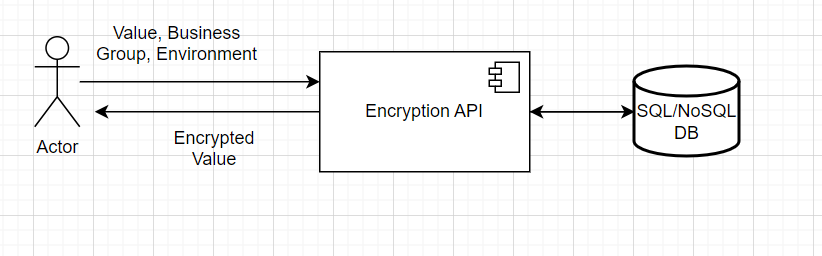
Pros |
Cons |
Complete abstraction is achieved. |
Password/secret is not easy to rotate and re-encryption and deployment is required. |
| Key is not exposed to developers. | Running the custom encryption API will incur cost in terms of CPU, Storage and Memory. |
|
Secure key management is done in SQL/NoSQL database. |
Recommended Approach
Best fit solution is:
- Store all security sensitive properties in a secure vault.
- Retrieve it at runtime and pass it to connector configuration dynamically.
- Encrypt the vault configuration using custom developed API.
In absence of secure vault, the best fit solution is:
- Create the custom API which only takes the property value, business group and environment as input and provides the encrypted value as output.
Opinions expressed by DZone contributors are their own.
Comments