

Shift-Left QA With Octopus Deploy: Orchestrating Katalon Tests in Your Pipeline
Integrate Octopus Deploy with Katalon to automate UI and API testing, gate releases, publish reports, and improve deployment reliability across environments.
Join the DZone community and get the full member experience.
Join For FreeOctopus Deploy is helpful in planning releases and runbooks across multiple environments. Integrating Katalon with the Katalon Runtime Engine (KRE) and TestOps provides strong, scriptable UI and API testing, reporting, and team workflows. Combining these approaches will allow us to improve release cycles through automated testing, publish artifacts to a single repository, and fail fast when quality is compromised.
There are two possible ways of integration:
- Triggering the tests from Octopus into the continuous integration (CI) system, such as an AWS CodeBuild project that runs Katalon. This is the simplest path and requires minimal Docker setup and Infrastructure-as-Code (IaC) work.
- Run KRE directly in the deployment pipeline using containers, shared test content, and environment-specific profiles, so releases and test execution happen side-by-side with explicit IaC flags and versioning.
Prerequisites
- Octopus Project and Environments configured for your app/service.
- Katalon Runtime Engine (KRE) is licensed and accessible in the runner (CI or container).
- Katalon TestOps project with profiles per environment and Test Suites for the pipeline.
- (Option A) AWS CodeBuild project that calls Katalon (or a wrapper script) and publishes reports to TestOps.
- (Option B) Container image(s) for KRE in ECR and test content in EFS (or another artifact store) with IaC wiring.
Option A: Trigger Katalon via CI From Octopus (Quickest Win)
When to use: You already have Katalon jobs in CI and want Octopus to gate deployments by calling those jobs.
Step-by-Step
1. Create an Octopus step (Run a Script or a community step) that calls your CI API (AWS CodeBuild, Jenkins, etc.), by sending the required details as parameters:
- Environment (maps to Katalon Execution Profile)
- Test suite (e.g., a smoke test suite)
- Release version/build number.
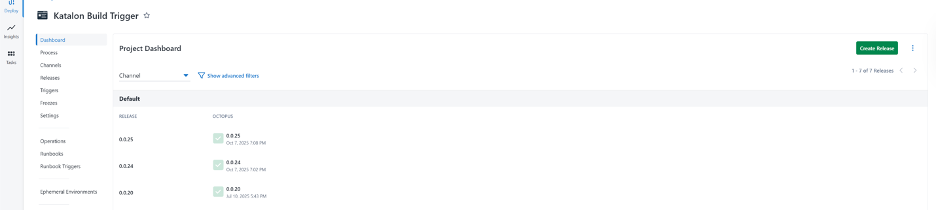
The figure below shows the project dashboard in Octopus UI.
2. Operator flow (from the guide):
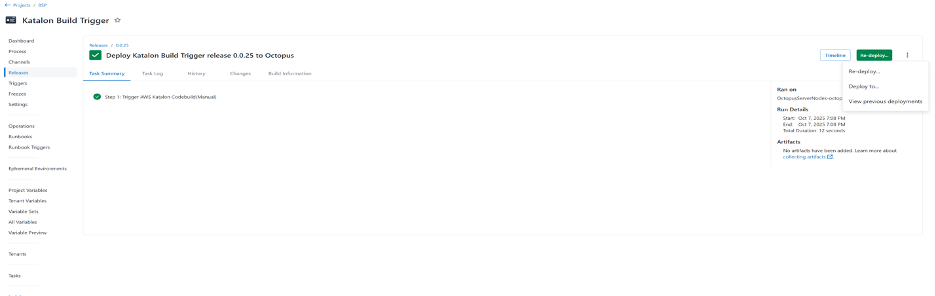
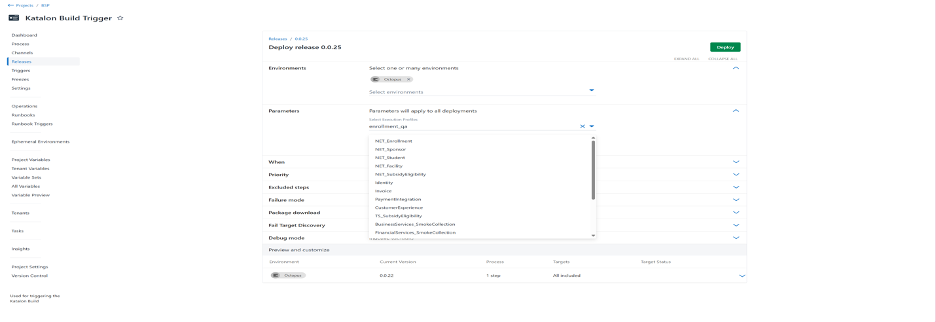
- Open the Octopus project (e.g., <project name> → Katalon Build Trigger) as shown in Fig 2, choose your environment, and deploy. If you see a green checkmark, select “Re-deploy” from the ellipsis. The guide also shows “Expand All,” pick Execution Profiles/Test Suites, then Deploy.
3. Observe in AWS:
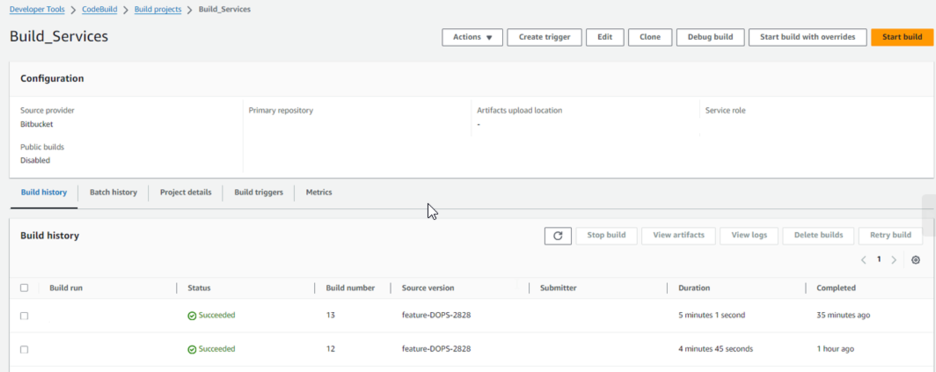
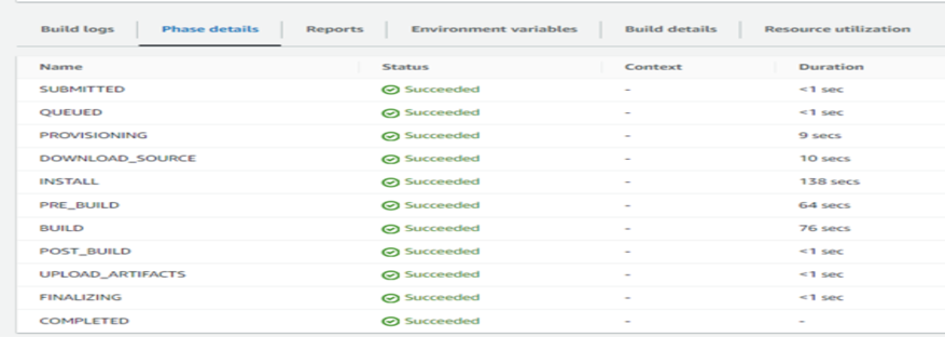
- Navigate to Developer Tools → CodeBuild, switch region if needed, and track the Build_Services project in In Progress/Succeeded status. The guide’s screenshots show searching projects, opening Build history, and drilling into Phase details for verbose logs. Below are snapshots (Figs. 4 and 5) of the AWS console showing the different states explained here.
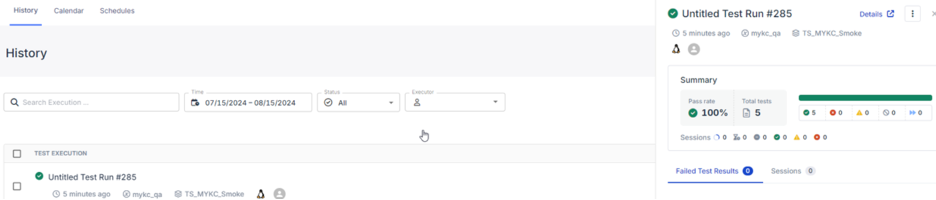
4. Final reports appear in Katalon TestOps as shown in Fig. 6.
Option B: Run KRE Inline in the Octopus Pipeline (Maximum Control)
When to use: You want tighter coupling of deployments and tests, version-pinned KRE images per environment, and IaC-driven toggles.
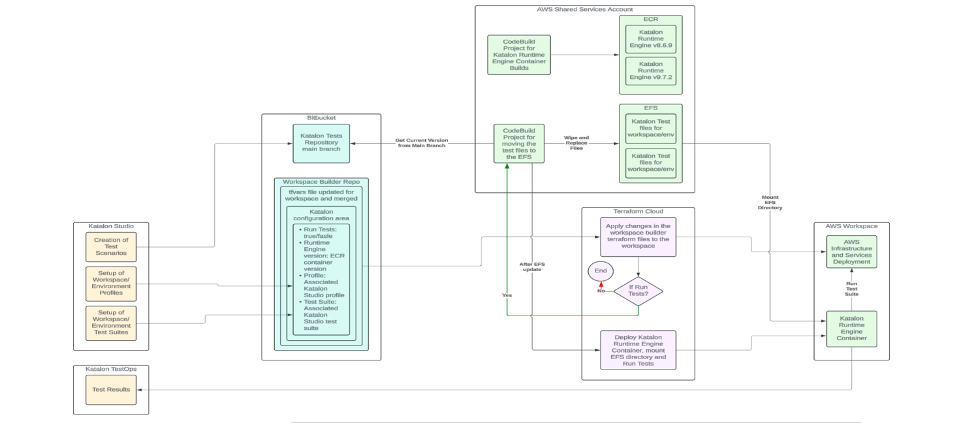
Core Design (From the Pipeline Concept)
- KRE container builds are versioned in ECR to match KRE versions.
- Katalon test files sync to EFS (e.g., via a Lambda trigger on main merges).
- TestOps is prepped with Profiles & Suites per workspace/environment.
- IaC tfvars supply:
- katalon_runtime_engine_version
- run_tests = true|false
- Deploy flow:
- After app infrastructure changes, deploy the KRE container.
- Mount the EFS path with the latest tests for that environment.
- Execute the Katalon run command with the selected profile and suite.
- Send results to TestOps (and optionally a team dashboard).
Reports, Artifacts, and Dashboards
- Katalon TestOps receives the run, history, and trends; the runbook’s screenshots show how a Test Run report appears after CodeBuild runs. See the report snapshot in Fig. 6.
- If you store JUnit/HTML outputs in a known path (/tests/Reports), configure your Octopus step to collect artifacts so they’re visible from the release page.
- For inline KRE, you can publish a summary markdown to the Octopus output and a link to the TestOps run.
Optional: Add a Lighthouse performance gate from Katalon
If you’re deploying web apps, you can launch Google Lighthouse from Katalon and treat performance/SEO as first-class gates. The how-to document provides:
- CLI flags to run Lighthouse headlessly or in desktop/mobile modes, with guidance on conflicts (e.g., don’t combine
--preset=desktopwith--form-factor=mobile). - A full Groovy script to run Lighthouse from Katalon, parse JSON, check thresholds, and mark the build PASS/FAIL — handy to wire into the same Octopus step.
- Practical tips and troubleshooting (version checks, headless mode, debug flow).
Example thresholds (tune to your risk appetite):
- Performance ≥ 80
- Accessibility ≥ 85
- Best Practices ≥ 90
- SEO ≥ 75
The report can be saved as JSON and attached as an Octopus artifact.
Operational Tips and Guardrails
- Start with smoke tests: Time-bounded suites (<5–10 min) keep deployments fast. The internal guide demonstrates a smoke-first approach.
- Pin KRE versions: Build and tag ECR images with explicit KRE versions, so upgrades are controlled per environment.
- IaC switches: Add a run_tests tfvar and enforce it in your Octopus variable scoping to enable/disable gates per lifecycle.
- Make failures obvious: Map non-zero exit codes to step failure; attach summarized HTML/JUnit; link to TestOps.
- Keep logs searchable: CI/CodeBuild shows granular phase logs; use them when diagnosing flaky tests or environment drift.
Conclusion
By letting Octopus call Katalon (and optionally Lighthouse) as first-class release steps, you transform your pipeline from “deploy-and-fingers-crossed moments” to deploy-and-verify. Start simple by triggering CI for smoke tests, then gradually evolve toward inline KRE with versioned containers, IaC toggles, and performance gates. The result is faster feedback, repeatable quality, and a release process that the engineers would trust.
Opinions expressed by DZone contributors are their own.
Comments