

How to Build an MCP Server and Client With Spring AI MCP
Benefit from a cohesive system where individual components, such as LLM, MCP server, and MCP client, integrate seamlessly to deliver meaningful results.
 CORE
·
CORE
·
Join the DZone community and get the full member experience.
Join For FreeIf it’s spring, it’s usually conference time in Bucharest, Romania. This year was, as always, full of great speakers and talks. Nevertheless, Stephan Janssen’s one, where the audience met the Devoxx Genie IntelliJ plugin he has been developing, was by far my favorite. The reason I mention it is that during his presentation, I heard about Anthropic’s Model Context Protocol (MCP) for the first time. Quite late though, considering it was released last year in November. Anyway, to me, the intent of standardizing how additional context could be brought into AI applications to enrich and enhance their accuracy was basically what’s been missing from the picture. With this aspect in mind, I have been motivated enough to start studying about MCP and to experiment with how its capabilities can improve AI applications.
In this direction, from high-level concepts to its practical use when integrated in AI applications, MCP has really caught my attention. The result: a series of articles.
The first one — Enriching AI with Real-Time Insights via MCP — provided general insights regarding MCP and its architecture. It also exemplified how Claude Desktop can leverage it to gain access to real-time web search only via configuration and a dedicated MCP server plug-in.
The second — Turn SQL into Conversation: Natural Language Database Queries With MCP — showed how PostgreSQL MCP Server can access private databases and enable LLMs to inspect them and offer useful pieces of information. Very little to no code was written in these two, and still ,the outcome obtained was quite promising.
In the third article, How to Build an MCP Server with Java SDK, an identical database to the one in the previous article was used, but this time the MCP server was developed from scratch, using only the Java SDK. Basically, it exposed several tools that allowed the AI assistant to access an external system via MCP over stdio transport and fetch accurate context as needed.
This article, the fourth, is the most complex one in the series in terms of the code written, as it exemplifies an end-to-end use case, and the components are developed from scratch:
- An MCP server that connects to a PostgreSQL database and exposes tools that deliver pieces of information to a peer MCP client
- An AI chat client integrated with OpenAI, which, by enclosing an MCP client, allows enriching the context with data provided by the MCP Server
Both are web applications, developed using Spring Boot, Spring AI, and Spring AI MCP. In terms of MCP, the transport layer, the entity responsible for handling the communication between the client and the server is HTTP and Server-Sent Events (HTTP + SSE), which holds a stateful 1:1 connection between the two.
Concerning the actual data that enriches the context, it resides in a simple PostgreSQL database schema. The access is accomplished via the great and lightweight asentinel-orm open-source tool. Being built on top of Spring JDBC and possessing most of the features of a basic ORM, it fits nicely into the client application.
Use Case
Working in the domain of telecom expense management, the experiment in this article uses data that models telecom invoices. Let’s assume a user can access a database that contains a simple schema with data related to these. The goal is to use the AI chat client and ask the LLM to compile several key insights about particular invoices, insights that may be further useful when compiling business decisions.
Considering the PostgreSQL database server is up and running, one may create this simple schema.
create schema mcptelecom;Everything is simplified, so it’s easier to follow. There is only one entity — Invoice — while its attributes are descriptive and straightforward. The database initialization can be done with the script below.
drop table if exists invoices cascade;
create table if not exists invoices (
    id serial primary key,
    number varchar not null unique,
    date date not null,
    vendor varchar not null,
    service varchar not null,
    status varchar not null,
    amount numeric(18, 2) default 0.0 not null
);
Although not much, the following experimental data is more than enough for the exemplification here; nevertheless, one may add more or make modifications, as appropriate.
insert into invoices (number, date, vendor, service, status, amount)
values ('vdf-voip-7', '2025-07-01', 'VODAFONE', 'VOIP', 'REVIEWED', 157.50);
insert into invoices (number, date, vendor, service, status, amount)
values ('vdf-int-7', '2025-07-01', 'VODAFONE', 'INTERNET', 'PAID', 23.50);
insert into invoices (number, date, vendor, service, status, amount)
values ('org-voip-7', '2025-07-01', 'ORANGE', 'VOIP', 'APPROVED', 146.60);
insert into invoices (number, date, vendor, service, status, amount)
values ('org-int-7', '2025-07-01', 'ORANGE', 'INTERNET', 'PAID', 30.50);

insert into invoices (number, date, vendor, service, status, amount)
values ('vdf-voip-8', '2025-08-01', 'VODAFONE', 'VOIP', 'PAID', 135.50);
insert into invoices (number, date, vendor, service, status, amount)
values ('vdf-int-8', '2025-08-01', 'VODAFONE', 'INTERNET', 'APPROVED', 15.50);
insert into invoices (number, date, vendor, service, status, amount)
values ('org-voip-8', '2025-08-01', 'ORANGE', 'VOIP', 'REVIEWED', 147.60);
insert into invoices (number, date, vendor, service, status, amount)
values ('org-int-8', '2025-08-01', 'ORANGE', 'INTERNET', 'PAID', 14.50);
Briefly, there are invoices from two vendors, from July and August 2025, on two different services —VOIP and Internet — some of them still under review, others approved or paid.
There is no doubt that without “connecting” the OpenAI LLM with the private database, the assistant cannot be of much help, as it has no knowledge about the particular invoices. As previously stated, the goal is to put these in relation via MCP, more precisely by developing an MCP server that exposes tools through which the LLM knowledge could be enriched. Then, the MCP server is to be used by the MCP client as needed.
According to the documentation [Resource 3], “Java SDK for MCP enables standardized integration between AI models and tools.” This is exactly what’s aimed here.
Developing the MCP Server
The purpose is to develop an MCP Server that can read pieces of information about the invoices located in the PostgreSQL database. Once available, the server is checked using the MCP Inspector [Resource 2], a very useful tool for testing or debugging such components. Eventually, the MCP Server is used by the MCP Client described in the next section via HTTP+SSE.
The server project set-up is the following:
- Java 21
- Maven 3.9.9
- Spring Boot – 3.5.3
- Spring AI – v. 1.0.0
- PostgreSQL Driver – v. 42.7.7
- Asentinel ORM – v. 1.71.0
The project is named mcp-sb-server and to be sure of the recommended spring dependencies used, the spring-ai-bom configured in the pom.xml file.
<dependencyManagement>
    <dependencies>
        <dependency>
            <groupId>org.springframework.ai</groupId>
            <artifactId>spring-ai-bom</artifactId>
            <version>${spring-ai.version}</version>
            <type>pom</type>
            <scope>import</scope>
        </dependency>
    </dependencies>
</dependencyManagement>
The leading dependency of this project is the Spring AI MCP Server Boot Starter that comes with the well-known and convenient capability of automatic components’ configuration, which easily allows setting up an MCP server in Spring Boot applications.
<dependency>
    <groupId>org.springframework.ai</groupId>
    <artifactId>spring-ai-starter-mcp-server-webmvc</artifactId>
</dependency>
As the communication is over HTTP, the WebMVC server transport is used. The starter activates McpWebMvcServerAutoConfiguration and provides HTTP-based transport using Spring MVC and automatically configured SSE endpoints. It also brings into the picture an optional STDIO transport (through McpServerAutoConfiguration) which can be enabled or disabled via the spring.ai.mcp.server.stdio property, nevertheless, it will not be used here.
In order to be able to read the PostgreSQL database schema, the designated postgresql dependency is added, together with the ORM tool. spring-boot-starter-jdbc is present to ensure the automatic DataSource configuration.
<dependency>
    <groupId>org.springframework.boot</groupId>
    <artifactId>spring-boot-starter-jdbc</artifactId>
</dependency>
<dependency>
    <groupId>com.asentinel.common</groupId>
    <artifactId>asentinel-common</artifactId>
    <version>1.71.0</version>
</dependency>
<dependency>
    <groupId>org.postgresql</groupId>
    <artifactId>postgresql</artifactId>
</dependency>
As I already mentioned in a previous article, I see the MCP servers’ implementation split very clearly into two sections. The former is an MCP-specific one that is pretty similar irrespective of the particular tools’ details, while the latter focuses on the actual functionality that is almost unrelated to MCP.
To configure the MCP Server, a few properties prefixed by spring.ai.mcp.server are added into the application.properties file. Let’s take them in order.
spring.ai.mcp.server.name=mcp-invoice-server
spring.ai.mcp.server.type=sync
spring.ai.mcp.server.version=1.0.0
spring.ai.mcp.server.instructions=Instructions - SSE endpoint: /mcp/invoices/sse, SSE message endpoint: /mcp/invoices/messages

spring.ai.mcp.server.sse-message-endpoint=/mcp/invoices/messages
spring.ai.mcp.server.sse-endpoint=/mcp/invoices/sse

spring.ai.mcp.server.capabilities.tool=true
spring.ai.mcp.server.capabilities.completion=false
spring.ai.mcp.server.capabilities.prompt=false
spring.ai.mcp.server.capabilities.resource=false
In addition to the server’s name and type, which are obvious, the ones that designate the version and the instructions are pretty important. The version of the instance is sent to clients and used for compatibility checks, while the instructions property provides guidance upon initialization and allows clients to get hints on how to utilize the server.
spring.ai.mcp.server.sse-message-endpoint is the endpoint path for Server-Sent Events (SSE) when using web transports, while spring.ai.mcp.server.sse-endpoint is the one the MCP client will use as the communication endpoint. Later in the article, we will see how an HTTP-based session for sending messages is created and how async responses are processed while sending POST JSON requests.
The last four properties in the above snippet define the server capabilities. Here, only tools are exposed.
Next, a ToolCallbackProvider is registered, which communicates to Spring AI the beans that are exposed as MCP services. A MethodToolCallbackProvider implementation is configured, which builds instances from @Tool annotated methods.
@Configuration
public class McpConfig {

    @Bean
    public ToolCallbackProvider toolCallbackProvider(InvoiceTools invoiceTools) {
        return MethodToolCallbackProvider.builder()
                .toolObjects(invoiceTools)
                .build();
    }
}
The tools’ configuration is further implemented in the component below.
@Component
public class InvoiceTools {

    private final InvoiceService invoiceService;

    public InvoiceTools(InvoiceService invoiceService) {
        this.invoiceService = invoiceService;
    }

    @Tool(name = "get-invoices-by-pattern",
            description = "Filters invoices by the provided pattern")
    public List<Invoice> invoicesBy(@ToolParam(description = "The pattern looked up when filtering") String pattern) {
        return invoiceService.findByPattern(pattern);
    }
}
We specify the name and the description of the tool, together with its parameters, if any. The tool in this MCP server is very simple; it returns invoices by a pattern that is looked up in their number attribute. The result is a list of database entities that are further sent to the client application and used by the LLM to have a better view of the context.
With this, the MCP server-specific implementation is completed. Although straightforward with only a few lines of code needed, conceptually, there is quite a lot to cover and configure. Spring in general and Spring AI MCP in particular seem magical (it actually is!), but a thorough understanding of the concepts is needed once the enthusiasm passes, so that the developed applications are robust enough and ready for production.
In order to complete the implementation and Invoice entities delivered to clients via MCP, an InvoiceService is developed.
Data source properties are set in application.properties file.
spring.datasource.url=jdbc:postgresql://localhost:5432/postgres?currentSchema=mcptelecom
spring.datasource.username=${POSTGRES_USER}
spring.datasource.password=${POSTGRES_PASSWORD}
The Invoice entities are mapped over the aforementioned Invoices table and modeled as below.
import com.asentinel.common.orm.mappers.Column;
import com.asentinel.common.orm.mappers.PkColumn;
import com.asentinel.common.orm.mappers.Table;

@Table("Invoices")
public class Invoice {

    public static final String COL_NUMBER = "number";

    @PkColumn("id")
    private int id;

    @Column(value = COL_NUMBER)
    private String number;

    @Column("date")
    private LocalDate date;

    @Column("vendor")
    private Vendor vendor;

    @Column("service")
    private Service service;

    @Column("status")
    private Status status;

    @Column("amount")
    private double amount;

    public enum Vendor {
        VODAFONE, ORANGE
    }

    public enum Service {
        VOIP, INTERNET
    }

    public enum Status {
        REVIEWED, APPROVED, PAID
    }
    ...
}
InvoiceService declares a single method, the one invoked above by the get-invoices-by-pattern tool.
import com.asentinel.common.orm.OrmOperations;

@Service
public class InvoiceService {

    private final OrmOperations orm;

    public InvoiceService(OrmOperations orm) {
        this.orm = orm;
    }

    public List<Invoice> findByPattern(String pattern) {
        return orm.newSqlBuilder(Invoice.class)
                .select()
                .where()
                .column(Invoice.COL_NUMBER).like('%' + pattern + '%')
                .exec();
    }
}
Ultimately, in order to use an OrmOperations instance and inject it into the service, it shall first be configured.
@Configuration
public class OrmConfig {

    @Bean
    public JdbcFlavor jdbcFlavor() {
        return new PostgresJdbcFlavor();
    }

    @Bean
    public JdbcOperations jdbcOperations(DataSource dataSource,
                                         JdbcFlavor jdbcFlavor) {
        PgEchoingJdbcTemplate template =  new PgEchoingJdbcTemplate(dataSource);
        template.setJdbcFlavor(jdbcFlavor);
        return template;
    }

    @Bean
    public SqlQuery sqlQuery(JdbcFlavor jdbcFlavor,
                             JdbcOperations jdbcOps) {
        return new SqlQueryTemplate(jdbcFlavor, jdbcOps);
    }

    @Bean
    public SqlFactory sqlFactory(JdbcFlavor jdbcFlavor) {
        return new DefaultSqlFactory(jdbcFlavor);
    }

    @Bean
    public DefaultEntityDescriptorTreeRepository entityDescriptorTreeRepository(SqlBuilderFactory sqlBuilderFactory) {
        DefaultEntityDescriptorTreeRepository treeRepository = new DefaultEntityDescriptorTreeRepository();
        treeRepository.setSqlBuilderFactory(sqlBuilderFactory);
        return treeRepository;
    }

    @Bean
    public DefaultSqlBuilderFactory sqlBuilderFactory(@Lazy EntityDescriptorTreeRepository entityDescriptorTreeRepository,
                                                      SqlFactory sqlFactory,
                                                      SqlQuery sqlQuery) {
        DefaultSqlBuilderFactory sqlBuilderFactory = new DefaultSqlBuilderFactory(sqlFactory, sqlQuery);
        sqlBuilderFactory.setEntityDescriptorTreeRepository(entityDescriptorTreeRepository);
        return sqlBuilderFactory;
    }

    @Bean
    public OrmOperations orm(SqlBuilderFactory sqlBuilderFactory,
                             JdbcFlavor jdbcFlavor,
                             SqlQuery sqlQuery) {
        return new OrmTemplate(sqlBuilderFactory, new SimpleUpdater(jdbcFlavor, sqlQuery));
    }
}
Although quite verbose at first glance, for a more thorough understanding, one might explore the configuration above in detail by referring to asentinel-orm project [Resource 5].
To check that the data is successfully retrieved from the database in accordance with the particular use case, the following simple test is run.
@SpringBootTest
class InvoiceServiceTest {

    @Autowired
    private InvoiceService invoiceService;

    @Test
    void findByPattern() {
        var pattern = "voip";
        List<Invoice> invoices = invoiceService.findByPattern(pattern);
        Assertions.assertTrue(invoices.stream()
                .allMatch(i -> i.getNumber().contains(pattern)));
    }
}
At this point, the mcp-sb-server implementation is finished and ready to be run on port 8081.
Testing the MCP Server With MCP Inspector
As already stated, MCP Inspector is an excellent tool for testing and debugging MCP servers. Its documentation clearly describes the needed prerequisites to run it and provides details on the available configurations.
It can be started with the following command.
C:\Users\horatiu.dan>npx @modelcontextprotocol/inspector
Starting MCP inspector...
Proxy server listening on localhost:6277
Session token: 3c672c3389d66786f32ffe2f90d6d2116634bef316a09198fb6e933a5eeefe2b
Use this token to authenticate requests or set DANGEROUSLY_OMIT_AUTH=true to disable auth

MCP Inspector is up and running at:
http://localhost:6274/?MCP_PROXY_AUTH_TOKEN=3c672c3389d66786f32ffe2f90d6d2116634bef316a09198fb6e933a5eeefe2b
Once the MCP Inspector is up and running, it can be accessed using the above link. Prior to connecting to the developed MCP server, though, there are some prerequisites:
- Transport Type:
SSE - URL:
http://localhost:8081/mcp/invoices/sse
Once successfully connected, one can observe the following in the mcp-sb-server logs, which means the session has been created.
[mcp-sb-server] [nio-8081-exec-2] i.m.s.t.WebMvcSseServerTransportProvider : Creating new SSE connection for session: ffdd13e8-ad1f-4e5d-9c0a-ad001d4081f6
[mcp-sb-server] [nio-8081-exec-2] i.m.s.t.WebMvcSseServerTransportProvider : Session transport ffdd13e8-ad1f-4e5d-9c0a-ad001d4081f6 initialized with SSE builder
[mcp-sb-server] [nio-8081-exec-5] i.m.server.McpAsyncServer                : Client initialize request - Protocol: 2025-06-18, Capabilities: ClientCapabilities[experimental=null, roots=RootCapabilities[listChanged=true], sampling=Sampling[]], Info: Implementation[name=mcp-inspector, version=0.16.2]
[mcp-sb-server] [nio-8081-exec-5] i.m.s.t.WebMvcSseServerTransportProvider : Message sent to session ffdd13e8-ad1f-4e5d-9c0a-ad001d4081f6
Next, the tools can be listed and also tried out.
The picture below exemplifies the execution of get-invoices-by-pattern tool, which returns two invoices when the provided pattern is voip-7.
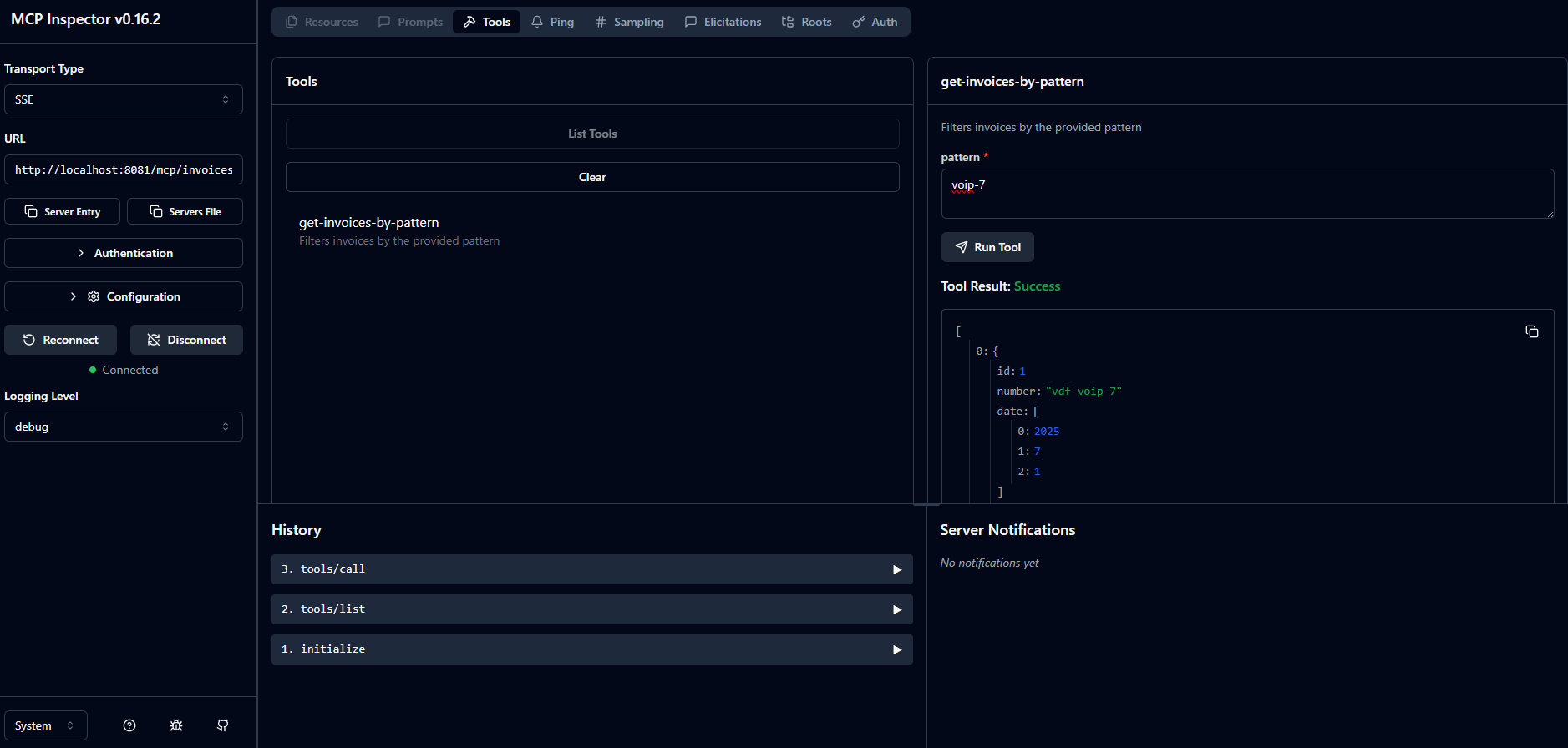
Testing the MCP Server Usage via SSE and JSON-RPC Over HTTP
At the beginning of the MCP server implementation, the SSE endpoints were set in the application.properties file.
spring.ai.mcp.server.sse-message-endpoint=/mcp/invoices/messages
spring.ai.mcp.server.sse-endpoint=/mcp/invoices/sse
When sending HTTP POST requests, the server uses Server-Sent Events for session-based communication, and asynchronous responses may be observed in the browser, once the session exists.
With the MCP server running, a session is created by invoking the designated endpoint from the browser.
http://localhost:8081/mcp/invoices/sseIn the server logs, the following lines appear:
[mcp-sb-server] [nio-8081-exec-7] i.m.s.t.WebMvcSseServerTransportProvider : Creating new SSE connection for session: 7bd2d41c-8643-41e6-9aa3-0b2a3e4496b4
[mcp-sb-server] [nio-8081-exec-7] i.m.s.t.WebMvcSseServerTransportProvider : Session transport 7bd2d41c-8643-41e6-9aa3-0b2a3e4496b4 initialized with SSE builder
And the response is shown in the browser:
id:7bd2d41c-8643-41e6-9aa3-0b2a3e4496b4
event:endpoint
data:/mcp/invoices/messages?sessionId=7bd2d41c-8643-41e6-9aa3-0b2a3e4496b4
One may observe that data is populated with exactly the endpoint configured above, together with the sessionId request parameter.
If sending an initialization request:
POST http://localhost:8081/mcp/invoices/messages?sessionId=7bd2d41c-8643-41e6-9aa3-0b2a3e4496b4
Accept: application/json

{
  "jsonrpc": "2.0",
  "id": 0,
  "method": "initialize",
  "params": {
    "protocolVersion": "2024-11-05",
    "clientInfo": {
      "name": "Exploratory MCP Client",
      "version": "1.0.0"
    }
  }
}
The server logs display:
[mcp-sb-server] [io-8081-exec-10] i.m.server.McpAsyncServer : Client initialize request - Protocol: 2024-11-05, Capabilities: null, Info: Implementation[name=Exploratory MCP Client, version=1.0.0]
[mcp-sb-server] [io-8081-exec-10] i.m.s.t.WebMvcSseServerTransportProvider : Message sent to session 7bd2d41c-8643-41e6-9aa3-0b2a3e4496b4
and a new message appears in the browser window:
id:7bd2d41c-8643-41e6-9aa3-0b2a3e4496b4
event:message
data:{"jsonrpc":"2.0","id":0,"result":{"protocolVersion":"2024-11-05","capabilities":{"logging":{},"tools":{"listChanged":true}},"serverInfo":{"name":"mcp-invoice-server","version":"1.0.0"},"instructions":"Instructions - SSE endpoint: /mcp/invoices/sse, SSE message endpoint: /mcp/invoices/messages"}}
To initialize the notifications retrieval, execute:
POST http://localhost:8081/mcp/invoices/messages?sessionId=7bd2d41c-8643-41e6-9aa3-0b2a3e4496b4
Accept: application/json

{
  "jsonrpc": "2.0",
  "method": "notifications/initialized"
}
To list the available tools, execute:
POST http://localhost:8081/mcp/invoices/messages?sessionId=7bd2d41c-8643-41e6-9aa3-0b2a3e4496b4
Accept: application/json

{
  "jsonrpc": "2.0",
  "id": "1",
  "method": "tools/list",
  "params": {}
}
and observe the response in the browser:
id:7bd2d41c-8643-41e6-9aa3-0b2a3e4496b4
event:message
data:{"jsonrpc":"2.0","id":"2","result":{"tools":[{"name":"get-invoices-by-pattern","description":"Filters invoices by the provided pattern","inputSchema":{"type":"object","properties":{"pattern":{"type":"string","description":"The pattern looked up when filtering"}},"required":["pattern"],"additionalProperties":false}}]}}
To invoke the get-invoices-by-pattern tool, execute:
POST http://localhost:8081/mcp/invoices/messages?sessionId=7bd2d41c-8643-41e6-9aa3-0b2a3e4496b4
Accept: application/json

{
  "jsonrpc": "2.0",
  "id": "2",
  "method": "tools/call",
  "params": {
    "name": "get-invoices-by-pattern",
    "arguments": {
        "pattern": "voip-7"
    }
  }
}
and observe the response in the browser:
id:7bd2d41c-8643-41e6-9aa3-0b2a3e4496b4
event:message
data:{"jsonrpc":"2.0","id":"2","result":{"content":[{"type":"text","text":"[{\"id\":1,\"number\":\"vdf-voip-7\",\"date\":[2025,7,1],\"vendor\":\"VODAFONE\",\"service\":\"VOIP\",\"status\":\"REVIEWED\",\"amount\":157.5},{\"id\":3,\"number\":\"org-voip-7\",\"date\":[2025,7,1],\"vendor\":\"ORANGE\",\"service\":\"VOIP\",\"status\":\"APPROVED\",\"amount\":146.6}]"}],"isError":false}}
Obviously, the same result as in the case of the MCP Inspector is obtained.
The conclusion is that the developed MCP server is tested and works as expected; it can now be actually used.
Developing the AI Chat Client
It’s a minimal web application that leverages Spring AI and allows users to communicate with OpenAI. The functionality here is straightforward; however, the emphasis is on the LLM response quality within a very specific scenario, as the MCP server is plugged in.
Let’s imagine a user is interested in finding out a few key insights about certain telecom invoices (for example, whose invoice numbers contain a pattern) and, moreover, restricted to a particular month of the year.
Could the LLM compile such pieces of information on its own? Not quite, but that’s the reason the previous MCP server was developed: to make this context available to the LLM so that it can take it from there.
Briefly, data flows in the following manner:
- The user issues a parameterized HTTP request –
GET /assistant/invoice-insights?month=July&year=2025&pattern=vdf. - The client application uses a prompt to create the previously mentioned input: "Give me some key insights about the invoices that contain ‘{pattern}’ in their number. If available, use year {year} and month {month} when analyzing."
- The client application sends it to the LLM, which provides its output that is further returned to the client as a response.
The client project set-up is the following:
- Java 21
- Maven 3.9.9
- Spring Boot 3.5.3
- Spring AI 1.0.0
The project is named mcp-sb-client and as in the case of the server the spring-ai-bom configured in the pom.xml file.
In addition to spring-ai-starter-model-openai dependency, the one of interest here is
<dependency>
    <groupId>org.springframework.ai</groupId>
    <artifactId>spring-ai-starter-mcp-client</artifactId>
</dependency>
which allows connecting to the MCP server via stdio or SSE transports. As the communication is done over HTTP, the latter is considered. The SSE connection uses the HttpClient transport implementation and for every connection to an MCP server, a new MCP client instance is created.
To configure the MCP client, a few properties prefixed by spring.ai.mcp.client can be added to the application.properties file.
Additionally, the following property indicates the base URL of the MCP server the client connects to, needed when constructing the HttpClientSseClientTransport.
mcp.invoices.server.base-url = http://localhost:8081As already stated, this proof of concept uses OpenAI. In order to be able to connect to the AI model, a valid API key of the user on behalf of which the communication is made should be set in the application.properties file [Resource 1]. To set a bit of the LLM boundaries and not make it too creative, the temperature parameter is configured as well.
spring.ai.openai.api-key = ${OPEN_AI_API_KEY}
spring.ai.openai.chat.options.temperature = 0.3
On my machine, the key is held in the designated environment variable and used when appropriate.
The interaction between the user and the LLM is doable via a ChatClient, that is injected into the below AssistantService.
@Service
public class AssistantService {

    private final ChatClient client;

    public AssistantService(ChatClient.Builder clientBuilder,
                            McpSyncClient mcpSyncClient) {
        client = clientBuilder
                .defaultSystem("You are a helpful assistant with Telecom knowledge")
                .defaultToolCallbacks(new SyncMcpToolCallbackProvider(mcpSyncClient))
                .build();
    }

    public String invoiceInsights(String month, String year, String pattern) {
        final String text = """
                Give me some key insights about the invoices that contain '{pattern}' in their number?
                If available, use year {year} and month {month} when analyzing.
                """;

        return client.prompt()
            .user(userSpec -> userSpec.text(text)
                    .param("month", month)
                    .param("year", year)
                    .param("pattern", pattern))
            .call()
            .content();
    }
}
The focus is not on how the ChatClient is used. If interested in the details, have a look at this article. The focus here is on the McpSyncClient that is packaged into a SyncMcpToolCallbackProvider instance and used when the ChatClient is build.
According to the JavaDoc, a SyncMcpToolCallbackProvider has the purpose of discovering MCP tools from one or more MCP servers. It is basically the Spring AI server tool provider. Very briefly, it connects to the MCP server via a sync client, it lists and reads the available exposed server tools (one in the case of our MCP server), and creates a SyncMcpToolCallback for each. The SyncMcpToolCallback actually connects the MCP tool to Spring AI’s tool system and allows it to be executed seamlessly inside Spring AI applications.
Obviously, tool calls are handled through the MCP client, which is configured as follows.
@Configuration
public class McpConfig {

    @Bean
    public McpSyncClient mcpSyncClient(@Value("${mcp.invoices.server.base-url}") String baseUrl) {
        var transport = HttpClientSseClientTransport.builder(baseUrl)
                .sseEndpoint("mcp/invoices/sse")
                .build();

        McpSyncClient client = McpClient.sync(transport)
                .requestTimeout(Duration.ofSeconds(10))
                .clientInfo(new McpSchema.Implementation("MCP Invoices Client", "1.0.0"))
                .build();

        client.initialize();
        return client;
    }
}
As the client application is a web one as well (running on port 8080), the AssistantService is plugged into a @RestController, to easily interact with it.
@RestController
public class AssistantController {

    private final AssistantService assistantService;

    public AssistantController(AssistantService assistantService) {
        this.assistantService = assistantService;
    }

    @GetMapping("/invoice-insights")
    public ResponseEntity<String> invoicesInsights(@RequestParam(defaultValue = "") String month,
            @RequestParam(defaultValue = "") String year,
            @RequestParam String pattern) {
        return ResponseEntity.ok(assistantService.invoiceInsights(month, year, pattern));
    }
}
The MCP client and server are now connected; the outcome may be examined.
The Results
To use the integration, one may first run the MCP server. When the MCP Client starts as well, the following lines appear in the logs.
2025-08-05T16:40:10.891+03:00 DEBUG 56796 --- [mcp-sb-server] [nio-8081-exec-1] i.m.s.t.WebMvcSseServerTransportProvider : Creating new SSE connection for session: c0eee498-ffdf-4f4e-bfbd-d5b683154e9b
2025-08-05T16:40:10.901+03:00 DEBUG 56796 --- [mcp-sb-server] [nio-8081-exec-1] i.m.s.t.WebMvcSseServerTransportProvider : Session transport c0eee498-ffdf-4f4e-bfbd-d5b683154e9b initialized with SSE builder
2025-08-05T16:40:10.994+03:00  INFO 56796 --- [mcp-sb-server] [nio-8081-exec-2] i.m.server.McpAsyncServer                : Client initialize request - Protocol: 2024-11-05, Capabilities: ClientCapabilities[experimental=null, roots=null, sampling=null], Info: Implementation[name=MCP Invoices Client, version=1.0.0]
2025-08-05T16:40:11.006+03:00 DEBUG 56796 --- [mcp-sb-server] [nio-8081-exec-2] i.m.s.t.WebMvcSseServerTransportProvider : Message sent to session c0eee498-ffdf-4f4e-bfbd-d5b683154e9b2025-08-05T16:40:11.053+03:00 INFO 11104 --- [mcp-sb-client] [ient-3-Worker-2] i.m.client.McpAsyncClient : Server response with Protocol: 2024-11-05, Capabilities: ServerCapabilities[completions=null, experimental=null, logging=LoggingCapabilities[], prompts=null, resources=null, tools=ToolCapabilities[listChanged=true]], Info: Implementation[name=mcp-invoice-server, version=1.0.0] and Instructions Instructions - SSE endpoint: /mcp/invoices/sse, SSE message endpoint: /mcp/invoices/messageswhich demonstrates the connection between the two was successfully initialized.
Let’s observe what happens when the user sends the next request to the client application, which means is interested in insights on the invoices from 2025, but only the ones having the vdf pattern contained in their number. To refresh our memory, there are four such invoices in the database.
GET http://localhost:8080/assistant/invoice-insights?year=2025&pattern=vdfThe response obtained is quite interesting:
Here are the key insights about the invoices that contain 'vdf' in their number for the year 2025:

1. **Total Invoices**: There are 4 invoices that match the pattern 'vdf'.

2. **Invoice Details**:
   - **Invoice 1**:
     - **Number**: vdf-voip-7
     - **Date**: July 1, 2025
     - **Vendor**: VODAFONE
     - **Service**: VOIP
     - **Status**: REVIEWED
     - **Amount**: $157.50

   - **Invoice 2**:
     - **Number**: vdf-int-7
     - **Date**: July 1, 2025
     - **Vendor**: VODAFONE
     - **Service**: INTERNET
     - **Status**: PAID
     - **Amount**: $23.50

   - **Invoice 3**:
     - **Number**: vdf-voip-8
     - **Date**: August 1, 2025
     - **Vendor**: VODAFONE
     - **Service**: VOIP
     - **Status**: PAID
     - **Amount**: $135.50

   - **Invoice 4**:
     - **Number**: vdf-int-8
     - **Date**: August 1, 2025
     - **Vendor**: VODAFONE
     - **Service**: INTERNET
     - **Status**: APPROVED
     - **Amount**: $15.50

3. **Total Amount**: The total amount for these invoices is $332.00.

4. **Status Overview**:
   - 2 invoices are marked as PAID.
   - 1 invoice is marked as REVIEWED.
   - 1 invoice is marked as APPROVED.

5. **Service Breakdown**:
   - VOIP Services: 2 invoices totaling $293.00.
   - INTERNET Services: 2 invoices totaling $39.00.

These insights provide a clear overview of the invoices associated with 'vdf', highlighting the amounts, statuses, and service types.
If recalling from the previous section, get-invoices-by-pattern MCP server tool filters invoices only by pattern, which means the context provided to the OpenAI LLM was ‘enlarged’ with the corresponding invoices. From this point on, it’s the model’s job to add its contribution to the requested analysis. As one may observe, it managed to come up with a decent solution to the user’s enquiry. Nevertheless, without the use of the MCP server, the context would have been almost empty; thus, no conclusions could have been drawn about the invoices in discussion.
Final Considerations
The applications presented in this article illustrate how users can benefit from a cohesive system where individual components integrate seamlessly to deliver meaningful results. With the use of MCP, more exactly by creating a 1:1 stateful connection over HTTP between the MCP server and the MCP client, data from a private database was put into context to help the OpenAI LLM provide the user with business insights related to telecom invoices.
Indeed, this is a simplistic use case, focused on a single specific tool intended to illustrate the purpose. Nevertheless, one may use it as a starting point to explore how MCP works, to understand its architecture, and how MCP can enhance AI applications by leveraging its functionalities.
One last aspect, though, concerns the idea of putting such services into a production environment, a place that programmers really appreciate and value. As these are Spring Web applications, they can be easily secured using Spring Security. In terms of scalability, although HTTP requests towards LLMs and databases use blocking IO, the thread usage can be significantly improved by leveraging Java 21’s virtual threads. Regarding the observability, all requests to an LLM do cost, but fortunately, Spring Boot Actuator can be quickly plugged in to monitor the metrics related to the actual token consumption, and the resource consumption can be optimized.
Resources
- Open AI Platform
- MCP Inspector
- MCP Java SDK Documentation
- Spring AI MCP Reference
- asentinel-orm project
- MCP Invoice Server code
- MCP Invoice Client code
- The picture was taken at Cochem Castle in Germany.
Published at DZone with permission of Horatiu Dan. See the original article here.
Opinions expressed by DZone contributors are their own.
Comments