

Spring Boot 2: Migrating From Dropwizard Metrics to Micrometer
Goodbye Dropwizard, hello Micrometer! Let's take a sneak peek at how to move your metrics to Micrometer for Spring Boot 2 projects.

Join the DZone community and get the full member experience.
Join For FreeSpring Boot 2 is around the corner. One of the minor changes is the replacement of Dropwizard Metrics with Micrometer. The migration path is fairly straightforward, and Micrometer actually provides a cleaner API. With Metrics, you have to inject MetricRegistry wherever you need some metrics (see: Monitoring and measuring reactive application with Dropwizard Metrics). This has many drawbacks:
- We are mixing business and technical dependencies in our components.
- Therefore, I am sometimes reluctant to add new metrics because it requires me to inject
MetricRegistry - Also,
MetricRegistrymust be stubbed in unit tests.
Micrometer's tagline is:
Think SLF4J, but for metrics
It's actually quite accurate. Whenever I need a Logger, I don't inject LoggerFactory. Instead, I simply use static methods available everywhere. The same goes for Micrometer — I simply use static factory methods on the globally available Metrics class:
private final Timer indexTimer = Metrics.timer("es.timer");
private final LongAdder concurrent = Metrics.gauge("es.concurrent", new LongAdder());
private final Counter successes = Metrics.counter("es.index", "result", "success");
private final Counter failures = Metrics.counter("es.index", "result", "failure");
That's it! You can put metrics anywhere you like without polluting your constructor with MetricRegistry. The API is very similar, e.g.:
concurrent.increment()One major difference is gauges vs. counters. In Dropwizard Metrics, counters can go up and down, whereas in Micrometer, counters must increase monotonically. I thought it was a bug... Counter is used in simple scenarios like counting how many requests succeeded. So how can we measure things like the number of concurrent requests or queue length? With gauges, but it's slightly convoluted.
Did you notice how Metrics.gauge() takes a new LongAdder() as an argument? And returns it? This way, we create a gauge that tracks (by periodically polling for value) any instance of the Number class (e.g. AtomicLong or LongAdder). We can modify the returned LongAdder, and its current value will be reflected by the gauge. Neat! Moreover, there are helper methods like gaugeCollectionSize() and gaugeMapSize() that take any Collection or Map, respectively — and are quite self-explanatory.
Micrometer also has a bunch of built-in system and JVM metrics, for example:
LogbackMetrics- number of log messages per each log level. You can watch e.g. error rateProcessorMetrics- average system loadJvmMemoryMetrics- memory usage, split by areaJvmThreadMetrics- number of threads (live, daemon, peak...)JvmGcMetrics- GC promotion rate, etc.
Most of these are registered by default by Spring Boot. The last two of them will be available as well. By having all these metrics, we can actually enhance our dashboard quite a bit:
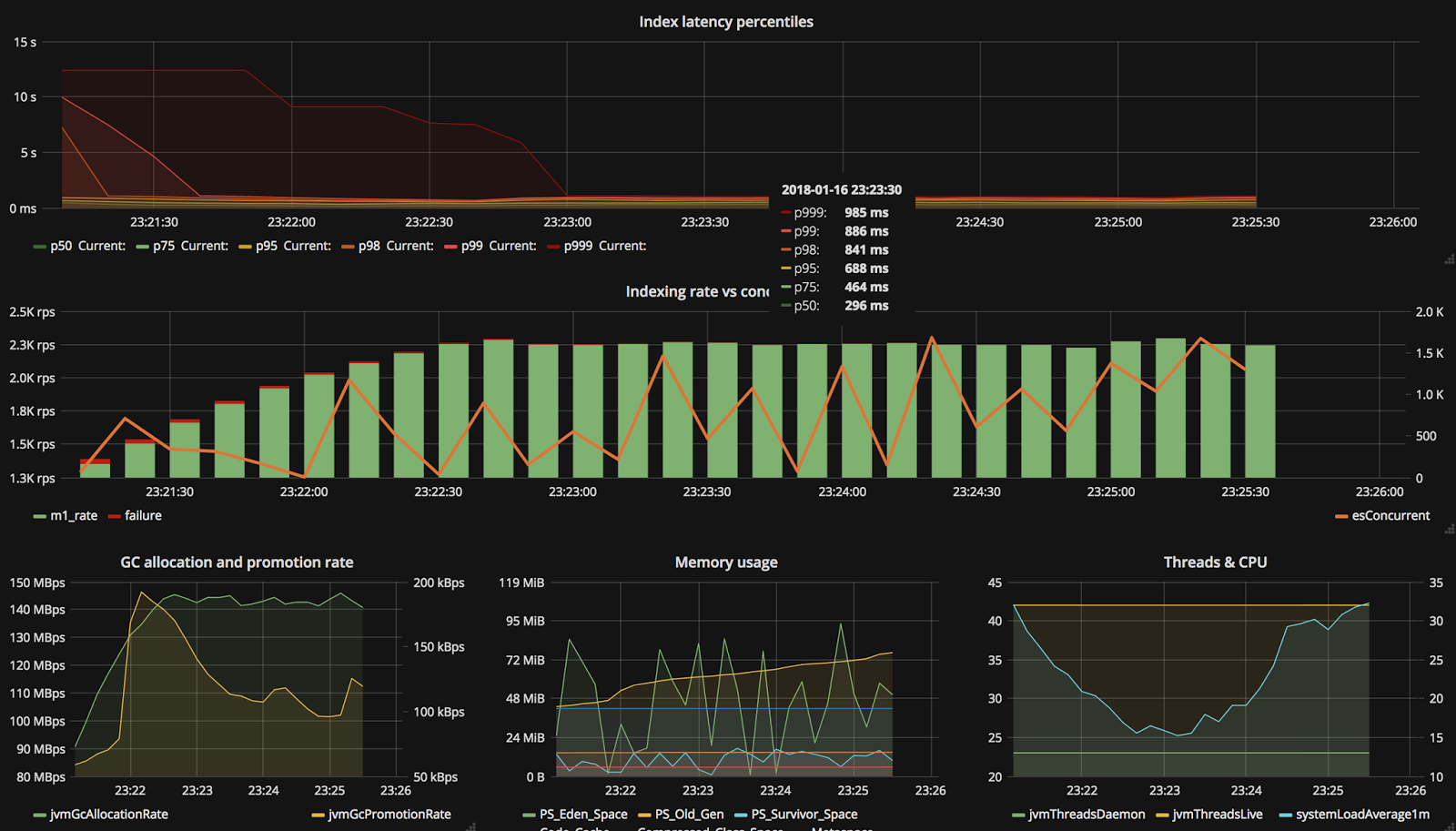
The dashboard definition for Grafana is available on GitHub. Notice how this application uses about 100 MiB of RAM while sustaining almost two thousand concurrent connections(!)? Also, there are fewer than 45 live threads compared to thousands of concurrent connections — impressive.
It's worth mentioning that the setup of Micrometer in Spring Boot is really simple. First, add the appropriate dependency:
compile 'io.micrometer:micrometer-registry-graphite:1.0.0-rc.5'And a bunch of configuration parameters. Zero code:
spring.metrics.export.graphite:
  host: graphite
  port: 2003
  protocol: Plaintext
  step: PT1S
In the last part of this short series, we will wrap everything together in a Spring Web Flux application.
Published at DZone with permission of Tomasz Nurkiewicz. See the original article here.
Opinions expressed by DZone contributors are their own.
Comments