

Transforming Customer Feedback With Automation of Summaries and Labels Using TAG and RAG
Streamline customer feedback analysis, enabling efficient insights extraction from large datasets to enhance decision-making and boost customer engagement.
Join the DZone community and get the full member experience.
Join For FreeIn today’s data-driven landscape, businesses encounter a vast influx of customer feedback through reviews, surveys, and social media interactions. While this information can yield invaluable insights, it also presents a significant challenge: how to distill meaningful data from an overwhelming amount of information. Advanced analytics techniques are revolutionizing our approach to understanding customer sentiment. Among the most innovative are Table-Augmented Generation (TAG) and Retrieval-Augmented Generation (RAG), which enable businesses to derive complex insights from thousands of reviews simultaneously using natural language processing (NLP).
This article delves into the workings of TAG and RAG, their implications for data labeling and Text-to-SQL generation, and their practical applications in real-world scenarios. By providing concrete examples, we illustrate how these technologies can enhance data analysis and facilitate informed decision-making, catering to both seasoned data scientists and newcomers to the field.
Harnessing Retrieval-Augmented Generation (RAG) for Advanced Data Insights
Retrieval-Augmented Generation (RAG) represents a transformative leap in how businesses can extract and interpret vast amounts of data. By combining retrieval mechanisms with the power of language models, RAG allows users to pose natural language questions and receive highly relevant, real-time answers drawn from vast datasets, like customer reviews or product feedback.
This section breaks down the core components of RAG, with each step supported by a visual to illustrate how the process works.
Query Input and Vectorization
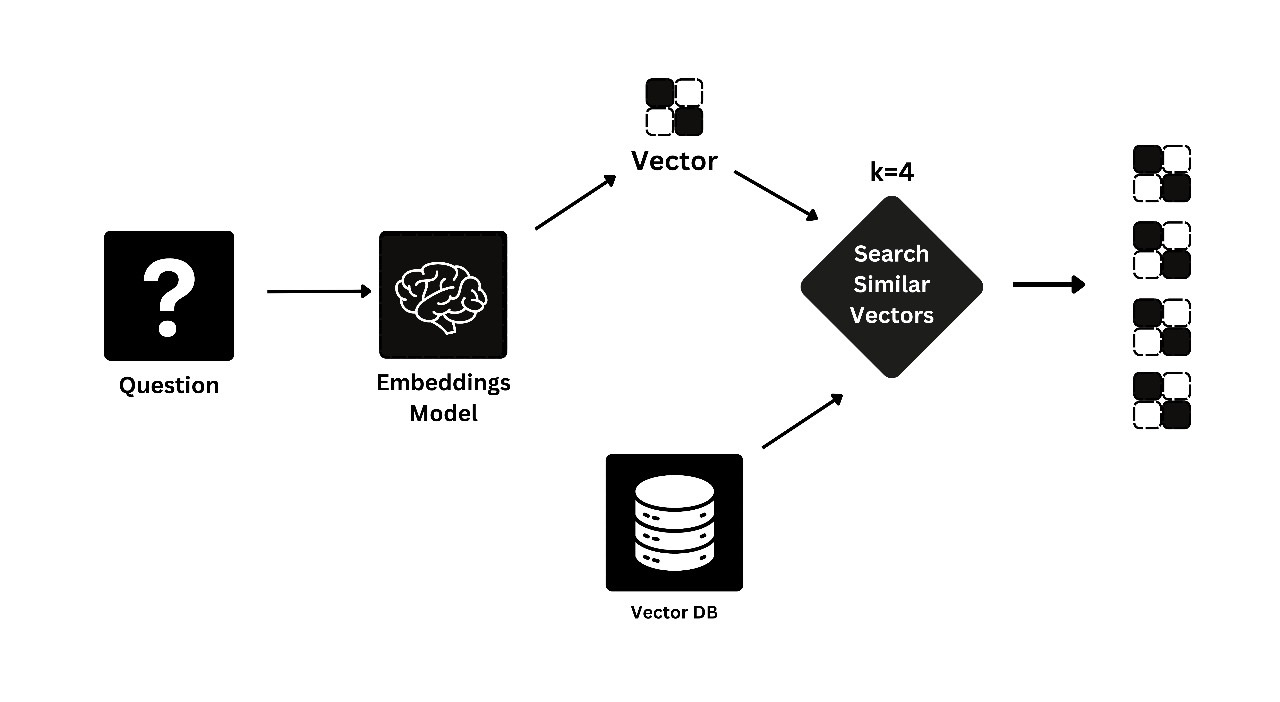
The first step in the RAG process is query input and vectorization. When a user enters a query, such as "What are the best family-friendly hotels?", RAG converts the question into a numerical format known as a vector. This vector represents the meaning of the question and prepares it for the next step: retrieving relevant data.
Image 1: Illustration of Query Input and Vectorization
This image depicts a user typing a query and the subsequent transformation of the query into a vector format. It highlights how the question is encoded into numbers that machines can process.
Context Retrieval From a Vector Database
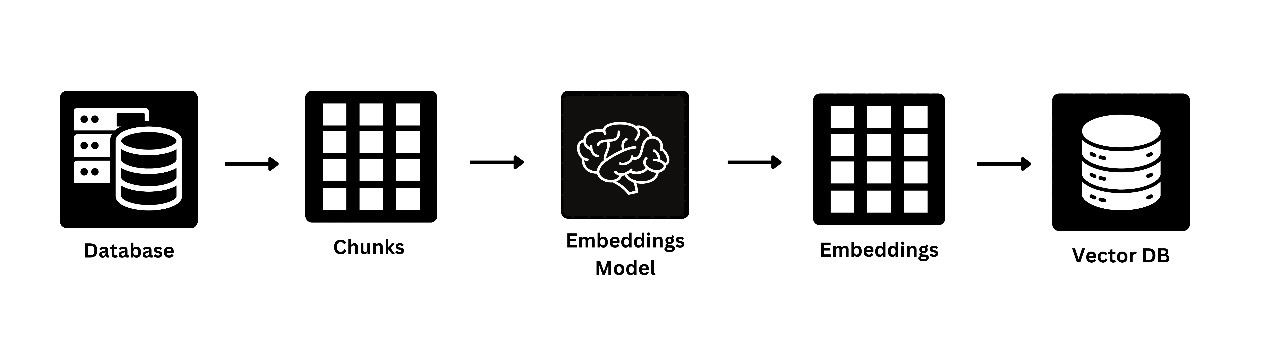
Once the query is vectorized, RAG searches through a pre-existing vector database that contains millions of pre-processed pieces of information (such as customer reviews, product descriptions, etc.). The RAG system identifies data most relevant to the query based on semantic similarity. For example, if someone is asking about family-friendly hotels, RAG pulls reviews that contain terms related to families, kids’ amenities, and family services.
Image 2: Illustration of Context Retrieval from Vector Database
This visual showcases how RAG retrieves relevant reviews or data from a vast vectorized database. You’ll see how the vectorized query is matched with the corresponding relevant data points stored in the system.
Natural Language Answer Generation
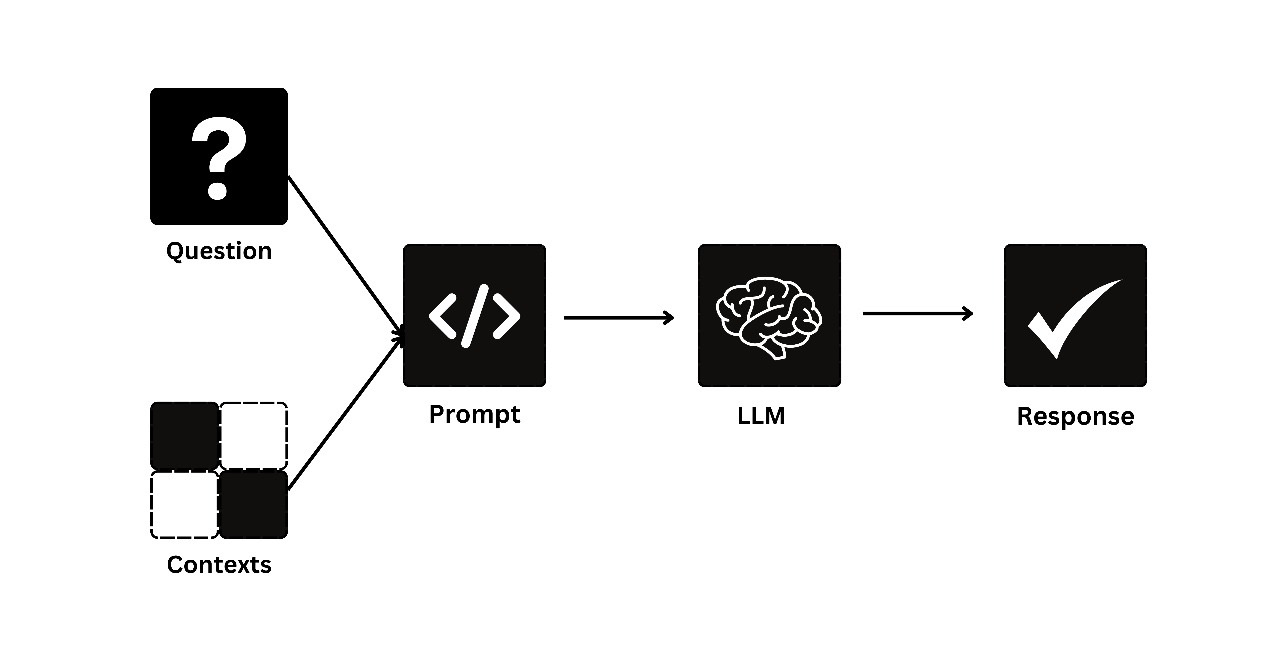
After retrieving the relevant pieces of data, RAG's final step is natural language answer generation. The retrieved reviews are then passed through a language model that synthesizes the data into a coherent, easy-to-read response. The user’s query is answered in natural language, enriched by the context provided by the retrieved data.
Image 3: Illustration of Natural Language Answer Generation
This diagram illustrates how the retrieved data is transformed into a readable, natural language response. It demonstrates how RAG synthesizes meaningful answers from the vast data at its disposal, making complex datasets accessible to non-technical users.
Understanding TAG and Its Role
TAG enhances conventional Text-to-SQL methodologies by creating a structured connection between language models and databases through a systematic three-step process:
- Data relevance and query synthesis: TAG identifies relevant data to address user inquiries, generating optimized SQL queries that align with the underlying database structure.
- Database execution: The generated SQL queries are executed against the datasets, efficiently filtering and retrieving pertinent insights.
- Natural language answer generation: TAG translates processed data into coherent, contextually rich responses, simplifying user interpretation.

The Importance of Data Labeling
Data labeling is vital for organizing and categorizing information, especially within datasets containing unstructured text. This process allows systems to recognize patterns and contexts, significantly enhancing the effectiveness of TAG.
By leveraging data labeling to systematically categorize vast amounts of information, particularly from unstructured text sources, engineering teams can assign meaningful tags to train systems that identify patterns and understand context, thus improving functionalities like search and recommendation systems.
For example, when users enter queries into search engines, data labeling enables the system to deliver the most relevant results by interpreting the intent behind user inputs. Similarly, in social media and e-commerce platforms, labeled data allows for personalized experiences by categorizing content based on user preferences. Thus, data labeling forms the backbone for technology providers to deliver smarter, more efficient services.
Key Benefits of Data Labeling
- Improved accuracy: Labeled data helps machine learning models better understand user intent, leading to more precise SQL query generation.
- Enhanced query relevance: Clear identifiers allow the system to prioritize results, boosting relevance.
- Facilitated user understanding: Labels provide context, aiding users in interpreting data more effortlessly.
Examples of Data Labels in Travel Reviews
- Family-friendly: Identifies hotels with amenities catering to families, such as kids' clubs and babysitting services.
- Pet-friendly: Marks hotels that accommodate pets, offering related services like pet beds and dog parks.
- Luxury: Labels high-end hotels that provide premium services and exclusive facilities.
- Value for money: Highlights affordable options that deliver quality service.
Descriptive labels enable organizations to streamline the retrieval process, ensuring users receive relevant insights promptly.
Leveraging TAG With Travel Review Data
Consider a dataset of travel reviews containing fields like reviewerID, hotelID, reviewerName, reviewText, summary, and overall rating. This structured data forms the basis for generating actionable insights tailored to various user needs.
Step-by-Step Process
Step 1: Data Import and Preparation
The process begins by importing datasets that capture customer sentiments, including overall ratings and feedback. This initial phase typically involves:
- Data Cleaning:
- Removing duplicates: Identify and eliminate duplicate reviews based on
reviewerIDandhotelIDto ensure uniqueness. - Error correction: Detect and correct errors, such as misspellings or inconsistencies in rating scales (e.g., using a 1-5 scale vs. a 0-10 scale).
- Handling missing values: Assess fields like helpful votes and
reviewTextfor missing entries, and deciding on appropriate imputation or removal strategies.
- Removing duplicates: Identify and eliminate duplicate reviews based on
- Preprocessing:
- Text normalization: Standardize text by converting it to lowercase, removing special characters, and ensuring consistent formatting.
- Tokenization: Break down
reviewTextinto individual tokens (words or phrases) for easier analysis. - Stop word removal: Filter out common words that do not contribute meaningfully to the analysis.
- Lemmatization/stemming: Reduce words to their base forms to unify variations.
- NLP Techniques:
- Sentiment analysis: Assign sentiment scores to reviews to evaluate overall customer satisfaction.
- Keyword extraction: Identify key themes in reviews using techniques such as TF-IDF or topic modeling (e.g., LDA).
- Scalability and Performance
- Handling larger datasets:
- Distributed computing: TAG can leverage frameworks like Apache Spark or Dask to process data across multiple nodes, enhancing the handling of large datasets.
- Database optimization: Implement indexing on frequently queried fields to boost search performance.
- Trade-offs:
- Speed vs. Accuracy: Optimizing for performance may expedite query execution but could compromise the depth of insights obtained from complex analyses.
- Resource Utilization: Increased scalability often demands more computational resources, impacting costs. Balancing cost and performance is crucial.
- Handling larger datasets:
Step 2: Query Synthesis
This phase employs a Text-to-SQL approach to convert natural language queries into executable SQL statements.
- Natural Language Processing (NLP):
- Intent analysis: Analyze the user's query to identify the underlying intent (e.g., seeking information on family-friendly hotels).
- Entity recognition: Identify key entities within the query, focusing on keywords related to hotel features.
- Query mapping: TAG maps the user's intent to relevant database tables and fields. For example, if the user queries about family-friendly hotels, TAG recognizes keywords associated with family amenities.
- SQL generation: Based on the mapping, TAG constructs an SQL query. For the user query, "What are the highlights of kid-friendly hotels?" the generated SQL might be:
SELECT hotelID, reviewerName, reviewText, summary, overall
FROM reviews
WHERE reviewText LIKE '%kid-friendly%' OR reviewText ILIKE '%family%'
ORDER BY overall DESC;
This SQL statement retrieves hotels that mention family-friendly features, sorted by ratings, enabling organizations to derive valuable insights from travel review data.
Example Queries
To illustrate how TAG addresses various queries regarding hotel features, consider the following examples:
- Question: What are the highlights of kid-friendly hotels?
- Question: Which hotels are best for dog owners?
Query Execution
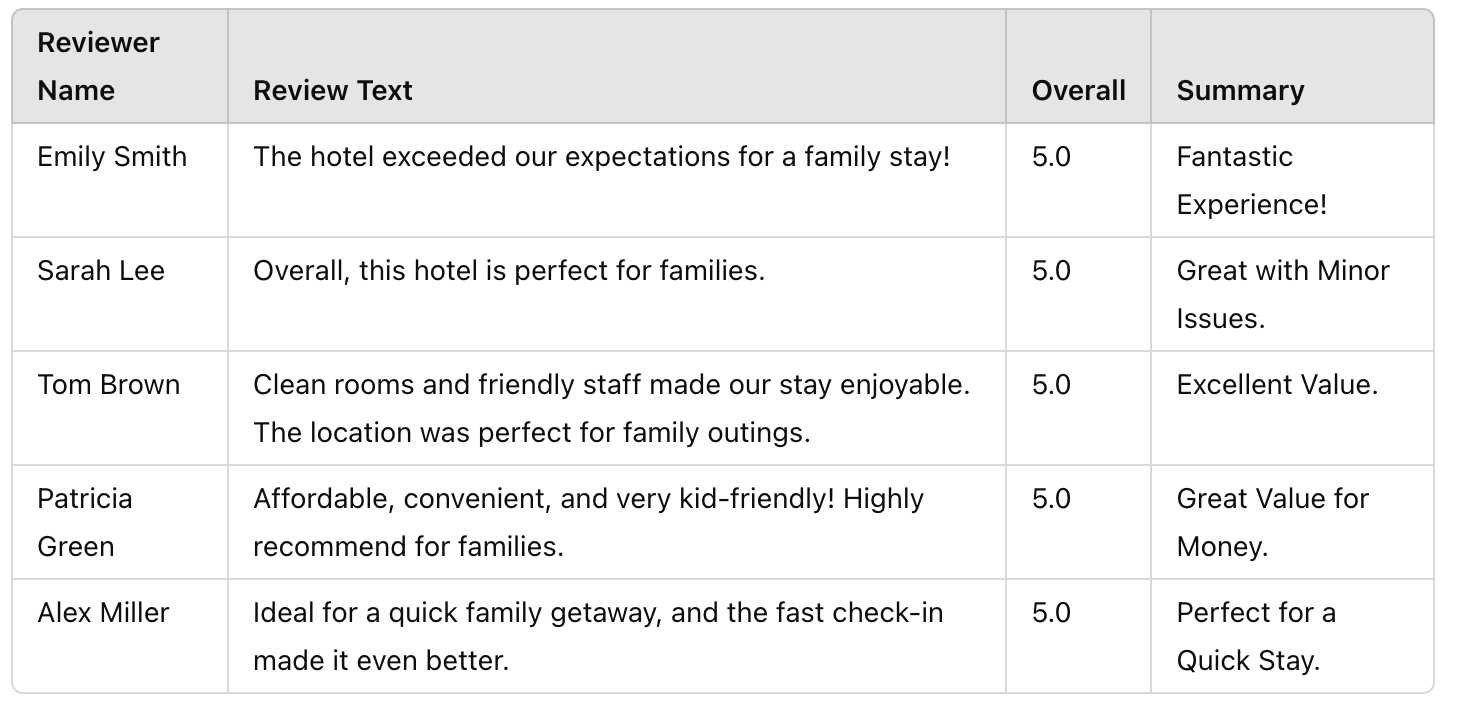
Upon synthesizing queries, executing them yields valuable results. Here’s an example of output data after executing SQL queries:
Natural Language Answer Generation
After retrieving relevant data, TAG employs RAG to generate concise summaries. Here’s how this process works:
from langchain import OpenAI, PromptTemplate, LLMChain
import sqlite3

# Establish connection to the SQLite database
def connect_to_database(db_name):
    """Connect to the SQLite database."""
    return sqlite3.connect(db_name)

# Function to execute SQL queries and return results
def execute_sql(query, connection):
    """Execute the SQL query and return fetched results."""
    cursor = connection.cursor()
    cursor.execute(query)
    return cursor.fetchall()

# Define your prompt for SQL query synthesis
query_prompt = PromptTemplate(
    input_variables=["user_query"],
    template="Generate an SQL query based on the following request: {user_query}"
)

# Initialize the language model
llm = OpenAI(model="gpt-3.5-turbo")

# Create a chain for generating SQL queries
query_chain = LLMChain(llm=llm, prompt=query_prompt)

# Define your prompt for generating natural language answers
answer_prompt = PromptTemplate(
    input_variables=["results"],
    template="Based on the following results, summarize the highlights: {results}"
)

# Create a chain for generating summaries
answer_chain = LLMChain(llm=llm, prompt=answer_prompt)

# Function to simulate data labeling (for demonstration purposes)
def label_data(reviews):
    """Label data based on specific keywords in reviews."""
    labeled_data = []
    for review in reviews:
        if "family" in review[1].lower():
            label = "Family-Friendly"
        elif "dog" in review[1].lower():
            label = "Pet-Friendly"
        elif "luxury" in review[1].lower():
            label = "Luxury"
        else:
            label = "General"
        labeled_data.append((review[0], review[1], label))
    return labeled_data

# Main process function
def process_user_query(user_query):
    """Process the user query to generate insights from travel reviews."""
    # Connect to the database
    connection = connect_to_database("travel_reviews.db")

    # Step 1: Generate SQL query from user input
    sql_query = query_chain.run(user_query)
    print(f"Generated SQL Query: {sql_query}\n")

    # Step 2: Execute SQL query and get results
    results = execute_sql(sql_query, connection)
    print(f"SQL Query Results:\n{results}\n")

    # Step 3: Label the data
    labeled_results = label_data(results)
    print(f"Labeled Results:\n{labeled_results}\n")

    # Step 4: Generate a summary using RAG
    final_summary = answer_chain.run(labeled_results)
    print(f"Final Summary:\n{final_summary}\n")

    # Format the output as unstructured data
    formatted_output = "\n".join([f"Reviewer: {review[0]}, Review: {review[1]}, Label: {review[2]}" for review in labeled_results])
    print("Unstructured Output:\n")
    print(formatted_output)

    # Close the database connection
    connection.close()

# Example user query
user_query = "What are the highlights of kid-friendly hotels?"
process_user_query(user_query)
Example output:
{"reviewSummary": "The hotel exceeded expectations for family stays, providing clean rooms and friendly staff, making it ideal for family getaways. It is affordable, convenient, and highly recommended for families looking for a perfect experience with minor issues.", "Label":"Kid-Friendly"}
This method leverages RAG to synthesize nuanced summaries from individual reviews, providing a clear overview rather than a mere aggregation of results.
Improvements With TAG
TAG significantly enhances the querying process by addressing traditional limitations:
- Enhanced query synthesis: TAG synthesizes optimized queries that consider the entire database structure, enabling a broader range of natural language queries.
- Efficient database execution: TAG executes queries rapidly across large datasets, facilitating quick retrieval of essential insights for time-sensitive decisions.
- Improved natural language generation: By utilizing advanced language models, TAG generates coherent, contextually relevant responses, simplifying user interpretation.
Benefits Over Current Methods
- User-friendly interactions: Users can pose questions in natural language without requiring SQL knowledge.
- Rapid insights: Quick query execution minimizes the time needed to access relevant data.
- Contextual understanding: Enhanced summary generation improves data accessibility and usefulness for decision-makers.
Reranking Strategies for Enhanced Results
To ensure high-quality retrieved results, effective reranking strategies can optimize outputs. Here are several strategies:
- Score-based reranking: Utilize scores (e.g., helpfulness, ratings) to prioritize responses, assigning higher weights to reliable reviewers to enhance quality.
- Semantic similarity: Employ embeddings to measure semantic similarity and rerank results based on relevance to the user’s query context.
- Contextual reranking: Analyze the query context (e.g., family-friendly) and rerank based on specific keywords present in reviews to deliver the most pertinent insights.
Conclusion
TAG and RAG are at the forefront of transforming customer feedback analysis, enabling businesses to harness the wealth of insights contained in reviews and surveys. By automating data labeling, query synthesis, and natural language generation, organizations can derive actionable insights that enhance decision-making processes.
As these technologies evolve, the potential applications are vast, from personalized customer experiences to targeted marketing strategies. Embracing TAG and RAG not only streamlines the analysis of large datasets but also empowers organizations to remain competitive in a rapidly changing market landscape.
Opinions expressed by DZone contributors are their own.
Comments