Creating an intelligent agent requires a methodical approach, blending technical expertise with a clear understanding of business needs. The following step-by-step guide helps you design and implement agents effectively.
Step 1: Define Objectives
The first step is to understand the purpose of the agent. It is important to clearly articulate what the agent is supposed to achieve. This step lays the foundation for the agent's capabilities and scope. The following steps are helpful in identifying an agent's objectives:
- Identify use cases. Start by pinpointing specific tasks or processes the agent will handle. These could range from automating invoice generation to managing customer queries.
- Set clear goals. Define measurable outcomes. For example: Reduce manual intervention in customer support by 30% or generate billing statements with 100% accuracy within two hours.
- Understand limitations. Clearly define the tasks the agent will not perform to avoid scope creep. By establishing boundaries up front, development stays focused, timelines are maintained, and the agent delivers on its intended purpose without unnecessary complexity.
When you’re building an agent that connects to core systems and touches sensitive data, treat application security as part of the build, not a final checkbox. Start with practical guardrails: Give the agent only the access it needs, validate inputs before they’re used, and run lightweight checks in your CI so obvious issues don’t slip through. Keep integrations locked down with strong auth, make sure logs don’t leak sensitive details, and manage secrets the right way; no hard-coding, and no copy-pasting into configs.
For higher-risk actions, creating financial outputs, changing records, or sending customer-facing documents, add clear “go / no-go” policies. The agent should be able to proceed when it’s safe, pause when something looks unusual, and escalate when it crosses a line. Pair that with safe defaults and keep an audit trail of what happened and why. You preserve speed and automation, while keeping risk from quietly creeping into production.
Example: A virtual assistant for HR onboarding has the primary goal of reducing administrative overhead by automating document verification, training schedules, and FAQs. However, this assistant is not designed to handle complex legal document reviews or employee performance management.
Step 2: Map Data and Integration Requirements
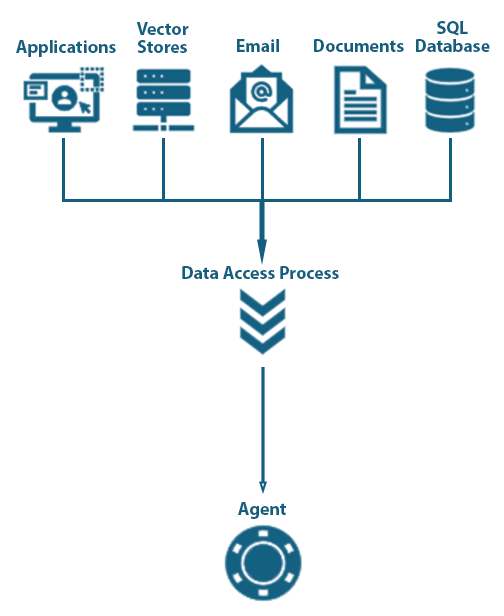
Agents rely on data to make decisions and take actions. Mapping the data and integration landscape ensures that the agent has access to the right resources. Performing the following tasks can help understand the data requirements:
- Data identification. Determine the data sources your agent will access, such as databases, APIs, documents, or user inputs.
- Integration strategy. Decide how the agent will interact with these sources. This might involve REST APIs, file parsing, or middleware solutions.
- Data security. Ensure that all integrations comply with security standards to protect sensitive and confidential information.
- Data validation. Implement mechanisms to check data integrity before processing it.
Example: An agent generating financial reports retrieves data from ERP systems, validates transaction records, and integrates with tax calculation APIs to produce accurate results. Controls are introduced to enforce restricted access to sensitive data, limiting access only to authorized users. Additionally, the agent also includes built-in data validation steps to verify the information to detect and flag inconsistencies or errors.
Step 3: Configure Intent Recognition and Task Management
Intent recognition enables the agent to understand user requests and respond accordingly. This is where the intelligence of the agent begins to shine.
- Training NLP models. Use machine learning techniques, pre-trained models, or generative AI (GenAI) models to enable the agent to interpret user intents accurately.
- Task prioritization. Define a task hierarchy. Ensure high-priority actions have more weight during execution.
- Fallback mechanisms. Design rules for scenarios where the agent fails to understand an intent. For example, prompt the user for clarification or escalate to a human operator.
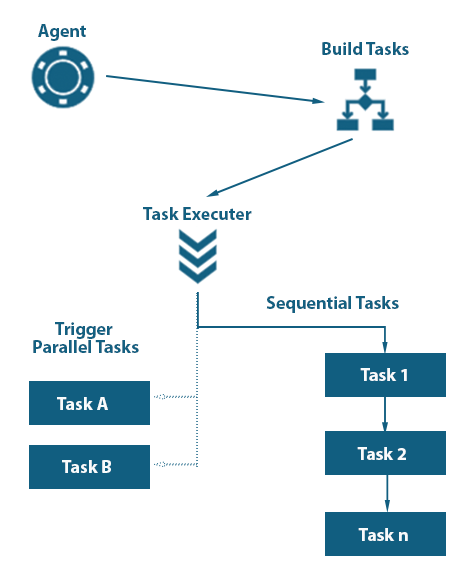
- Workflow automation. Develop workflows that the agent will execute based on identified intents. Workflows should include decision trees, conditional logic, and task dependencies.
Example: A scheduling agent receives the input, "Book a meeting with John next week." The agent interprets the intent to schedule using a pre-trained NLP model, accurately identifying the task and key details like "John" and "next week." The agent prioritizes tasks by checking for conflicts with other high-priority actions, such as pre-scheduled meetings or deadlines. If John cannot be found in the contacts database, the agent asks the user to provide clarification. Using workflow automation, the agent queries both calendars for availability and confirms final meeting details with the user.
Step 4: Incorporate Context and Memory
Context and memory management are crucial for creating a seamless user experience. An agent with robust memory capabilities can personalize interactions and maintain continuity across sessions. There are different memory and context management approaches to achieve this:
- Short-term memory. Store session-specific information such as recent queries or ongoing tasks.
- Long-term memory. Retain user preferences, historical interactions, and recurring patterns to enhance personalization.
- Context awareness. Use memory to provide responses that consider the user's current situation and past interactions.
- Data privacy. Implement guardrails to ensure sensitive user data is stored and accessed securely.
It is important to identify what capabilities are required for the agent and implement them accordingly.
Example: An e-commerce chatbot remembers a customer's preferred payment method and automatically suggests it during the checkout process. The agent uses short-term memory to recall the items added to the cart during the current session, as well as long-term memory to recognize recurring purchase patterns and suggest relevant promotions or loyalty discounts. Context awareness ensures it can seamlessly transition from answering a product query to finalizing a purchase. The agent encrypts the sensitive payment details, and only anonymized interaction data is stored for personalization.
Step 5: Establish Communication Protocols
Agents interact with users, other applications, and other specialized agents to perform tasks. The communication between these entities must be robust to achieve the best outcomes. It is important to consider the following when building the communication methods for agents:
- User communication. Use clear, concise responses that are tailored to the user's level of understanding. The agent can assess this by analyzing user input, such as vocabulary complexity or response patterns, and adapting its language accordingly. For example, a technical user might receive more detailed explanations, while a less experienced user gets simplified guidance.
- Inter-agent communication. Define APIs or messaging standards for agents to share data and collaborate effectively. The messaging standards define how the data is structured, along with additional metadata to support the communication and understanding of information.
- Error handling. Provide meaningful error messages to the user and suggest next steps when issues arise.
- Multilingual support. If necessary, enable the agent to communicate in multiple languages.
Example: A customer support agent uses NLP to assess the user's familiarity with technical terms. For a new user, it explains billing discrepancies in plain language, such as: "Your last payment was $50 short, which is why there's an outstanding balance." For a more advanced user, the agent provides additional technical details and links to relevant FAQs.
Inter-agent communication enables the support agent to fetch transaction data from a billing system and coordinate with a notification agent to send follow-up emails. If the system encounters incomplete data, the agent presents an error message like: "We are missing your billing ID. Please provide it to proceed."
Step 6: Test, Deploy, and Optimize
Testing is crucial to ensure that the agent performs reliably in real-world scenarios. It is important to consider the following testing methods based on the requirement to test the agent:
- Simulation testing. Create test cases to mimic actual user interactions and validate the behavior of the agent.
- Monitoring and feedback. Use analytics tools to track the performance of the agent to identify bottlenecks, execution issues, and areas for improvement.
- Iterative improvements. Regularly update the agent to improve accuracy, expand functionality, and address emerging issues.
Example: A customer service assistant is tested for response accuracy, escalation workflows, and response time before being deployed to live customer interactions. Simulation testing is used to simulate certain user inputs and scenarios to test how the agent behaves. Monitoring and feedback are used to track the assistant's performance metrics, user satisfaction scores, and error rates.