

DZone
Thanks for visiting DZone today,
Edit Profile
  • Manage Email Subscriptions
  • How to Post to DZone
  • Article Submission Guidelines
Sign Out View Profile
  • Post an Article
  • Manage My Drafts
Over 2 million developers have joined DZone.
Log In / Join
Refcards Trend Reports
Events Video Library
Refcards
Trend Reports

Events

View Events Video Library

Zones

Culture and Methodologies Agile Career Development Methodologies Team Management
Data Engineering AI/ML Big Data Data Databases IoT
Software Design and Architecture Cloud Architecture Containers Integration Microservices Performance Security
Coding Frameworks Java JavaScript Languages Tools
Testing, Deployment, and Maintenance Deployment DevOps and CI/CD Maintenance Monitoring and Observability Testing, Tools, and Frameworks
Culture and Methodologies
Agile Career Development Methodologies Team Management
Data Engineering
AI/ML Big Data Data Databases IoT
Software Design and Architecture
Cloud Architecture Containers Integration Microservices Performance Security
Coding
Frameworks Java JavaScript Languages Tools
Testing, Deployment, and Maintenance
Deployment DevOps and CI/CD Maintenance Monitoring and Observability Testing, Tools, and Frameworks

Enterprise AI Trend Report: Gain insights on ethical AI, MLOps, generative AI, large language models, and much more.

2024 Cloud survey: Share your insights on microservices, containers, K8s, CI/CD, and DevOps (+ enter a $750 raffle!) for our Trend Reports.

PostgreSQL: Learn about the open-source RDBMS' advanced capabilities, core components, common commands and functions, and general DBA tasks.

AI Automation Essentials. Check out the latest Refcard on all things AI automation, including model training, data security, and more.

Related

  • SharePoint Integration With MuleSoft
  • Using PostgreSQL pgoutput Plugin for Change Data Capture With Debezium
  • Migrating MuleSoft System API to AWS Lambda (Part 1)
  • Hello YugabyteDB: Running Kong on the Distributed PostgreSQL Database

Trending

  • Finite State Machines: How to Enhance Software Testing
  • Feature Flags and Canary Releases in Microservices
  • OpenTofu Vs. Terraform: The Great IaC Dilemma
  • Machine Learning: A Revolutionizing Force in Cybersecurity
  1. DZone
  2. Data Engineering
  3. Databases
  4. Connect the MuleSoft Database Connector to Heroku Postgres

Connect the MuleSoft Database Connector to Heroku Postgres

Let's see how to connect the MuleSoft database connector to Heroku Postgres.

By 
Dejim Juang user avatar
Dejim Juang
·
Updated Mar. 12, 20 · Tutorial
Like (7)
Save
Tweet
Share
34.6K Views

Join the DZone community and get the full member experience.

Join For Free

The MuleSoft Database Connector provides the ability to easily connect to any database as long as you have the JDBC driver. Here’s a quick post/walk-through on how to configure the connector to connect to Heroku Postgres. This post assumes you have a Heroku account with Postgres already added and configured. You also have Anypoint Studio 7.x installed. To start, let’s build a simple Mule flow with the following components:
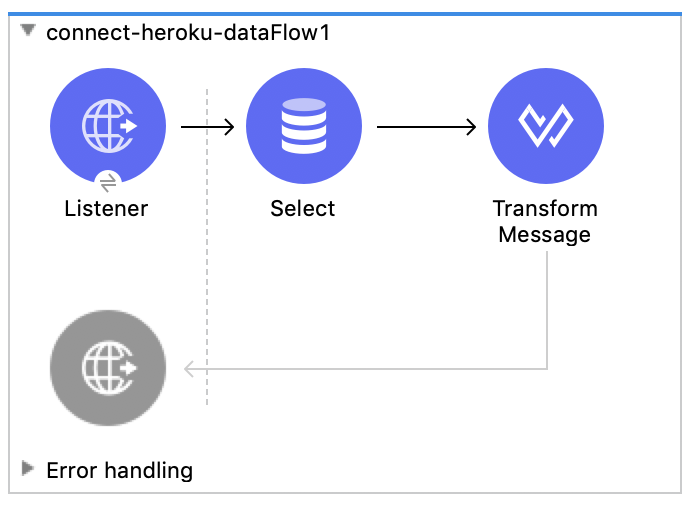
Example Mule flow
Example Mule flow
You may also like: Mule 4: Database Connector Bulk Insert

The flow will listen for an HTTP request, make a call to Heroku Postgres, and return the data in JSON format. We’ll keep the listener simple and use the defaults, localhost and port 8081. For the path, we’ll use /post so the config looks like the following:
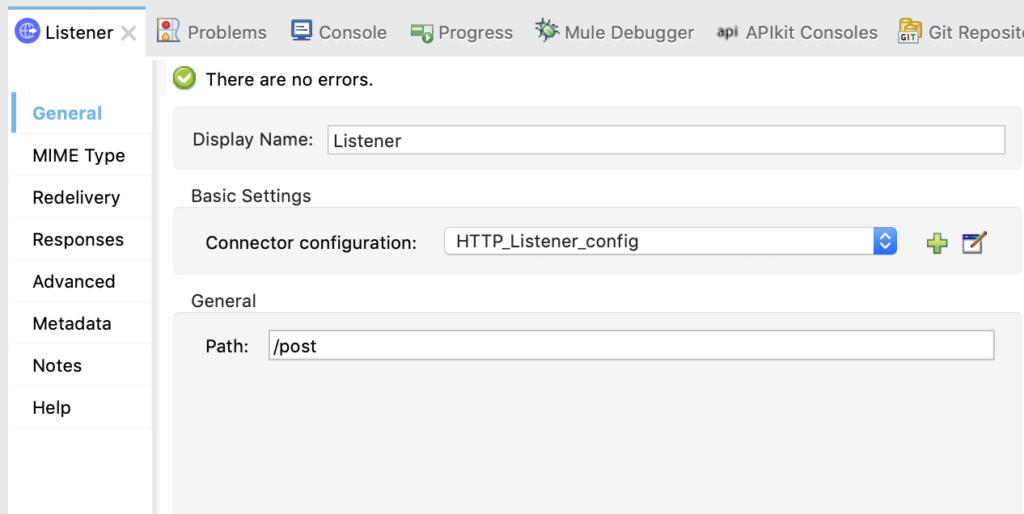
Example config
Example config

Next, let’s configure the Database Connector. Under Basic Settings, click on the green plus sign to add a new configuration. Change the Connection drop down to Generic Connection then click on Configure…for the JDBC Driver field and then click on Add Maven dependency.

Paste the following snippet into the text box on the right of the Maven dependency dialog box

XML


xxxxxxxxxx
1


1
<dependency>  
2
<groupId>org.postgresql</groupId>  
3
<artifactId>postgresql</artifactId>  
4
<version>42.2.1</version>
5
</dependency>


It should look like the following:
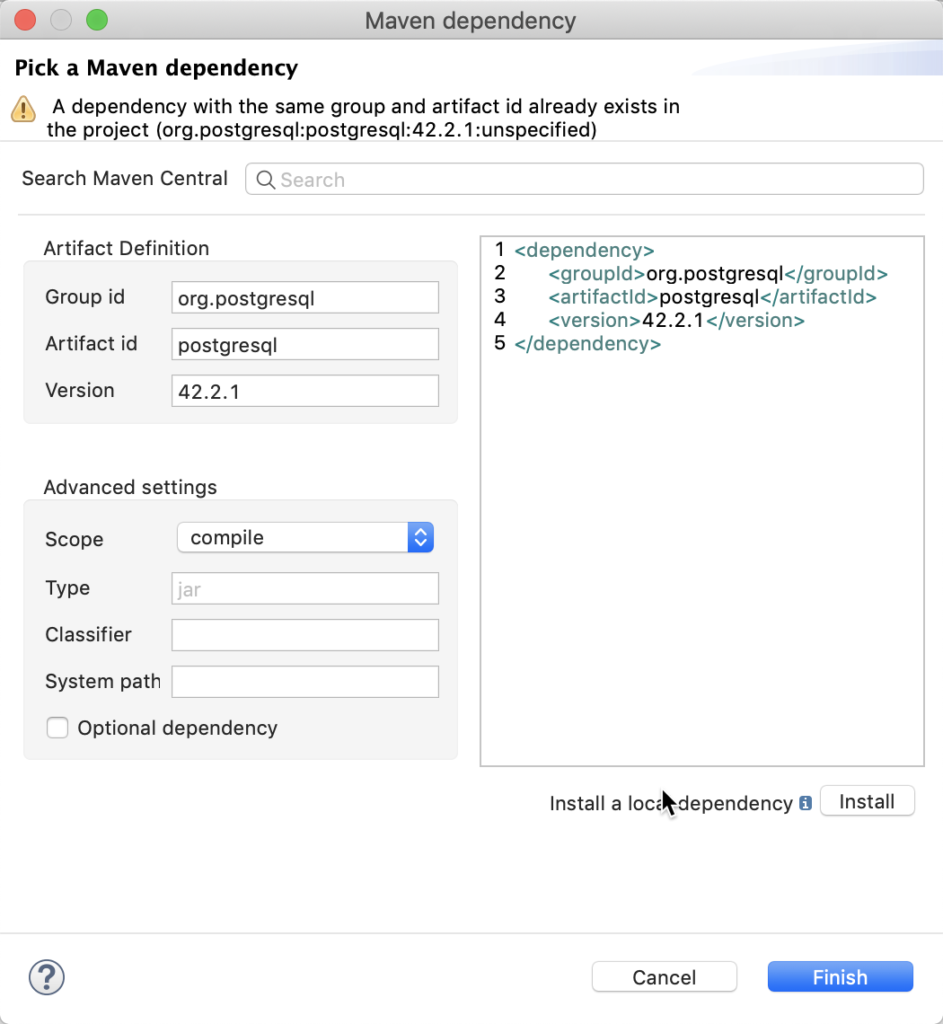
Maven dependency

Maven dependency

Click on Finish.

Back in the Global Element Properties dialog window. Fill in the URL, Driver class name, User, and Password fields with your credentials from Heroku Postgres.

You can find your credentials in Heroku Postgres under Settings > Database Credentials. Just click on View Credentials to see the host, database, port, username, and password.
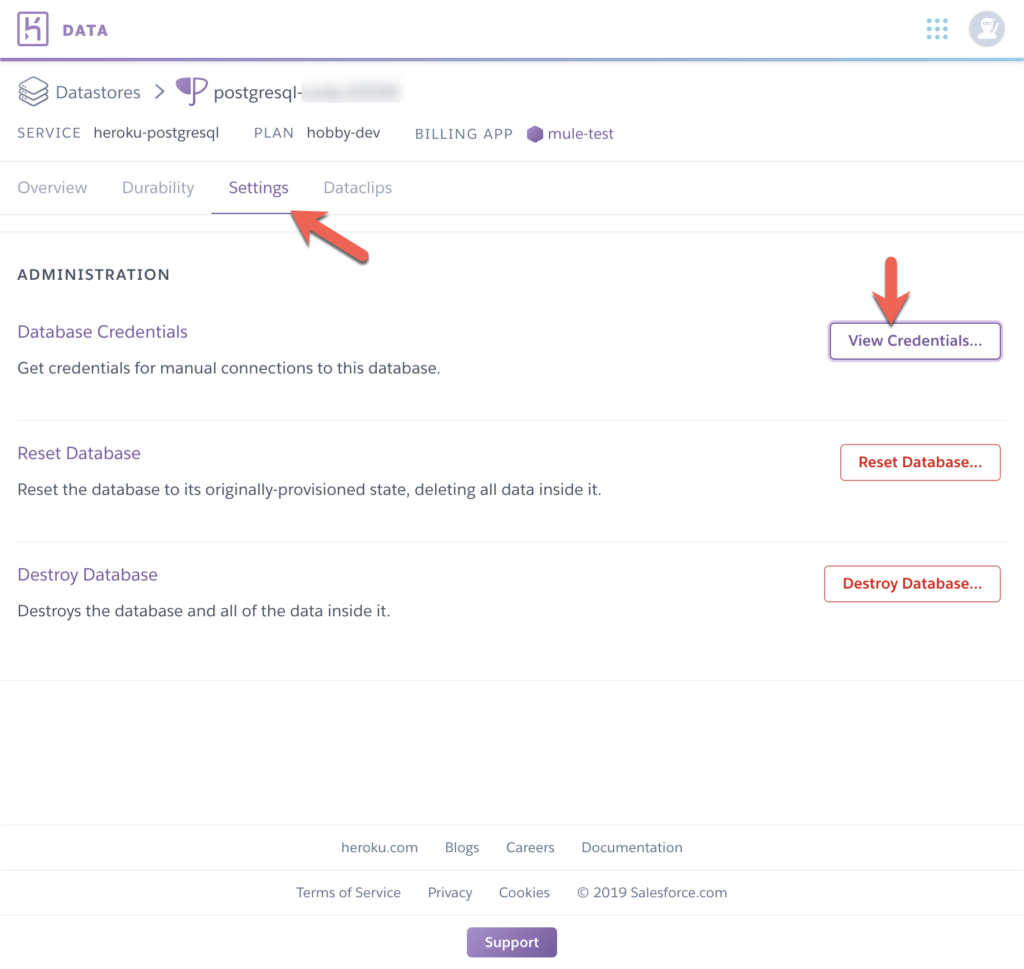
Credentials in Heroku

Credentials in Heroku

The URL should be in the following format below. The sslmode field is required.

 jdbc:postgresql://:/?sslmode=require 

The Driver class name should be org.postgresql.Driver

Your configuration should look like the following below. Click on Test Connection… to make sure everything was configured correctly.
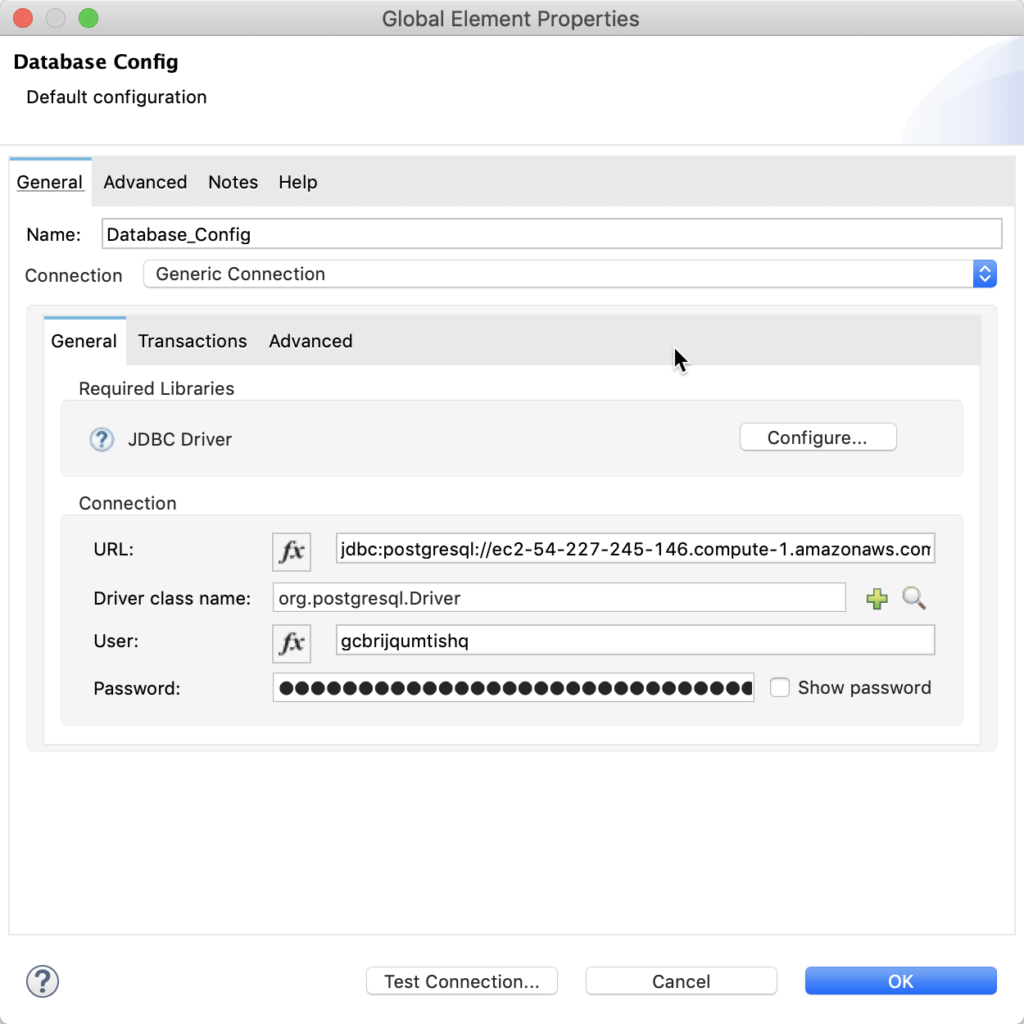
Database configuration

Database configuration

Once you click OK, fill in the SQL Query Text field with a valid SQL query that returns data back from your Heroku Postgres database.

The last thing we need to configure is the Transform Message to convert the data from the database to JSON. Use the following DataWeave script

Plain Text


xxxxxxxxxx
1


1
%dw 2.0
2
output application/json
3
---
4
payload


It should look like the following:
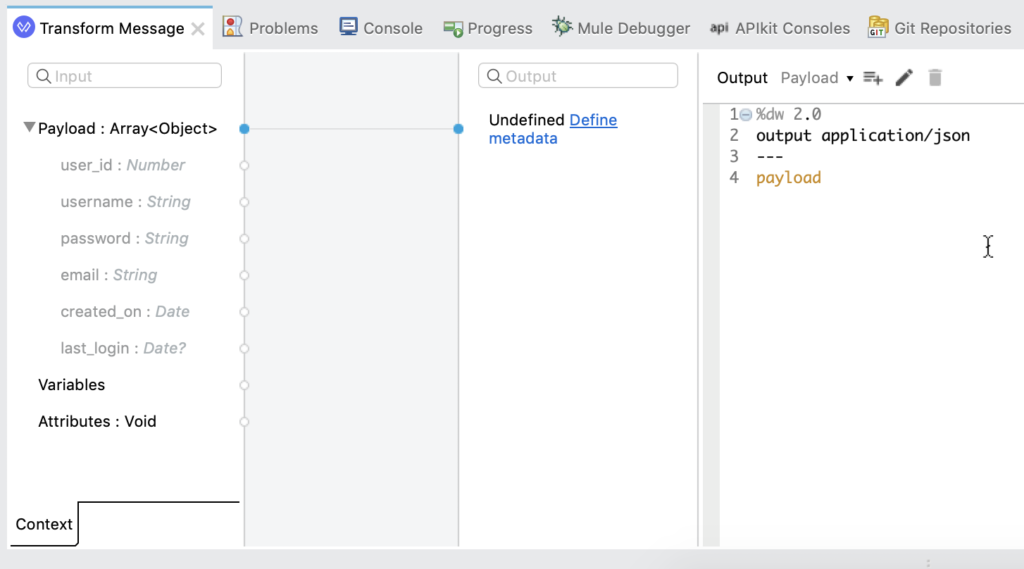
Transforming messages

Transform messages

And that’s it! I’ll leave it up to you to run and test the flow from your browser. The hardest part was figuring out the Database URL connection string. Let me know if you have any questions or run into any issues.

Versions

  • Anypoint Studio 7.3.4
  • Postgresql JDBC Driver 42.2.1
  • Mule Server 4.2.0 EE

Further Reading

Mule 4: Database Connector (Part 1).

Connecting to MS SQL Server With MuleSoft.

Database PostgreSQL Connector (mathematics) MuleSoft

Published at DZone with permission of Dejim Juang, DZone MVB. See the original article here.

Opinions expressed by DZone contributors are their own.

Related

  • SharePoint Integration With MuleSoft
  • Using PostgreSQL pgoutput Plugin for Change Data Capture With Debezium
  • Migrating MuleSoft System API to AWS Lambda (Part 1)
  • Hello YugabyteDB: Running Kong on the Distributed PostgreSQL Database

Partner Resources


Comments

ABOUT US

  • About DZone
  • Send feedback
  • Community research
  • Sitemap

ADVERTISE

  • Advertise with DZone

CONTRIBUTE ON DZONE

  • Article Submission Guidelines
  • Become a Contributor
  • Core Program
  • Visit the Writers' Zone

LEGAL

  • Terms of Service
  • Privacy Policy

CONTACT US

  • 3343 Perimeter Hill Drive
  • Suite 100
  • Nashville, TN 37211
  • support@dzone.com

Let's be friends: