

Fine-Grained Access Control — What's All the Buzz About?
Intuit, Airbnb, Google, and others have all described their architectural challenges surrounding access control at scale. But what about everyone else?
Join the DZone community and get the full member experience.
Join For FreeAuthorization has become quite a hot topic: Intuit, Airbnb, Google, and others have recently described the architectural challenges surrounding authorization at scale and the solutions that they’ve built internally to address them.
As a developer of a B2B SaaS application, you may be scratching your head about how this is relevant to you. Early on in your application’s lifecycle, these challenges may not be obvious: your application typically starts with “regular users” and “admins”; for admin-level operations, you write some code to check whether the logged-in user has admin rights. Life is simple.
But as your application gains users, it’s a sure bet that a coarse-grained authorization model will no longer cut it: your customers will ask you to add finer-grained authorization on a number of dimensions, and that’s when things get interesting.
In this article, we’ll go over the requirements that drive the evolution of B2B SaaS applications and provide some advice that will help you sell your application to enterprise customers as you move up market.
Defining Fine-Grained Authorization
What exactly is “fine-grained authorization?” There are two fundamental dimensions to consider: the authorization model your application exposes and how your customers map their users onto your model.
Authorization Model
There are three main things to consider for your authorization model: the resource types you define, the set of permissions you define over those resource types, and the resource granularity over which your customers can set those permissions.
Let’s illustrate these with an example application that will be familiar to most: an applicant tracking system (ATS).
Resource Types
Every application has a set of “nouns”: in the example, we’ve chosen, an ATS has candidates, jobs, and reports. These are the resource types that the application manages.
Permissions
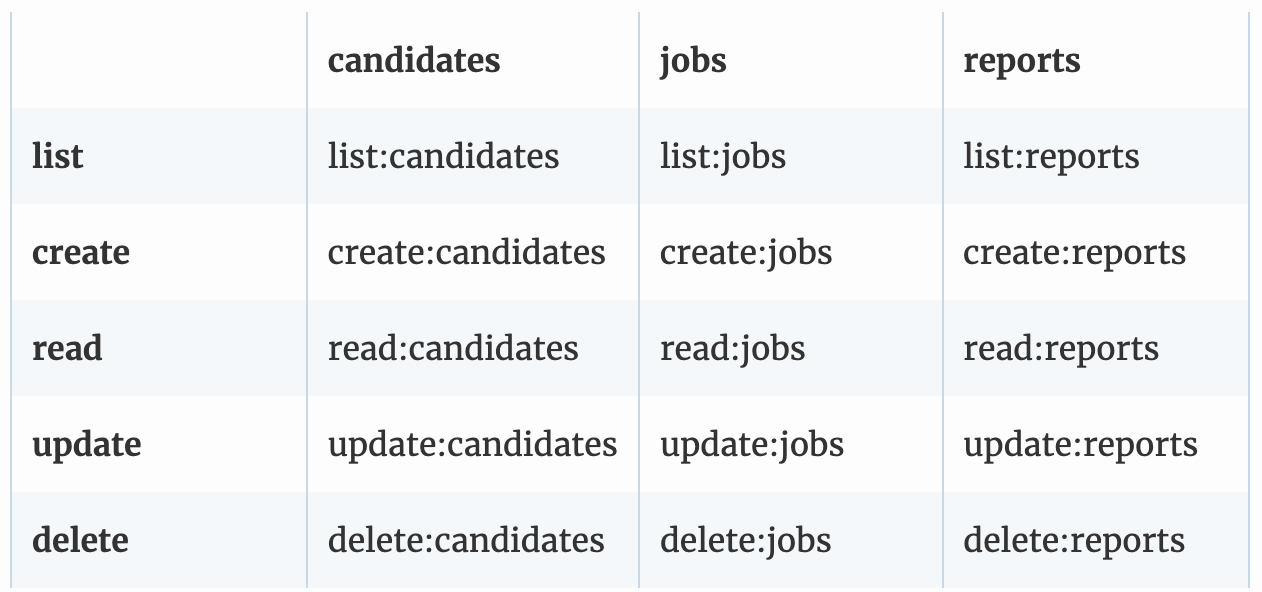
Every one of these nouns has a set of “verbs” or operations that can be performed on them: for example, you can list, create, read, update, or delete a candidate or a job. The cartesian product of these represents the set of permissions that your application can expose to users:
Roles: A Rollup of Permissions
Our simplified ATS offers a reasonable number of permissions, but most real-world applications have dozens or even hundreds of distinct operations and therefore express permissions. Most of your customers rarely want to manage each of these permissions individually, so you end up defining a set of roles that “roll up” these permissions in common configurations. For example, you may have a candidate-viewer role that has read-only access to candidates and a candidate-admin role that can create, edit, and delete candidates. Similarly, job-viewer and job-admin can roll up the respective permissions for jobs.
Resource Granularity
If the (“nouns”) in your application (jobs, candidates, reports) are resource types, then the resources your application manages are instances of those types.
The other important parameter you can tune in your authorization model is the resource granularity for which you can set these permissions. For our ATS example, we could set that dial at various points:
Tenant-level: permissions extend to all resources of that type (e.g., all jobs)
Organization-level: tenants consist of multiple organizations, and permissions extend to resources of that type within each organization (e.g., all engineering jobs)
Individual resources: the permissions for every resource can be set individually.
Resource Groups: A Practical Way to Organize Resources
Assigning distinct permissions to each resource may provide the highest level of granularity, but that flexibility often comes with an added administration burden: each resource has to be managed individually, and it’s often hard to get an overall view of who has access to what.
In practice, most applications define an organizational construct - a project, organizational unit, or group - and assign permissions uniformly to every resource in that construct. We call these resource groups.
Checkpointing
What do we have so far? There are two important elements of an authorization model: the set of permissions it defines (operations x resource types) and the resource granularity that these permissions apply to. We also have two simplifying constructs - roles are a pragmatic “roll-up” of permissions, and resource groups are a pragmatic organizing construct around collections of resources which can be managed together.
How Your Customers Map Their Users to Your Model
So far, we’ve described the set of tradeoffs you can make in designing your authorization model. You also need to consider how your customers map their users onto this model.
Assign Users to Roles (“RBAC”)
The most common pattern we see in SaaS applications is to map your customers’ users into your identity provider via an enterprise single sign-on provider such as Okta, Auth0, etc, and require an application administrator to assign each of these users into the roles defined by your application. This is commonly known as role-based access control (RBAC).
Sometimes that process can be automated, where a role in the customer’s directory or identity provider maps cleanly into a role that your application defines. As your application moves upmarket and you sell into larger enterprises, those customers tend to require both a level of flexibility and automation in how their users map into your roles.
Map User Attributes to Permissions (“ABAC”)
When mapping your customers’ users into your roles and permissions crosses from a static, simple process into a dynamic mapping of user attributes into permissions, you’ve crossed into the land of attribute-based access control (ABAC). The primary advantage is giving your customers finer-grained control over what attributes from your customers’ identity provider are used to determine what permissions that user will have in your application. The challenge is that this kind of customization often requires some form of solution engineering and extends implementation timeframes.
Encoding user attributes as assertions that are baked into a SAML token can make this a bit more standard but suffers from the same issues that plague JWT tokens with baked-in scopes: namely until those tokens expire, users have all the permissions that those tokens confer.
For our ATS example, an enterprise customer may want to assign the candidate-admin and job-admin roles to users that have a “department” attribute equal to “Talent Acquisition'' (ABAC). They may also want to assign the job-admin role to managers but scoped to jobs that are in that manager’s organization (ABAC mapping for a role to an organization-scoped set of resources).
Parting Lessons
Every successful SaaS application goes through an evolution of its authorization model. The two main dimensions of evolution are the parameters exposed (moving from coarse-grained roles to fine-grained permissions over resource groups) and the way customer organizations can map their users into the authorization model.
A few pragmatic lessons that can help you in this evolution:
Define permission for each distinct operation in your system (the cartesian product of verbs and nouns). This gives your authorization model room to evolve without any additional re-architecture.
Define some common roles that are “roll-ups” of these permissions. Most of your customers will prefer to use these roles, but allowing these roles to be augmented with additional permissions gives your customers the ability to start from defaults and customize to their environment.
Assuming your customers have their own identity provider that they want to source users from, give your customers the flexibility to map between their identity provider attributes and your roles and permissions.
Applying these lessons is a big step toward being able to sell your application into enterprise customers.
Published at DZone with permission of Omri Gazitt. See the original article here.
Opinions expressed by DZone contributors are their own.
Comments