

How to Test a DELETE API Request With REST-Assured Java
This tutorial demonstrates how to test DELETE requests using Rest-Assured Java for API testing, including examples of deleting data.
 CORE
·
CORE
·
Join the DZone community and get the full member experience.
Join For FreeAPI testing has become increasingly popular in recent times. Since it doesn’t involve a UI, it is generally faster and easier to execute. This makes API testing a preferred choice for validating end-to-end system functionality. Additionally, integrating automated API tests into CI/CD pipelines enables teams to receive quicker feedback on their builds.
In this tutorial, we will explore DELETE API requests and learn how to handle them with Rest-Assured in Java for automated testing. The following topics will be covered:
- What is a DELETE request?
- How to test the DELETE API using Rest-Assured Java?
What Is a DELETE API Request?
A DELETE API request is used for removing a specific resource from the server. In most cases, DELETE requests do not return a response body.
The resource to be deleted is identified using a URI, and once the request is processed, it is permanently removed from the server. Because of this, DELETE operations can have side effects, such as removing records from a database.
Here are some important considerations when working with DELETE requests:
- Data removed using a DELETE request cannot be recovered, so it should be handled carefully.
- It is not considered a safe method, as it directly impacts server data and may lead to inconsistencies if not managed properly.
- DELETE is not always idempotent in practice. For example, the first DELETE call may return a 204 (No Content) status indicating successful deletion, while a subsequent call on the same resource may return 404 (Not Found) since the resource no longer exists.
Application Under Test
For this tutorial, we will use freely available RESTful e-commerce APIs that provide multiple endpoints related to order management, enabling operations such as creating, retrieving, updating, and deleting orders.
This application can be set up locally using Docker or Node.js.
Here’s an example of a DELETE API endpoint from the RESTful e-commerce project.
DELETE /deleteOrder/{id}
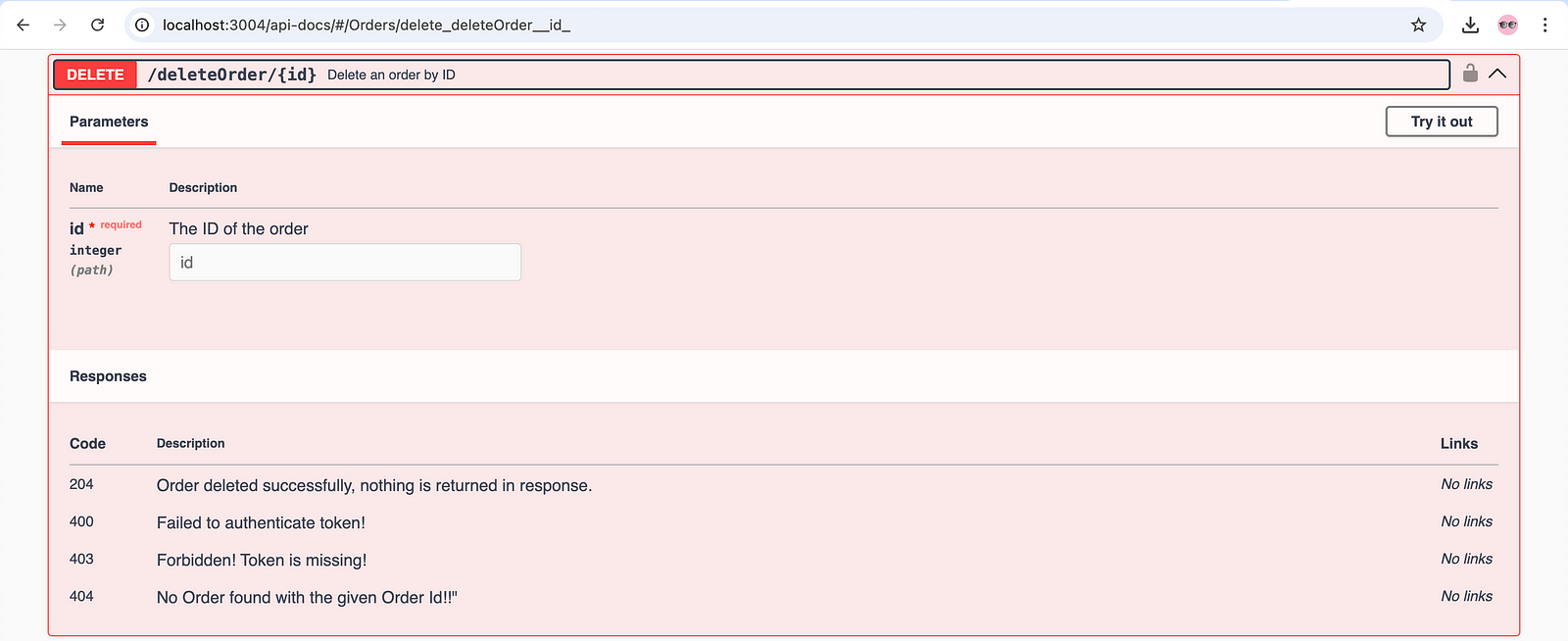
This API expects an order_id as a path parameter to identify the order that should be deleted from the system. There’s no need to send a request body for this DELETE request. However, for security purposes, a valid authentication token must be included in the request header.
Once the API is successfully executed, the specified order is removed from the system, and a 204 (No Content) status code is returned.
If the order doesn’t exist, or if the token is missing or invalid, the API will return an appropriate error response.
How to Test DELETE API Requests Using REST-Assured Java
Testing the DELETE APIs is important for maintaining the stability and reliability of an application. Since these APIs are responsible for removing data from the system, it’s necessary to validate their behavior to avoid unintended data loss and inconsistencies in the system.
In this demonstration, we will use REST-Assured Java to test the DELETE /deleteOrder/{id} endpoint, which is used to delete an existing order from the system.
Getting Started
It is recommended to go through the earlier tutorial to understand the prerequisites, setup, and configuration.
Check out What Is API Testing to learn how to test APIs efficiently.
Test Scenario 1: Delete a Valid Order
The following test scenario will be used in this demonstration of testing a delete API request:
### Precondition
- There should be some valid orders available in the system.

### Test Steps:

1. Delete the order with order_id "1" using the DELETE request.
2. Verify that 204 Status Code is returned in the response.
Test Implementation
To implement this test scenario, we need to have valid orders available in the system. These orders can be injected by running the POST /addOrder API. Check out this tutorial on how to test a POST /addOrder API, which discusses different approaches to generating request payloads.
Additionally, we need the authorization token before we hit the Delete API request. This test scenario will be implemented in two parts:
- Hitting the POST /auth API endpoint and extracting the token from it.
- Hitting the Delete /deleteOrder/{id} API endpoint using the token generated in Step 1.
Step 1: Generating and Extracting the Token
Let’s create a new Java class, TestDeleteRequestExamples, and add the test method testTokenGeneration() to it.
public class TestDeleteRequestExamples {

    private String token;

@Test
public void testTokenGeneration () {
  String requestBody = """
      {
        "username": "admin",
        "password": "secretPass123"
      }""";

    token = given ().contentType (ContentType.JSON)
      .when ()
      .body (requestBody)
      .post ("http://localhost:3004/auth")
      .then ()
      .statusCode (201)
      .and ()
      .body ("token", notNullValue ())
      .extract ()
      .path ("token");
  }
//..

}
The testTokenGeneration() test method sends a POST request to the /auth endpoint with a username and password to generate an authentication token. Since this is a demo API, the login credentials are hardcoded and used directly as a String.
In a real-world scenario, credentials should not be exposed and should instead be accessed using an environment variable.
It validates that the response status code is 201 and checks that the token field is present in the response body. It then extracts the token from the response and stores it in the token variable for further use in subsequent API requests.
Step 2: Testing the Delete Order API
Let’s create a new test method, testDeleteOrder(), to implement the test to delete the order.
public class TestDeleteRequestExamples {

    private String token;
    int orderId = 1;

    @Test
    public void testDeleteOrder () {
        given ().header ("Authorization", token)
            .log ()
            .all ()
            .when ()
            .delete ("http://localhost:3004/deleteOrder/" + orderId)
            .then ()
            .log ()
            .all ()
            .statusCode (204);
    }

//..
}
The testDeleteOrder() test method sends a DELETE request to the /deleteOrder/{id} endpoint, passing an authorization token in the request header.
- header(): The
header()method is used to add the Authorization header to the request. It ensures the API call is authenticated, allowing only valid users to perform the delete operation. - token: The
tokenvariable holds the authentication token generated using thetestAuthorizationToken()test method. - delete(): This method sends a DELETE request to the
/deleteOrder/{id}endpoint, instructing the server to delete the specified order(1). - statusCode(): The test verifies that the response returns a 204 (No Content) status code, indicating that the request was successful and the resource was deleted, with no response body.
Test Scenario 2: Fetch the Deleted Order
This test scenario ensures that the specified resource was successfully deleted from the system.
- Hit the GET /getOrder API, try retrieving the order with order_id 1.
- Verify that the 404 status code is returned in the response.
Test Implementation
Let’s create a new test method, testFetchingDeletedOrder(), in the existing test class where we wrote the delete API test.
@Test
    public void testFetchingDeletedOrder () {
        given ().when ()
            .queryParam ("id", orderId)
            .get ("http://localhost:3004/getOrder")
            .then ()
            .statusCode (404);
    }
The testFetchingDeletedOrder() method sends a request to the GET /getOrder API using the same order_id that was previously deleted with the DELETE /deleteOrder API. The assertion of this test verifies that a 404 (Not Found) status code is returned, to check that the resource has been deleted and is no longer available in the system.
Check out this tutorial on how to test a GET API request using REST-Assured Java.
Although the assertions used in the previous delete test scenario already confirm that the data was deleted. However, testing by fetching the deleted resources scenario can be included as an additional validation, especially when performing end-to-end API testing.
Check out this tutorial, which provides a comprehensive list of assertion examples for verifying the response data, status codes, headers, and more.
Test Execution
Let’s create a testng.xml file and add all the tests for verifying the DELETE API requests sequentially.
<?xml version="1.0" encoding="UTF-8"?>
<!DOCTYPE suite SYSTEM "http://testng.org/testng-1.0.dtd">
<suite name="Restful ECommerce Test Suite">
    <test name="Restful ECommerce delete order tests">
        <classes>
            <class name="restfulecommerce.tutorial.TestDeleteRequestExamples">
                <methods>
                    <include name="testTokenGeneration"/>
                    <include name="testDeleteOrder"/>
                    <include name="testFetchingDeletedOrder"/>
                </methods>
            </class>
        </classes>
    </test>
</suite>
Now, all three tests should run in sequence. The first will generate the token, the second will delete the order with order_id 1, and the last will try to retrieve the deleted order.
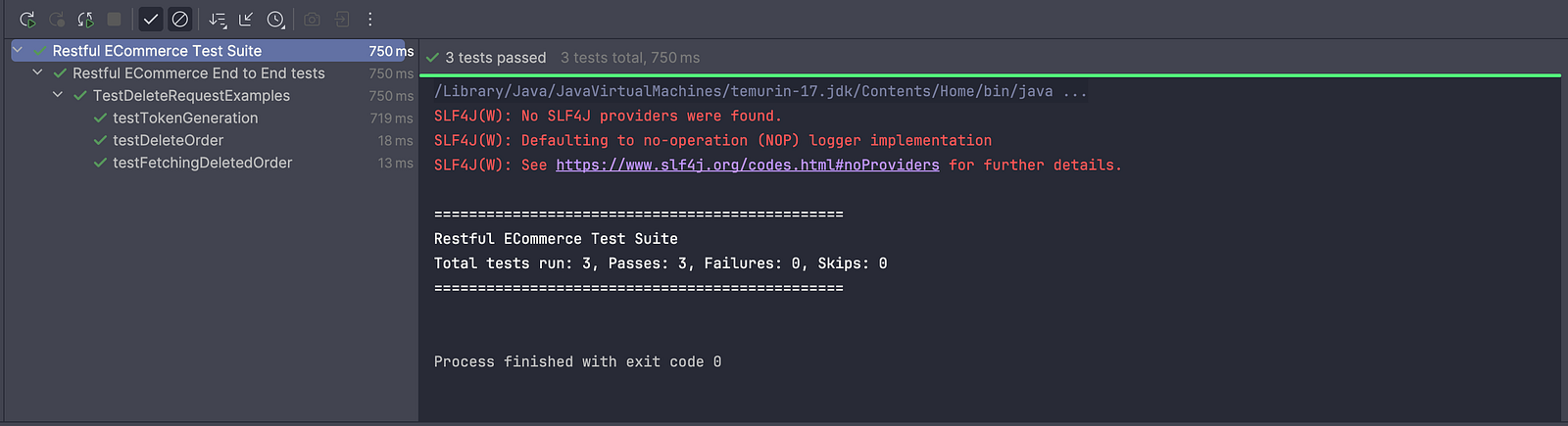
The screenshot above shows that the tests ran successfully and the DELETE API works as expected.
Summary
DELETE API requests are used to remove resources from the system. Since deletion is a critical part of CRUD operations, it’s important to test it thoroughly to ensure the system behaves as expected. At the same time, keep in mind that DELETE operations are irreversible, so they should always be handled with care.
From a practical standpoint, a good approach is to call the GET API after executing a DELETE request to verify that the resource has been successfully removed from the system.
Next, learn how to perform data-driven testing with REST Assured using files such as JSON, Excel, and CSV.
Happy testing!
Published at DZone with permission of Faisal Khatri. See the original article here.
Opinions expressed by DZone contributors are their own.
Comments